- 01-26-2011, 05:15 PM
Thread Author #1
Android Central's R.A.T (Root Apps Thread)
Welcome to Android Central's Root Apps Thread or R.A.T for short. This is the place where all of us with rooted devices can come together and discuss Android applications that require root access. Don't know what root access means/does? Check out this THREAD that will go into further detail regarding all things root and was written by Jerry himself.
Have you recently just rooted your device but are not sure what apps to download that will take full advantage of all of the things you have access to now? How about if I told you that there is a thread in our forum that could assist you with this concern. Well, there is!!!

This is that thread.
This is the place where you can share your experiences with these types of apps. Share your recommendations, reviews and knowledge with other members within the best Android community ever, Android Central.
There are a few important rules that must be followed if you would like to post in this thread.
1- Please do not ask questions about how to root devices and things related to that. There are threads and sections specifically designed for this. (ex. the one I posted above)
2- No spam. Your post will be deleted if you decide to post spam.
3- Please keep things PG in here. There is never a reason to swear or speak vulgar. Keep the potty mouth at home.
4- Do not insult or make fun of others. We are here to help others, not put them down. If you do not agree with somebody then please express your concerns in a polite and respectful manor. Treat others like you would like to be treated.
5- This thread is for applications that require root access only. All other apps can be discussed in other threads.
6- The posting of warez (illegal copies of paid paid) is prohibited and will not be tolerated. What you do on your own time is none of our business but do not share apks and/or links to apks of pirated applications.
7- Have fun. What is the point of a application thread if you are not enjoying yourself.
8- This rule is the most important rule. Downloading applications that require root access are done at your own risk. Nobody in this forum will be held accountable if you download an app that takes advantage of root access you are running the risk of doing permanent damage to your device and/or having an application exploit the Super User ability and stealing your personal data/info. This type of harm is un-likely of happening but it is still possible so please be careful and cautious when you install new download and install new apps. By giving your device super user abilities (root access) your gaining access to a lot of files and data that is inside of your device. Criminal app developers can take advantage of this so please do your research before you download a new app. Better safe than sorry.
Well guys, have a blast.Last edited by Brett; 01-26-2011 at 07:20 PM. Reason: edited a bit
- 01-26-2011, 06:56 PM
Thread Author #2
- 01-26-2011, 07:02 PM #3
ShootMe

Unfortunately, taking screen shots in Android is not as easy as it should be. Coming from a BlackBerry, there were plenty of applications in the App World that would allow for one-click screen capture with little to no effort to the end user. This was, for me, one of my main motivations for rooting, as taking screen shots without root access is an absolute pain in the ****. The application ShootMe does the job very well. After downloading from the Marketplace, you're essentially ready to go. The latest version of ShootMe allows for continuous screen capture up to 8 fps [Frames Per Second], which is great for tutorials, as well as individual captures. You can take captures using multiple methods, my favorite is the shake method, in which you shake your phone to take a screen shot. ShootMe automatically saves all of your captures in a separate folder entitled "ShootMe" on your SD card for easy access. As a writer here at Android Central and a forums Moderator, being able to take screen shots quickly and easily is essential, which is why ShootMe is my app of choice that requires root access. If you haven't checked it out yet, be sure to head on over to the Market where you can find it for the very low price of FREE.
Note: ShootMe reportedly works on some non-rooted devices which are running versions of Android prior to 2.2 [Froyo]. This is due to a security hole in the Android OS.
New York Giants | New Jersey Devils | Colorado Avalanche | New York Knicks - 01-26-2011, 07:17 PM #4
Root Explorer


Congrats!! You are freshly rooted, but in comes that age old question,"NOW WHAT" How do you modify files that the new Superuser access has granted you permission to? You've tried to use the native file manager but alas
, you can't touch those elusive system files or folders. But in comes your saving grace, your hercules, your very own master key to unlocking your phones deepest darkest secrets. ROOT EXPLORER
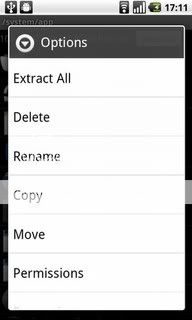
Root explorer is your very own Conquistador, allowing you to discover and conquer the depths of your phones. Want to create or extract zip files, no problem. Need to Rename and therefore disable preinstalled apps, root explorer has your back! Root explorer is packed with features, Text editor,multi-select, execute scripts, search, remount, permissions, bookmarks, send files (via email, bluetooth etc), image thumbnails, APK binary XML viewer. Just don't forget to hit the button at the top that allows you to either mount as R/O(Read only) or mount as R/W (Read/Write) privileges. It even lets you see the icon of the applications you are viewing. This application is nothing short of amazing and one of the only rooted apps that i keep on my phone at all times.
You can find it via the app store, just simply search root explorer orLast edited by DroidXcon; 01-26-2011 at 08:59 PM.
- 01-26-2011, 07:42 PM #5
Reboot Manager


Reboot Manager, is a handy little app/widget that every rooted user should have. Aside from the obvious name of the application it allows you to place shortcuts on your home screen such as reboot, recovery (to boot into ClockWorkMod) and power off to mention a few. You can select color/background color of the widget (icon) placed on your home screen. It also has a scheduler to setup daily reboots and power down. This is a simple yet handy little application for the "flash junky" like many of us. It will save the wear and tear on your phone buttons to boot into recovery mode and simply make the process a whole lot easier.
Reboot Manager can be found by typing "Reboot Manger" in the Market search.
QR Market Code
Last edited by Paul627g; 01-27-2011 at 01:32 AM. Reason: Added AppBrain Link

:: Getting Started with Android :: Forum Rules :: General Help and How To ::
» » » The All New Android Central App « « «
Thanked by 4: - 01-26-2011, 07:47 PM
Thread Author #6
Thread is now open for everybody to see.
I would like to give a big thanks to Chris, DroidXcon and Paul627g for helping me get this together and contributing their time and effort into writing some amazing descriptions/reviews.
I hope you all enjoy - 01-26-2011, 08:18 PM #7
Wireless Tether for Root Users
Carry a laptop or netbook around and don't feel like carrying (or paying for) a mobile hotspot? Wireless Tether is what you need.

This app simply takes your 3G signal and broadcasts it just like a hotspot would for other devices to be able to connect to it. The app also has some handy features, like the ability to change the SSID, or even being able to encrypt your wireless signal to keep leechers away. Best of all: Wireless Tether is free! Many roms come pre-installed with this handy app, but if not, you can find it easily in the market.
NOTE: Verizon and AT&T have removed this app from the marketplace
Last edited by terpitude71; 05-05-2011 at 05:10 PM.
Thanked by 9: - 01-26-2011, 08:27 PM #8
Thanks for all the work Mods and Advisors. Great thread.
- 01-26-2011, 10:15 PM #9
ROM Manager
Arguably the most prolific root app, created by an amazing dev. - Koush
Note-I am on MIUI, a custom rom. Your version of rom manager will look slightly different.


This app does it all.
From this app you can:
Download-and flash roms automatically (including wiping if desired), change or flash a new recovery very easily, get push update notifications of updated ROMs, web connect to your favorite dev, easily do nandroid backups and name them, partition youre SD card for Apps2SD, auto flash any .zip file that needs flashing by simply selecting it, and easily reboot into recovery for manual system management.
All of these features can be controlled through and handy, and trustworthy UI. If rom manager says it can do it, IT CAN DO IT and do it well.
No more fastboot flashing recovery's, no more manually downloading roms, no more manually flashing themes or kernels, it can all be done automatically through rom manager.
This app is available for free, with an option to buy a paid key that will unlock a few more features such as a cyanogenmod nightlies. The free version is worth its weight in gold, no worries.
Thanks Koush!Last edited by igotsanevo4g; 01-26-2011 at 10:44 PM.
Some say the glass is half empty. Some say its half full. I say, "Are you going to drink that?" - 01-26-2011, 10:29 PM #10
- 01-26-2011, 10:33 PM #11Some say the glass is half empty. Some say its half full. I say, "Are you going to drink that?"
- 02-02-2011, 03:44 PM #12
Actually yes. Titanium backup has an option that allows you to "freeze" certain apps, including bloatware. It won't delete off your phone, but it will remove it from your app tray.
It's similar to renaming the apk extension, but much easier with the click of a button.
(I believe you need the paid version of Titanium, but it is well worth it)
Droid Razr - 02-02-2011, 08:23 PM #13
My absolute favorite root app is AdFree Android. It was one of the first apps that I downloaded once I rooted & since then I have not seen even 1 ad in many ad supported games (like Angry Birds). Another bonus is that a lot of the apps that have paid versions that only remove the ads aren't necessary because AdFree blocks the ads from the free version!
A close second favorite root app is Cache Cleaner NG which keeps my Droid X lightning fast by cleaning all cache from the phone & SD card automatically as often as I want it do. (I currently have it set for once a day during the middle of the night) The first time I installed it and manually ran it, 20MB was cleaned off my phone & 2MB off of my SD card!"They don't think it be like it is, but it do." -Oscar Gamble
-----------------------------------------
Droid X (Liberty 3 v2.0)
Droid Incredible (CM 7.2.0 RC1)
Nook Color w/ 8GB N2A card
----------------------------------------- - 03-01-2011, 03:19 PM #14
I found another root app that I couldn't do without. Keyboard Manager
It allows you to assign seperate keyboards for both portrait & landscape orientation of the phone. For instance, I prefer Swype when I am in portrait mode but find it hard to use in landscape which I tend to flip to if typing a longer message/e-mail. For landscape mode, I prefer Swiftkey because it is like the stock multi-touch keyboard but has much better word prediction than stock. Swiftkey is hard for me to use in portrait mode when typing a quick reply because I have larger fingers.
This app gives me the best of both worlds because I have Swype assigned for portrait & Swiftkey assigned for landscape, so anytime I am typing a quick message to my wife in portrait orientation...Swype automatically pops up, but I can turn my phone to landscape if the reply turns into a longer one & the app automatically switches my keyboard to Swiftkey all within the SMS/Gmail/Facebook app that I was typing in!"They don't think it be like it is, but it do." -Oscar Gamble
-----------------------------------------
Droid X (Liberty 3 v2.0)
Droid Incredible (CM 7.2.0 RC1)
Nook Color w/ 8GB N2A card
----------------------------------------- - 05-11-2011, 08:58 AM #15
I love Move2SD Enabler, even once rooted there were a couple apps that wouldn't budge from my internal memory. Move2SD sets it so everything can be moved and you can set it to Auto (let the program decide), Internal or SD. If set to SD everything automatically installs to the SD card (with a couple exceptions).
- 06-01-2011, 10:03 AM #16
Good suggestion, El Jefe. I'm going to take a closer look at the keyboard manager and see if it's for me.
- 06-08-2011, 12:37 PM #17
I love Bloat Freezer. It freezes the crapware from AT&T for me.
- 06-08-2011, 03:34 PM #18"They don't think it be like it is, but it do." -Oscar Gamble
-----------------------------------------
Droid X (Liberty 3 v2.0)
Droid Incredible (CM 7.2.0 RC1)
Nook Color w/ 8GB N2A card
----------------------------------------- - 07-04-2011, 03:02 PM #19
- 08-17-2011, 04:16 AM #20
Re: Android Central's R.A.T (Root Apps Thread)
One of the most fun root programs I like to play with (yes I said play with! ) is Boot RANDImations, because you've got over 130 boot animations to choose from, you can even add your own! The beauty of this app is it randomly displays the animations that you have chosen, its real easy to add your own custom sounds or recordings in mp3 format by putting them in the same folder labeled as android_sound.mp3. Its just plain old fun to run this root app.
If i haven't already said it, thank you so much for all your help, it means a lot to me! So thanks!
- 08-17-2011, 04:18 AM #21
Re: Android Central's R.A.T (Root Apps Thread)
One of the most fun root programs I like to play with (yes I said play with! ) is Boot RANDImations, because you've got over 130 boot animations to choose from, you can even add your own! The beauty of this app is it randomly displays the animations that you have chosen, its real easy to add your own custom sounds or recordings in mp3 format by putting them in the same folder labeled as android_sound.mp3. Its just plain old fun to run this root app.
If i haven't already said it, thank you so much for all your help, it means a lot to me! So thanks!
- 09-04-2011, 10:27 AM #22
Re: Android Central's R.A.T (Root Apps Thread)
question about Set Cpu. Shouldn't Gingerbread already be optimized enough to scale between 300 mhz and 1 ghz. I have a Droid x and I really don't see any difference using set cpu. I've heart juice defender has a couple of cool radio tweaks along with a built in cpu scaler but is set cpu beneficial on its own if you are not under/overlooking?
- 09-05-2011, 11:19 AM #23
- 09-16-2011, 11:49 AM #24
Re: Android Central's R.A.T (Root Apps Thread)
Thanks for sharing that, one of my friends told me that those apps which access the root are often the major cause of problem and the problem may be unintentionally caused due to software issues. I think you should share the 8th warnings link on the home page somewhere and kindly make it a sticky post. thanks
- 09-26-2011, 02:34 PM #25


Reply