No account is currently storing backed up data

  • Thread starter Thread starter AC Question
  • Start date Start date
A

AC Question

This question has been asked a thousand times, but I don't see an intelligent reply or solution yet, so let me try.
My Lenovo Yoga YT3 tablet running Android 5.1.1 is prompting me for a System Update "you system can update to the latest version").
But, it is also warning me, scarily, that "this update will erase ALL data.... please back up etc.etc."

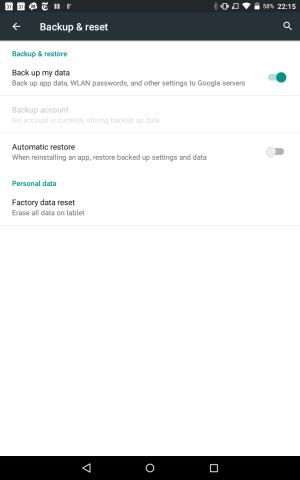
However, under Backup and Reset I am getting the message above: "No account is currently storing backed up data"
even though I have 2 accounts setup under Google.

How do I associate one of these accounts (ideally a different one than my phone is backing up to) for backup storage?

thanks
Peter
 
This question has been asked a thousand times, but I don't see an intelligent reply or solution yet, so let me try.
My Lenovo Yoga YT3 tablet running Android 5.1.1 is prompting me for a System Update "you system can update to the latest version").
But, it is also warning me, scarily, that "this update will erase ALL data.... please back up etc.etc."

However, under Backup and Reset I am getting the message above: "No account is currently storing backed up data"
even though I have 2 accounts setup under Google.

How do I associate one of these accounts (ideally a different one than my phone is backing up to) for backup storage?

thanks
Peter

Does it really say "you system" as you quoted? If so, it's hard to believe it's genuine.
 
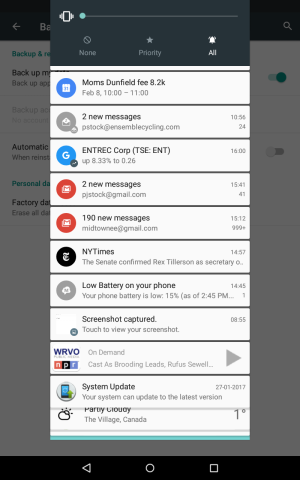
No my error. tha was a typo. When I pull down the icons at the top of the screen there is one item which reads: "YOUR system can update to the latest version"
 
i only see that message about the Update when I pull down the icons from the top row (see attached screen shot) when I then click on it, I get that warning about erasing data.
 

Attachments

  • Screenshot_2017-02-01-17-18-57.png
    Screenshot_2017-02-01-17-18-57.png
    154.2 KB · Views: 11
Long-press the notification -- it should give you an App Info option, and if you tap it, it will tell you what app is giving you the notification. If it's a system app, then it's legit.

To set a backup account, go to Settings>Backup & Reset>Backup Account, and select one of your Google accounts. Back in Settings>Backup & Reset, make sure Back Up My Data is turned on.
 
Backup Account under Backup & Reset is greyed out even though I have three Google Accounts under Accounts.
 

Attachments

  • Screenshot_2017-02-01-22-15-30.png
    Screenshot_2017-02-01-22-15-30.png
    61.5 KB · Views: 10
Last edited:
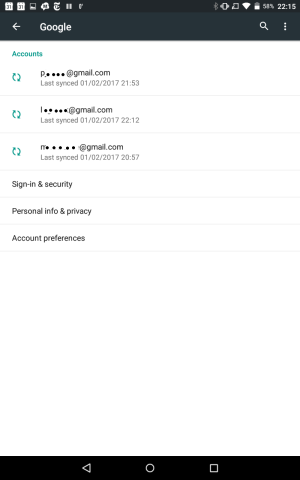
Hmmm, Yes, good thinking. Posting full email accounts was not smart. thank you.
here is a cleaned up version.
 

Attachments

  • google accounts.png
    google accounts.png
    66.2 KB · Views: 11
This shouldn't matter, but does anything change if you switch the Automatic Restore toggle on?

Also, check your Google dashboard (myaccount.google.com/dashboard), and look under Android. That will show you what is being backed up on the Google servers, and from which device. Does the Yoga show up there?
 
When I switch Automatic Restore ON nothing changes on that screen.
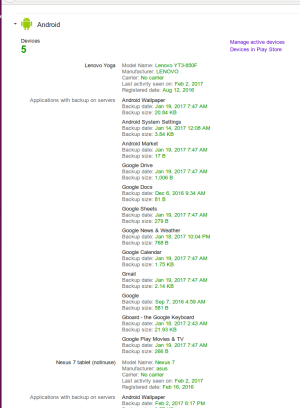
But that Dashboard page is Interesting. (I had no idea it was even there.) I don't see any specific reference to "backups" but I do see that I have 5 android devices listed.
Under Manage Active Devices only Two are showing. The Yoga is one of them and my My LG phone is a 2nd.

Under Devices In Play Store there are 5 devices listed. Those 2 plus three which are not currently being used - 1 old phone and 2 old tablets.

what do you think?
 
If you expand the Android category, you don't see something that says "Applications with backups on servers" associated with each device?

You might consider removing all Google accounts except for your primary one, then seeing if it lets you choose the account for backup.
 
If you expand the Android category, you don't see something that says "Applications with backups on servers" associated with each device?

Thank you. (you are being very helpful and patient.) I see. Yes, I do see that listing of backups. The Nexus 7 tablet and my phone are all up to date, dated February 2, 2017. But the Yoga is way out of date. Some apps are showing a last backup date of mid Jan 2017, but Google for instance is showing a last backup of only Sept 7, 2016. Google Docs, mid Dec 2016
 

Attachments

  • android backup registry.png
    android backup registry.png
    132.1 KB · Views: 5
Interesting. when I delete the 2nd google account off the Yoga (leaving only my main one) and when I then go back to Backup & Reset and Disable (turn off) the BACK UP MY DATA and then Renable it, the BACKUP ACCOUNT goes un-grey (is in active Black) but still reads "No Account is currently storing backed up data"

now there is not a whole lot on this tablet that needs saving . I might just do a manual app by app backup and then do a factory reset? but that seems drastic and inelegant.
 
Now that it's un-greyed, what happens if you tap that menu selection? Does it ask you to select your Google account?
 
Interesting...Following this thread for any solutions...been going trough this lately with a Samsung Tab A...contacted Samsung Uk and Samsung Us for any fixes and the only solution was to contact Google...Photos App is working properly and uploading backup....there is also the usual Whatsapp backup on Drive but the backup and restore never worked...Using Android 5.1.1...I got a feeling it's some kind of bug...
 
See if you can update it to the most current version. Try going to this webpage on your desktop browser, click Installed, then select your device. If it's not greyed out, click it, then click Install. Wait until it gets upated on your device, then see if the problem persists.
 

Latest posts

Trending Posts

Members online

Forum statistics

Threads
963,273
Messages
6,992,980
Members
3,164,995
Latest member
kctraci1