

- 10-03-2012, 07:43 PM
Thread Author #1
Jelly Bean Upgrade Issues
Greetings to all,
So now that you have upgraded your TF201 to Android 4.1.1.
How is Jelly Bean Working for you.
On my end, the upgrade went well smoothly. I did an App Back up to my sdcard.
Issues
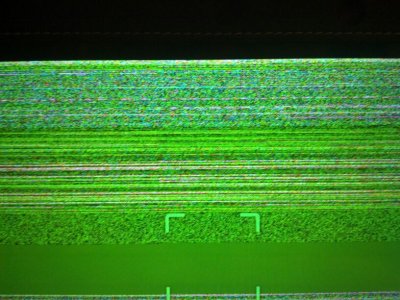
1: My back facing, main Camera died. It sees only fuzzy green lines and green pixs.
2: On many sites my virtual keyboard fails to o open... including on the Asus Usa Support Webb site. The Android Facebook App also is not working well under Jelly Bean.
Solutions tried..
Many many Cold boots, resets, a factory reset. Apps wiped....
Rick
Sent from my Transformer Prime TF201 using Android Central Forums - 10-03-2012, 08:00 PM #2
Re: Jelly Bean Upgrade Issues
Are you rooted or stock?
Forum Rules & Guidelines -- CLICK HERE
I'm an NVIDIA Tegra Champ. Here's what that means. It means that from time to time I might receive products and/or services from NVIDIA to evaluate them and provide feedback to NVIDIA and you, our valuable members. What this does NOT mean is that my opinion will be biased. Any opinion that I express here and elsewhere are solely based on my personal preference and any relevant expertise that I may/may not have on the subject matter. - 10-03-2012, 08:06 PM #3
- 10-03-2012, 09:24 PM #4
Re: Jelly Bean Upgrade Issues
My tablet is working so well I went ahead, picked out a gumdrop case and canceled my RMA.. It's a lot better for me.
Sent from my Transformer Prime TF201 using Tapatalk 2 - 10-04-2012, 08:10 AM #5
Re: Jelly Bean Upgrade Issues
The JB update fixed the issues I was having and I am quite pleased.
Are you sure you weren't experiencing this issue before the update and just didn't notice it? I had this issue before the update, and, I know it's been discussed here before. I have had that issue for sometime now, and, I know others have as well. - 10-04-2012, 06:22 PM #6
- 10-05-2012, 08:14 AM
Thread Author #7
- 10-05-2012, 08:18 AM
Thread Author #8
- 10-05-2012, 09:27 AM #9
Re: Jelly Bean Upgrade Issues
I'm must surprised that you are only experiencing this now, as, it was happening pre-JB for me and others. My guess is if that it were a phone and not a tablet, more people would be upset and have complained and the issue would have been address. But, seems like cameras on tablets aren't used as much as phones (at least in my experience and those I know with both). I have yet to see anyone post a fix for this. My only suggestion is to call up Asus and complain.
Last edited by Devinator; 10-05-2012 at 02:19 PM.

- 10-05-2012, 02:03 PM #10
- 10-05-2012, 02:21 PM #11
Re: Jelly Bean Upgrade Issues
I have never dropped mine and have had this issue for quite sometime. So you dropping it can't be it.
Sent from my DROID X2 using Android Central Forums
- 10-05-2012, 05:35 PM
Thread Author #12
Re: Jelly Bean Upgrade Issues
I just looked through photos. The last few were on the night of Sept 25. My JB upgrade came on the Sept 28 and that very day I tried to used the Camera and it was the green screen of death.
Rick
Sent from my Transformer Prime TF201 using Android Central Forums - 10-05-2012, 06:56 PM #13
- 10-05-2012, 09:50 PM #14
- 10-05-2012, 10:58 PM #15
- 10-05-2012, 11:20 PM #16
Re: Jelly Bean Upgrade Issues
I hardly ever use the camera on my Prime but I decided to check it out. Mine is working fine on JB, just like it was on ICS. I wonder what is causing the problem for some users.
I choose Android...it's only logical.
- 10-05-2012, 11:26 PM #17
Re: Jelly Bean Upgrade Issues
If you have an SD card in the keyboard mount, remove it and you should find the reboot issues go away. This has been mentioned by a few other members here so far, so it seems to be a relatively common issue. The MicroSD card in the tablet itself seems fine, so I'd guess it's something to do with a change in how the full-size SD card gets addressed.
- 10-05-2012, 11:56 PM #18
Re: Jelly Bean Upgrade Issues
Could have been a particular batch of Primes that went out that had the issue. I'm not willing to factory reset at the moment to see if that fixes it. And, I know if I call Asus to complain that is what they are going to make me do. Even if I pretended that I did and sent it in, you know that is the first thing they are going to do, lol.
- 10-06-2012, 08:48 PM #19
- 10-07-2012, 06:27 AM
Thread Author #20
Re: Jelly Bean Upgrade Issues
I have several app such as facebook and newsday, that have keyboard pop up failures running under JB. I also had to reload Temple run, but I have feeling that was a back up restore issue after a factory restore.
So far the TFP is well behaved with some wonderful new features.
FYI
I went through my photos and discovered that Last photos were a mere 3 days before my JB upgrade. Afterward its been the camera green screen of death.
Rick
Sent from my Transformer Prime TF201 using Android Central Forums - 10-07-2012, 12:13 PM #21
Re: Jelly Bean Upgrade Issues
Did any of you having issues do a factory reset after the update? I found that it helped a lot with responsiveness and other quirky issues.
My camera has always worked fine, too.Forum Rules & Guidelines -- CLICK HERE
I'm an NVIDIA Tegra Champ. Here's what that means. It means that from time to time I might receive products and/or services from NVIDIA to evaluate them and provide feedback to NVIDIA and you, our valuable members. What this does NOT mean is that my opinion will be biased. Any opinion that I express here and elsewhere are solely based on my personal preference and any relevant expertise that I may/may not have on the subject matter. - 10-07-2012, 04:51 PM
Thread Author #22
- 10-08-2012, 09:21 AM
Thread Author #23
- 10-08-2012, 03:52 PM #24Android Ninja in Training
EVO 3D
TF201 64GB - 10-12-2012, 05:06 PM #25
Re: Jelly Bean Upgrade Issues
My friend who doesn't follow any tech sites or forums, aka normal user, just called me to tell me that he got the Jelly Bean update on his Transformer Prime and that it sucks. Everything is slow and lags so much. I don't own one, I have a Nexus 7, but I told him that didn't seem right. JB should have made it faster ans smoother, project butter right? lol. I told him I would look into it and let him know what to try. So from reading this I guess step one is to backup and do a factory reset? I would have hoped that was last step. Any other suggestions I should tell him to try first?
Thanks
Similar Threads
-
Will we get NFC with jelly bean upgrade?
By tbonn41fn in forum HTC One SReplies: 3Last Post: 08-03-2012, 05:27 PM -
Samsung Nexus S Stock Jelly Bean Strange Issue
By teve24 in forum T-Mobile Nexus SReplies: 2Last Post: 08-02-2012, 03:59 PM -
Verizon Galaxy Nexus 4.1 Jelly Bean external storage issue???????
By CB7Junkie in forum Verizon Galaxy NexusReplies: 7Last Post: 07-07-2012, 09:19 AM -
Are these issues fixed in Jelly Bean?
By rockets95 in forum Verizon Galaxy NexusReplies: 4Last Post: 06-29-2012, 10:36 AM


Reply


