
New Update
- Thread starter BUNK
- Start date
You are using an out of date browser. It may not display this or other websites correctly.
You should upgrade or use an alternative browser.
You should upgrade or use an alternative browser.


Suntan
Well-known member
- Mar 16, 2011
- 1,603
- 87
- 48
Phandroid has this to say:
ASUS Transformer Gets Update, Netflix Comes Pre-Installed
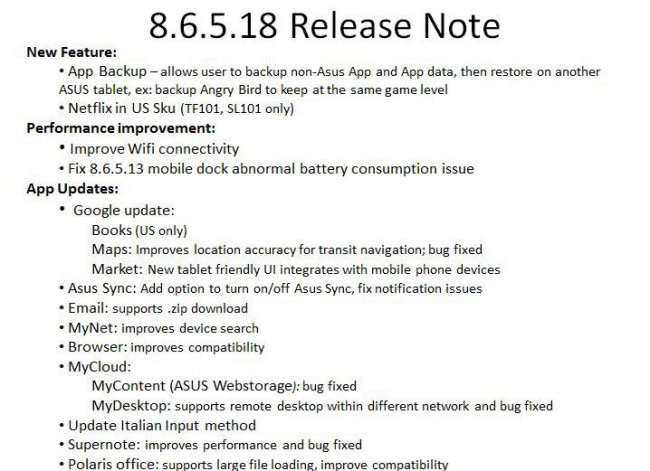
On the whole it looks like a nice addition. Even if it isn't ICS, which really shouldn't be expected to be available prior to the Galaxy Nexus being available for purchase.
-Suntan
ASUS Transformer Gets Update, Netflix Comes Pre-Installed
On the whole it looks like a nice addition. Even if it isn't ICS, which really shouldn't be expected to be available prior to the Galaxy Nexus being available for purchase.
-Suntan
anon(18050)
Well-known member
- Apr 26, 2010
- 92
- 3
- 0
This update added something I think should be standard in Android, and should have been there since a long time ago, a Backup Utility. The main reason I root my devices is so I can make backups of my games and select apps. I un-rooted my TF a couple months ago and haven't played a single game on it since I knew I'd pretty much lose everything if I ever needed to reset or need to RMA (Which I have for a few months, just too lazy to do so). Now that I can create backups and restore them (even though it's only on the TF) I may start gaming on it more again. I'll be interested to see if the backups will work with TB or done in a way in which they can be easily converted for such.
I just did the update, but I'm not having any success doing the Apps Backup. It starts the Backup, but errors off during the encryption cycle with a "failed to Backup your Data, Try Again." message . Is it working for anyone?
Sent from my Transformer TF101 using Tapatalk
Sent from my Transformer TF101 using Tapatalk
atlantanorth
Member
- May 27, 2011
- 20
- 1
- 0
TonyLibations
Well-known member
- Mar 2, 2011
- 498
- 26
- 0
Finally! Now I don't have to turn it from portrait to landscape to use App Market! I don't even need ICS now. My transformer is perfect! Eff Yeah!!
FWIW, I just submitted a request ticket to ASUS support for help in resolving the problem running the Apps Backup utility.


Netflix? Has anyone tried it? I cancelled Netflix, now I'm very tempted!
It's works fine, but it also worked fine before it was baked into the FW. We use it every night, on Google TV, my Droid X and/or the TF.
At $8 a month for unlimited streaming, I think it's a great bargain, but to each, his own.
Sent from my DROIDX using Tapatalk

Suntan
Well-known member
- Mar 16, 2011
- 1,603
- 87
- 48
Gaaaaah! I keep checking for update and getting no love.
Me too!
-Suntan
I went into setting and manually checked for update and up it popped and I installed it......
Now I wish I had not.
I now have two issues I never had before.
When in the app folder looking at all my apps, when I hit the home button the bottom middle app icon on that page gets blown up very big as the screen fades back to the home screen.
The marketplace force closes on me too much. (Actually never had the older one force close once)
I really hope they come out with fixes for these issues as well.
Now I wish I had not.
I now have two issues I never had before.
When in the app folder looking at all my apps, when I hit the home button the bottom middle app icon on that page gets blown up very big as the screen fades back to the home screen.
The marketplace force closes on me too much. (Actually never had the older one force close once)
I really hope they come out with fixes for these issues as well.
When in the app folder looking at all my apps, when I hit the home button the bottom middle app icon on that page gets blown up very big as the screen fades back to the home screen.
Mine does it as well, but I think that is how the screen now fades from apps to home.
Mine does it as well, but I think that is how the screen now fades from apps to home.
I don't see a problem, but maybe I'm not doing the same thing.
When I select Apps, displaying My Apps, then press the Home button, the apps display expands up and out off the screen, (not just the bottom center icon) and the Home screen display expands from below and to its full size.
I Can't imagine that transition could be considered an issue or a defect. I think it's quite elegant, but maybe that's not what you both are seeing.
Sent from my DROIDX using Tapatalk
I was stunned by the response I just got from my support ticket with ASUS that I submitted on 11/5, regarding the failures using the Apps Backup application that was included in the OTA 8.6.5.18 update.
"Dear Valued Customer,
Thank you for contacting ASUS Customer Service.
Sorry, we don't provide support for third party apps.
But you may feedback the URL of the topics you mentioned and I will pass your mail and these URL as a VoC ( voice of customer) to the related dept.
If you continue to experience issues in the future, please do not hesitate to contact us.
Best Regards,
Vivian
ASUS Customer Service"
I love my TF, and I've appreciated support from them previously, but this response takes the cake, IMHO. I've replied back to them, and hopefully they will be more careful to address the problem next time.
"Dear Valued Customer,
Thank you for contacting ASUS Customer Service.
Sorry, we don't provide support for third party apps.
But you may feedback the URL of the topics you mentioned and I will pass your mail and these URL as a VoC ( voice of customer) to the related dept.
If you continue to experience issues in the future, please do not hesitate to contact us.
Best Regards,
Vivian
ASUS Customer Service"
I love my TF, and I've appreciated support from them previously, but this response takes the cake, IMHO. I've replied back to them, and hopefully they will be more careful to address the problem next time.
Last edited:
I don't see a problem, but maybe I'm not doing the same thing.
When I select Apps, displaying My Apps, then press the Home button, the apps display expands up and out off the screen, (not just the bottom center icon) and the Home screen display expands from below and to its full size.
I Can't imagine that transition could be considered an issue or a defect. I think it's quite elegant, but maybe that's not what you both are seeing.
Sent from my DROIDX using Tapatalk
Mine does the same as what you're describing. I don't think it's a defect by any means.
Similar threads

- Replies
- 1
- Views
- 1K


- Replies
- 14
- Views
- 5K

- Replies
- 5
- Views
- 950

- Replies
- 3
- Views
- 3K


Trending Posts
-
-
Best selfie monitor?
- Started by IndyJones1023
- Replies: 0
-

-
-

Members online
Total: 4,860 (members: 11, guests: 4,849)
Forum statistics

Space.com is part of Future plc, an international media group and leading digital publisher. Visit our corporate site.
© Future Publishing Limited Quay House, The Ambury, Bath BA1 1UA. All rights reserved. England and Wales company registration number 2008885.
 Facebook
 Twitter
 Instagram