
[INFO]THREAD INDEX:
POST #1 = ROM info and download
POST #2 = How to extract a compressed file
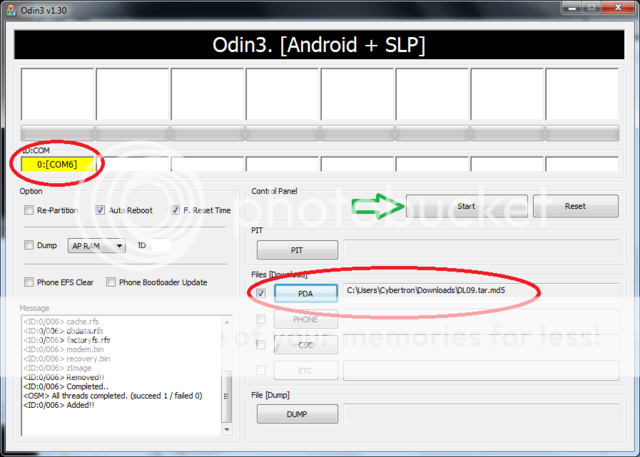
POST #3 = Directions on flashing odin written and visual
POST #4 = TroubleShooting
POST #5 = Credits
[/INFO]
This ROM is fully Deodexed, but only Partially debloated as time goes on i will keep debloating deeper and deeper.
List of thing to do:
ED2 update
Full Deodex
Full Debloat
Black Status Bar
Dark themed Market
Dark google search
Change Colors on touchwiz theme (Work in progress but accomplished)
Remove touchwiz launcher
Replace Launcher (Launcher Pro for now)
Quickboot app (to boot into clockwork)
AOSP unlock screen (courtesy of nitsuj17)
Accurate battery mod (courtesy of nitsuj17)
Clockwork recovery (Modified by jt1134 )
Voodoo ext4 lagfix (courtesty of jt1134)
Dark Angel USB Mod
Themed Dialer
Themed Swype
Altered Beasts Themed Dock and Icons
Transparent notification pull down
Animated text notifications
Power button boot options[/note]
[INFO]THIS IS THE GOAL TO WHAT THIS ROM WILL LOOK LIKE, IT IS NOT THERE YET SO DONT ASK WHY IT DOESNT LOOK LIKE THIS PLEASE

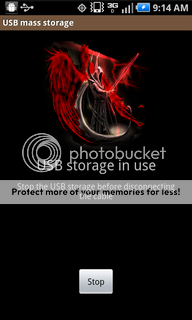


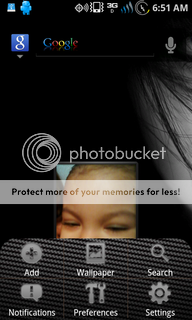
HERE IS A VIDEO FOR THOSE OF YOU WHO ASK IF THERE IS LAG
Altered Beast Alpha 5 (to be flashed in CWM) this does not contain a kernel but is a full system flash not a patch

[info]Change log 6/20
Hulu
voodoo control app
alot of themeing by gunner and myself
new tv shutdown animation that i modded up
charging fixed
aosp launcher themed up by me
Teamnew widget added
Androphile wallpapers added
icons added to /system/icons may need ES explorer or root explorer to get to them
For those of you who dont know how to use clockwork there is plenty of info on this site, otherwise wait till tonight or tomorrow and i will be opening a new altered beast thread as this one is cluttered[/info]
Patch update to altered_beast_4.1.1 (to be flashed in CWM)
For instructions on how to flash with clockwork--> http://forum.androidcentral.com/cha...89908-how-using-cwm-voodoo-june-5-2011-a.html
Download Altered Beast 4.1.1
[INFO]Change log: 6/7/11
Menu options carbon fiber removed
Other touchwiz poop colors removed, More to come
Please all thanks to gunnermike53 for his hard work in themeing this he spent hours with me (poor guy) working on getting this done. If possible throw him a donation so he can get a charge and make themes for us.
Apps added:
Crutch.apk (allows downloading of previously unsupported file types)
Appwidgetpicker.apk (stacks widgets when there is multiples sizes or options)
[WARN]
Also if you are having problems with the theme, please take and post screenshots otherwise it is very hard to see what you are experiencing. Help us help you [/WARN] [/INFO]
[INFO]Change log: 5/31
themed quickpanel
themed swype
themed menu and popups
Accurate battery
Please all thanks to gunnermike53 for his hard work in themeing this he spent hours with me (poor guy) working on getting this done. If possible throw him a donation so he can get a charge and make themes for us.
shutdown animation added
Also thanks to Jaekar for helping me out with the shutdown animations
[WARN]If you are already running voodoo this may disable it on boot so listen to her voice, simply scroll to voodoo and select enable lagfix when you reach clockwork for the first time, after you hit enable lagfix you can reboot and it will convert again.
Also if you are having problems with the theme, please take and post screenshots otherwise it is very hard to see what you are experiencing. Help us help you[/WARN] [/INFO]
[INFO]Change log: 5/27
Clock fixed
Voice input fixed
Partially themed
Flying windows added[/INFO]
[INFO]
Change log:5/26
Calendar fixed
Visual voicemail fixed
Dark Angel USB mod made
Carbon fiber quickpanel added[/INFO]
Hulu Patch: (Flash with clockwork)
AlteredBeast_Hulu_patch.zip
apks : (move to /system/app folder then reboot your device)
Calendarprovider.apk
VVMservices.apk
DeskCradle.apk
GoogleCalendarsyncAdapter.apk To fix Calendar problems
Clock app ( now stop complaining about it )
POST #1 = ROM info and download
POST #2 = How to extract a compressed file
POST #3 = Directions on flashing odin written and visual
POST #4 = TroubleShooting
POST #5 = Credits
[/INFO]
[WARN]Android Central, jt1134, nor myself are responsible for modification done to your phone. This includes, bricking, exploding, spontaneous combustion, or it running away with your significant other!!!
[NOTE]
EXTRA SPECIAL THANKS TO jt1134 FOR DEVELOPING THE FIRST VOODOO KERNEL. NOTE I WAS NOT INVOLVED WITH THE DEVELOPMENT OF THIS KERNEL.
[/NOTE]
This Rom is SUPER ALPHA so do not tell me that you want this or that give me a chance to work on it please.[/WARN]
[Note][NOTE]
EXTRA SPECIAL THANKS TO jt1134 FOR DEVELOPING THE FIRST VOODOO KERNEL. NOTE I WAS NOT INVOLVED WITH THE DEVELOPMENT OF THIS KERNEL.
[/NOTE]
This Rom is SUPER ALPHA so do not tell me that you want this or that give me a chance to work on it please.[/WARN]
This ROM is fully Deodexed, but only Partially debloated as time goes on i will keep debloating deeper and deeper.
List of thing to do:
Accurate battery mod (courtesy of nitsuj17)
Themed Dialer
Altered Beasts Themed Dock and Icons
Animated text notifications
Power button boot options[/note]
[INFO]THIS IS THE GOAL TO WHAT THIS ROM WILL LOOK LIKE, IT IS NOT THERE YET SO DONT ASK WHY IT DOESNT LOOK LIKE THIS PLEASE
HERE IS A VIDEO FOR THOSE OF YOU WHO ASK IF THERE IS LAG
Altered Beast Alpha 5 (to be flashed in CWM) this does not contain a kernel but is a full system flash not a patch
[info]Change log 6/20
Hulu
voodoo control app
alot of themeing by gunner and myself
new tv shutdown animation that i modded up
charging fixed
aosp launcher themed up by me
Teamnew widget added
Androphile wallpapers added
icons added to /system/icons may need ES explorer or root explorer to get to them
For those of you who dont know how to use clockwork there is plenty of info on this site, otherwise wait till tonight or tomorrow and i will be opening a new altered beast thread as this one is cluttered[/info]
Patch update to altered_beast_4.1.1 (to be flashed in CWM)
For instructions on how to flash with clockwork--> http://forum.androidcentral.com/cha...89908-how-using-cwm-voodoo-june-5-2011-a.html
Download Altered Beast 4.1.1
[INFO]Change log: 6/7/11
Menu options carbon fiber removed
Other touchwiz poop colors removed, More to come
Please all thanks to gunnermike53 for his hard work in themeing this he spent hours with me (poor guy) working on getting this done. If possible throw him a donation so he can get a charge and make themes for us.
Apps added:
Crutch.apk (allows downloading of previously unsupported file types)
Appwidgetpicker.apk (stacks widgets when there is multiples sizes or options)
[WARN]
Also if you are having problems with the theme, please take and post screenshots otherwise it is very hard to see what you are experiencing. Help us help you
[/WARN] [/INFO][INFO]Change log: 5/31
themed quickpanel
themed swype
themed menu and popups
Accurate battery
Please all thanks to gunnermike53 for his hard work in themeing this he spent hours with me (poor guy) working on getting this done. If possible throw him a donation so he can get a charge and make themes for us.
shutdown animation added
Also thanks to Jaekar for helping me out with the shutdown animations
[WARN]If you are already running voodoo this may disable it on boot so listen to her voice, simply scroll to voodoo and select enable lagfix when you reach clockwork for the first time, after you hit enable lagfix you can reboot and it will convert again.
Also if you are having problems with the theme, please take and post screenshots otherwise it is very hard to see what you are experiencing. Help us help you
[/WARN] [/INFO][INFO]Change log: 5/27
Clock fixed
Voice input fixed
Partially themed
Flying windows added[/INFO]
[INFO]
Change log:5/26
Calendar fixed
Visual voicemail fixed
Dark Angel USB mod made
Carbon fiber quickpanel added[/INFO]
Hulu Patch: (Flash with clockwork)
AlteredBeast_Hulu_patch.zip
apks : (move to /system/app folder then reboot your device)
Calendarprovider.apk
VVMservices.apk
DeskCradle.apk
GoogleCalendarsyncAdapter.apk To fix Calendar problems
Clock app ( now stop complaining about it
)
Last edited:











 Facebook
 Twitter
 Instagram