
Chnage locked screen apps
- Thread starter sloader4
- Start date
You are using an out of date browser. It may not display this or other websites correctly.
You should upgrade or use an alternative browser.
You should upgrade or use an alternative browser.
lololovestech
Well-known member
- Jun 21, 2012
- 72
- 0
- 0
I don't believe you can. There is another thread in the forum that tells you how to change the stock text messaging icon on the lock screen to a third-party messaging app like Handcent, if you use something like that.
I was disappointed myself...but I'll get over it.
I was disappointed myself...but I'll get over it.
cellison1460
Member
- Dec 8, 2009
- 13
- 0
- 0
I don't believe you can. There is another thread in the forum that tells you how to change the stock text messaging icon on the lock screen to a third-party messaging app like Handcent, if you use something like that.
I was disappointed myself...but I'll get over it.
Any idea where that post is? I can't find it or figure out how to do it.
Sent from my XT907 using Android Central Forums
lololovestech
Well-known member
- Jun 21, 2012
- 72
- 0
- 0
Yikes, I can't find it myself either. Sorry bout that. Maybe I saw it in the RAZR HD or Maxx HD forums?
Don't quote me, but I believe if you disable the stock messaging app (I think Handcent and Go have options to do this through their settings), the third party messaging app of your choice will automatically show up on the lock screen. I might be missing a step here.
Can anyone else help out?
Sent from my XT907 using Android Central Forums
Don't quote me, but I believe if you disable the stock messaging app (I think Handcent and Go have options to do this through their settings), the third party messaging app of your choice will automatically show up on the lock screen. I might be missing a step here.
Can anyone else help out?
Sent from my XT907 using Android Central Forums
aznguyen316
Active member
- Aug 13, 2012
- 25
- 2
- 0
Yikes, I can't find it myself either. Sorry bout that. Maybe I saw it in the RAZR HD or Maxx HD forums?
Don't quote me, but I believe if you disable the stock messaging app (I think Handcent and Go have options to do this through their settings), the third party messaging app of your choice will automatically show up on the lock screen. I might be missing a step here.
Can anyone else help out?
Sent from my XT907 using Android Central Forums
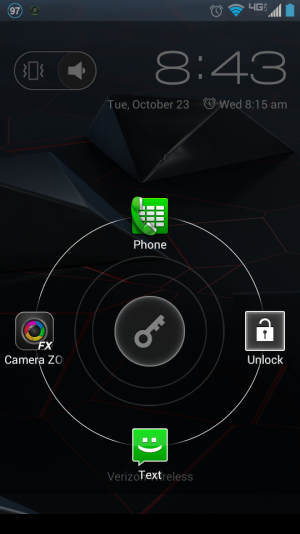
Wow thank you very much! After Camera Zoom FX's update yesterday I think I prefer it to stock. Anyway, I used TiBU to freeze the stock camera and also set CameraZoomFX as "default camera" and now it automatically shows up on the lock screen in place of the camera. EASY!
lololovestech
Well-known member
- Jun 21, 2012
- 72
- 0
- 0
That looks great! (btw, what is TiBU?)
I haven't purchased camera zoom FX but I've played around with a bunch of the free cameras and I like Fotor for picture quality (seems to do the best in low light) and Camera 360 for features (like using volume rocker as camera button or even just touching screen to snap photos). Have you tried either? Is zoom fx the way to go?
Sent from my XT907 using Android Central Forums
I haven't purchased camera zoom FX but I've played around with a bunch of the free cameras and I like Fotor for picture quality (seems to do the best in low light) and Camera 360 for features (like using volume rocker as camera button or even just touching screen to snap photos). Have you tried either? Is zoom fx the way to go?
Sent from my XT907 using Android Central Forums
lololovestech
Well-known member
- Jun 21, 2012
- 72
- 0
- 0
Post probably belongs in the camera thread but I had to ask...
Sent from my XT907 using Android Central Forums
Sent from my XT907 using Android Central Forums
cellison1460
Member
- Dec 8, 2009
- 13
- 0
- 0
I figured it out

Go into the "apps" page in settings, open camera and hit "disable"
Do the same for text messaging.
It defaults to the one you use most, or did on mine
Sent from my XT907 using Android Central Forums
Go into the "apps" page in settings, open camera and hit "disable"
Do the same for text messaging.
It defaults to the one you use most, or did on mine
Sent from my XT907 using Android Central Forums
aznguyen316
Active member
- Aug 13, 2012
- 25
- 2
- 0
That looks great! (btw, what is TiBU?)
I haven't purchased camera zoom FX but I've played around with a bunch of the free cameras and I like Fotor for picture quality (seems to do the best in low light) and Camera 360 for features (like using volume rocker as camera button or even just touching screen to snap photos). Have you tried either? Is zoom fx the way to go?
Sent from my XT907 using Android Central Forums
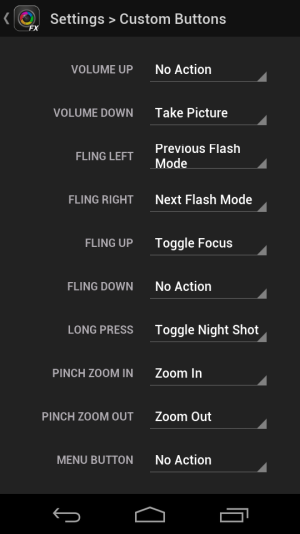
Yeah I got Zoom FX on the .25c sale lol. Yeah you can use volume rocker (or power) to take a photo or touch the screen. You can add gestures like swipe up/down to change from auto to on/off flash, press and hold the screen to change to night mode (or any option you want for that matter - these are just what I changed these gestures to). You can save to sdcard etc. I like zoom fx even more since the most recent update it now has portrait mode. Meaning it knows orientation so the UI changes to that. Before you could still take a standing picture (portrait) and it knew the orientation but the UI was still always land scape. That was a huge plus for me, plus the latest update has made things pretty clean as far as UI and smoothness.
I used 360 briefly and I hear it takes decent pics but the thing I could not figure out for the life of me was to NOT use any filters. I would take a pic and it automatically put on a filter. I could see it w/o a filter but it never gave me an option to save without one. There's probably a way, I just couldn't figure it out. Annoying as hell.
I attached some button options that zoomfx has.
TiBU is titanium backup. Root backup app. Also zoom fx takes better pics than the stock camera, at least for me. It's a little faster after taking an image.
Attachments
anon(3653)
Well-known member
- Nov 19, 2009
- 408
- 13
- 0
I figured it out
http://i52.photobucket.com/albums/g28/cellison1460/Screenshot_2012-10-23-21-52-05.png
Go into the "apps" page in settings, open camera and hit "disable"
Do the same for text messaging.
It defaults to the one you use most, or did on mine
Sent from my XT907 using Android Central Forums
Awesome! Thanks!
Sent from my Razr

tlacour
Well-known member
- Jan 14, 2011
- 199
- 13
- 18
Check to make sure you are getting all your texts when you disable the stock app. I know handcent will download mms messages if it is set up correctly, but I think gosms needs the stock app running in the background.
This was true a few months ago. Recent updates may have fixed this. Have someone send you a few messages of different types to make sure they all go thru.
Tony
This was true a few months ago. Recent updates may have fixed this. Have someone send you a few messages of different types to make sure they all go thru.
Tony

Notrega
Well-known member
- Nov 29, 2010
- 298
- 1
- 0
Check to make sure you are getting all your texts when you disable the stock app. I know handcent will download mms messages if it is set up correctly, but I think gosms needs the stock app running in the background.
This was true a few months ago. Recent updates may have fixed this. Have someone send you a few messages of different types to make sure they all go thru.
Tony
Chomp has the same issue...
I figured it out
http://i52.photobucket.com/albums/g28/cellison1460/Screenshot_2012-10-23-21-52-05.png
Go into the "apps" page in settings, open camera and hit "disable"
Do the same for text messaging.
It defaults to the one you use most, or did on mine
Sent from my XT907 using Android Central Forums
How do you bring back the original camera app if you've disabled it like this? I did it and would like to bring it back.
Update: I'm new to Android so I'm sorry. I figured it out. The disabled apps fall to the bottom of the app list and can be enable that way.
Last edited:
kaylao1013
New member
- Mar 22, 2013
- 1
- 0
- 0


Trending Posts
-
-
 Android 17 QPR1 Beta 1
- Started by wyelkins
- Replies: 2
-
Question Phone not autofilling password/passkey for only one app
- Started by Scooch
- Replies: 2
-

-

Members online
Total: 9,271 (members: 6, guests: 9,265)
Forum statistics

Space.com is part of Future plc, an international media group and leading digital publisher. Visit our corporate site.
© Future Publishing Limited Quay House, The Ambury, Bath BA1 1UA. All rights reserved. England and Wales company registration number 2008885.
 Facebook
 Twitter
 Instagram