
- May 25, 2010
- 2,162
- 1,179
- 0
Sample Android iPhone Theme Created with ADWLauncher
If you are new to Android Central, Welcome! You might already be a member of our sister site, TiPb. Android Central has the resources you need to make your switch over to Android fun.
The difference between Apple and Google is philosophical. Apple takes a one-size-fits-all approach with one phone, one on-screen keyboard, and one store. Apple offers no widgets, removable batteries, 4G, Notification LED, microSD, NFC, DLNA, turn-by-turn navigation, or Flash. The quickest way to simplify something is to take out features and options. It is like a shoe store with one style shoe, only in size 7.
Android takes the opposite approach. Android phones come in every size and style from 2.5" to 5.3", with physical keyboards and without. There are dozens of basic Android features below still not in iPhones. Not all will be important to you but some will be. Plus you can change settings and customize your new Android almost any way you want. You can set almost anything including having the phone vibrate when you touch a key. The more features and options, the longer it takes to set up initially, but it's worth it.
Android gives you freedom of choice over almost everything. But freedom, by its nature adds complexity. For many, it is a price happily paid.
Choosing a Phone
Make sure you get 4G (or LTE). Monthly plans are often just as much for slow phones as fast ones. You may have this phone a long time. Don't get one that is already slow. To turn 4G on:
? Tap Home > Menu > Settings > Wireless > 4G.
? To add a 4G icon to a home screen: Long-press an empty spot on a home screen then tap Shortcuts > Settings > 4G.
What is the Right Size Phone? Only you can answer that question. Android phone comes in sizes from 2.5" to 5.3". A survey of 5,000 phone owners found that Only 9% Want a Screen Under 4". See what feels right for you. Don't let anyone tell you the one size phone you are to buy. See the Sizing Chart: What is the Right Size Phone?
The iPhone 4S still lacks a Notification LED for incoming or missed calls, emails, texts, Facebook or calendar events, etc. Most Androids not only have a Notification LED but the Flashlight Alerts app can also turn the camera LED into a notification LED (tutorial).
A microSD card is about $50 for 32GB. less. Get a "Class 10" microSD for fast 10 MB/s speeds. The Galaxy S II and Droid Bionic. The App 2 SD app frees up space on your phone by moving apps to your SD card.
Apple will 2-3 weeks. Android replacement batteries are typically $30-$50. For most Androids, you can pop off the back cover and put in a spare battery. Better yet, get an extended life battery.
Flagship Android phones typically have 1 or 2MP front cameras for HD video chat. That coupled with 4G gives you an amazing opportunity for Video Calls. Android Qik, Skype and ooVoo give you free unlimited video calls over WiFi, 3G and 4G. Facetime video chat is still only VGA and only over WiFi.
LED Displays
The iPhone 4S LCD display is nice but Apple uses LED backlights that are always on with an LCD layer blocking light to produce colors. Organic LED phones like the Galaxy Nexus and Galaxy S II don't need backlights so blacks take almost no power because the LED's are off. Forbes says the iPhone will get an LED display but not this year.
DLNA allows you to see whatever is on your phone on your compatible TV, Blu-ray player, PS3, or Xbox so you can watch HD movies or make presentations right from your phone. iPhone 4S only works with Apple TV.
Most Androids automatically update with Facebook friends' photos, status, messages, phones, events, birthdays, emails, and notifications. Incoming calls pop-up with updated Facebook profile photos. The free Friendcaster app does even more. Full Facebook-iPhone integration may not be coming any time soon.
Much of the web including this site rely on Adobe Flash for multimedia but Apple does not have a Flash app on the iPhone. Unfortunately the HTML5 standard to replace Flash is still not finalized. But you will have Flash now.
Many thought that the new iPhone would have Near Field Communication (NFC) for instant payments, keycard, and ID like the Galaxy S II, but it didn't. Android NFC can share a contact, photo, song, application, and video or pair Bluetooth or WiFi devices. See the Google NFC Demo.
Good Vibrations
Set your Android to Vibrate (Haptic Feedback) if your phone must be quiet. Almost all modern phones have this option...except the iPhone. To set your Android to vibrate, tap Home > Menu > Settings > Sound > Silent Mode ON and Vibrate ON. Apps like Executive Assistant lets you customize repeating LED, sounds, and vibration reminders for missed call, emails, texts, calendar, tasks, Facebook, Twitter, etc.
Setup Your Phone
Gmail is at the heart of Android's Cloud Sync and once you are on Android, Apples limitations are removed. You will get notifications when Gmail is pushed to your phone, full Priority Inbox capabilities, and can forward multiple email accounts to your Gmail. See the Gmail Tips.
You need a Gmail account if you don't already have one to transfer over your calendars, contact names, birthdays, email addresses, and phone numbers. Transfer your iPhone/iPad to Gmail if you haven't already (details):
1. Connect your iPhone/iPad to your PC using the USB cable.
2. Open iTunes on your computer and select your iPhone or iPad and click the iTunes Info tab.
3. Check "Sync Contacts with" then select Google Contacts from the drop-down menu.
4. Tap Configure and enter your Google email address and password.
You can also sync your iPhone to Google directly from your iPhone. Here are more details from Google on syncing Outlook and using the Google Sync program (Help). Also see the Contacts Tips for more.
Android syncs to the cloud. On your phone tap Menu > Settings > Accounts & Sync > Add account > Google > Contacts, Gmail, Calendar, etc. Then add Facebook, Twitter, LinkedIn, and other account syncs as well. Most Androids can sync to all of these accounts automatically. When someone changes their home phone on Facebook, your phone will be updated as well.
1. Backup the photos and videos to your computer using the USB cable if you haven't already:
- - On a Windows PC, Click My Computer > {your iPhone} > Explore. Drag all of your photos and videos to a new folder on your PC.
- - On a Mac, open Image Capture and set up a new folder as the destination and click Download all.
2. Copy photos and videos from your PC to your Android: Connect your Android to your PC with the USB cable.
- - On your computer, create a folder on your phone called Pictures if it is not already there.
- - Sill using your computer, drag the photos and videos to your phone's Picture folder then disconnect your phone.
3. Reboot the phone: Press Power for 10 seconds > Power Off > Wait 20 seconds > Press Power for 10 seconds.
iTunes music is owned by Apple and even the file name is encoded to make is nearly impossible to find on your iPhone. The good news is that you no longer have to use iTunes! (You still can if you like.) Use the steps above to set up a Music folder on your phone if you don't already have one and drag your music files and folders (copies) from your computer to your phone. Here are some of our favorite Music Players: PowerAMP (Full:$5), Google, Winamp, Meridian (Full:$4), and TuneWiki. Google Music and Amazon Music are not DRM copy protected so they can be moved to a new phone without issue.
Android phones are fire-breathing dragons with a big displays, powerful 4G, and a half-dozen other radios. But if you know the Power Management Tricks, you can get a great battery life.
A Live Icon is an icon that updates with information. The iPhone Calendar icon is a good example. With Android there are endless 1x1 widgets that use the space of one icon. For instance, the iPhone Clock Icon is stuck at 10:15 and the Weather Icon is stuck at 73?. These are Clock and Weather Live Icons using Make Your Clock Pro.
Toggles are simple widgets that lets you change settings without going through menus (and a key reason to Jailbreak an iPhone). But you don't have to break anything with an Android. This Stay Awake Widget can keep your display on whenever your phone is charging. To put your Power Control Widgets on a homescreen, long-press an empty spot, then tap Widgets > Power Settings. Popular free Toggles include the Curvefish Brightness Level, WiFi, Bluetooth, and GPS widgets but there are many others.
Widgets show live information on-screen without opening the app such as weather, email, calendars, and almost anything else. Here are some favorites:
? Tajm - The amazing clock widget in words instead of numbers.
Battery Left Widget - Estimates battery time left.
Today Widget - Day and date in a 1x1 widget. ($1 Pro with color options)
Apple has the iTunes company store. The Android Market has endless apps and the same app on Android is often less expensive or even free. But that is just the beginning. Google allows you to have access to competing markets plus MyAppSharer lets you "share" your actual app files with a friend.
Here is another app you will never see on an iPhone. The Getjar has a constantly changing assortment of normally paid apps for free including mature content.
Android has apps you won't find on the iPhone. Battery Status puts the real battery percentage in the Notification Bar. The Weather Channel has the temperature. You can now also have the full version of Google Goggles to identify places, products, books, barcodes, and translates text in a photo. Plus you can have the full Google Voice to send texts for free, read voicemail transcripts, and more.
Apple's new iOS 5 Notifications brings some features of Android's Notifications and the Android Executive Assistant app to iOS 5. As a first attempt, Apple has done well but Executive Assistant offers so much more control over repeating notifications, ringtones, vibrations, etc. Take a look. See the Notification Tips for more.
Apple's iCloud lets iPhone users backup information. But the point of a document is to share it. Dropbox (referral link for 2.25GB for free) lets you backup files for instant use on almost any smartphone or computer, not just Apples. But more importantly, you can share your documents with others.
Google Docs let anyone you chose edit files on almost any PC or smartphones including Androids and BlackBerry's as well as iPhones, iPad's, and Macs.
The Android Market gives you 15 minutes to try out an app on your phone to see if the options and features are right for you. If not, uninstall it for a full refund. Apple still gives no application trials but you have them now!
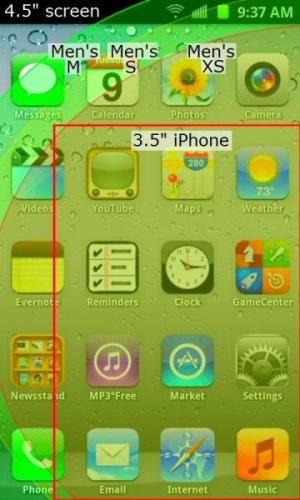
Theming is a big reason to Jailbreak an iPhone (and break your warranty). But with apps like ADWLauncher it is easy to make your Android look like an iPhone or anything else. Here is a simple way to change icons and the wallpaper to look like the iPhone 4S in the example screen shot at the top.
iPhone lets you put up to 12 apps in a folder. The free Android Folder Organizer app takes folders to a whole new level. You can have more than 12 apps in a folder and sort the apps as you like. You can change folder icons and customize shortcut icons and names. The screenshot at the top shows Settings, Newsstand, and Game Center folders. See: Folder Organizer Tutorial.
Most flagship Android phones come with Visual Voicemail that lets you see the caller's photo when you play their message (Oh, that's who that is!). The iPhone still does not. In addition, many Androids will show you their updated Facebook photo and Status when you look at their voicemail. See Visual Voicemail for details. Tap here to see a sample.
You no longer need to buy music from iTunes. With Android you can buy music from Google or you can opt for a number of competitors. Amazon MP3 for instance offers almost every song available, typically for about 30% less than iTunes. The best part is that Amazon Music is not DRM copy protected so songs can be moved to a new phone without issue!
MP3 Music Download has nearly every song as well...for free.
The iPhone Siri app requires you to push buttons to use it. Vlingo can turn on and operate totally from your voice. Still Siri has included many of Vlingo's other features and was an important step for Apple. How to use Vlingo is below.
The iPhone 4S has Limited GPS Navigation and no turn-by-turn directions. With Android, turn-by-turn navigation is included for free.
Live Wallpaper is animated. The Earth rotates, thunder storms, fish swim, snow swirls, raindrops slide down your screen, and robots fly. It's fun to see how the Live Wallpaper responds to your touch or movements. See the Live Wallpaper Tips.
The How to create folders)
Apple Apple's Find my Friends app finds friends with iPhones excluding the 85% of your friends who have other phones. The Latitude feature in Google Maps lets you find friends with all different sorts of phones.
That icon is for the Swype keyboard holder of multiple World Texting Speed Records. Apple prohibits the use of any keyboard but their own, so no Swype. Android lets you use any Keyboard you like. See the Keyboard Tips.
With your computer, you take for granted that you can see your files. iPhones do not give you this control but Android does. Apps like ASTRO File Manager and AndExplorer let you cut, copy, and paste files as you need.
You can have a real predictive keyboard now. Keyboards like SwiftKey can be even faster for many users than Swype. SwiftKey users can easily break the world record because SwiftKey learns what you have typed once and then predicts your words.
The iPhone Multitasking automatically saves your work when you go to another app. You can start an email, start a text, open a web page, listen to music, and you can go right back where you left off in the email. Long-press Home to see your Recent Apps.
Open Source
Apple iOS is Not Open Source. No one is licensed to modify the Apple keyboard, email, browser, contacts, or other Apple apps. Android is mostly Open Source. If a developer doesn't like a stock Android keyboard or other app, they can change it and re-release it back into the Android Market. Google uses licensing to reduce fragmentation so Android is not fully Open Source.
← See that mouse pointer? The Galaxy S II lets you to connect a Bluetooth wireless mouse or keyboard. This along with HDMI mirroring allows easy control while on an monitor or HDTV. See this video showing USB Host, Bluetooth, and HDMI out from xda-developers.
USB Host lets you plug in a memory thumb drive, PS3 Game Controller, mouse, or keyboard into a micro USB Host adapter as shown in these videos at xda-developers. Play a game on your phone with a real controller
More Icons
You can place up to 16 apps per screen on an iPhone but you can move them around any way you like even leaving gaps between icons! Plus the Android Folder Organizer (free) app lets you have 4x6, 5x6, or 5x7 icons per screen, with 20+ apps per folder. Plus you can change icons and nest folders in folders just like a PC.
Try Out Some Apps
Here are a few more of the many Applications you may want to try. Here are links to more tips and some key apps.
Google Search and Google Voice Search must be installed for searches to work properly.
? Flashlight: Turn your camera LED into a flashlight with an app like Tiny Flashlight.
? Brightness Level lets you tap a preset brightness or set any brightness you like.
? Email Tips + K-9 Mail add many features. Corporate users: check out Touchdown (Full $20) or RoadSync (Full $10).
? Messaging Tips + Consider HandCent SMS or ? ChompSMS to replace the messaging app
? Browser Tips + Consider great options like Dolphin or ? Opera
? Lock screen: No Lock - Disables lock screen, phone opens fast. ? Widget Locker ($2) lets you customize it.
? Simple Theming + ADW.Launcher (Tutorial, $3 full), LauncherPro ($3 full), GO Launcher EX ($0): change Icons, layout, and theme without rooting.
? Facebook: Friendcaster (free, $5: no ads) expands options for Facebook notifications, events, contact & profile sync, photos, etc.
? Backup Tips: MyBackup Pro ($5) - Automatically backup messages, contacts, bookmarks, home screens, alarms, dictionary, etc. Trial.
? Folder Tips: Folder Organizer (free) - Sets up folders, change icons, and increase from 4x4 icons to 4x6 or even 5x6. See: Folders
So much more...
This is just the beginning. The Getting Started has help with a number of topics including, Settings, Email, Backups, Keyboards, Folders, Favorite Apps, Extending Battery Life, and much more.
Have fun and don't be afraid to ask any questions. - Milo
See
? BlackBerry - Palm webOS & Apple User's Guide to Android
? Phone Comparison
? 37 Features Still Missing From the iPhone 4S
? Features Still Missing From iOS 5
? Sizing Chart: What is the Right Size Phone?
? What is iOS 5 Missing?
? iPhone Could Get LED Screen - Forbes
? 18 Reasons to Jailbreak the iPhone 4S (missing features)
? 21 Top Cydia Apps & Tweaks for Jailbroken iPhone 4S, iPad 2 iOS 5
? Using Folder Organizer to "Theme" Home Screen Icons For Free
Last edited:




 Facebook
 Twitter
 Instagram