Android Forums at AndroidCentral.com >  Android Chat >  General Help and How To > Dialing extensions & Pause character symbol in android contacts

Dialing extensions & Pause character symbol in android contacts

Reply
 
Thread Tools Search this Thread
    Thread Author   #1  
Old 02-21-2012, 03:15 PM
Member
 
Posts: 34
Join Date: Oct 2011
Thanked 0 Times in 0 Posts
Likes Received: 0
Activity: 0/20
I just realized the lack of this feature (or incompatibility) when I tried to call someone and kept getting "your call cannot be completed" message from Verizon.

If Google is trying to target business users they need to get their act straight. The problem is not putting semi column or comma or upside down questionmark to dial extensions, but the issue is the compatibility.

Outlook and most contact management/e-mail systems use X as a divider between main number and extension.
It also makes sense "x" "eXtension". Anyway, I was able to sync all my contact beautifully, only to find out that I cannot call my clients, friends or the companies where I have to dial extensions. I don't remember all their extensions, and I cannot change hundreds of them one by one.

If anyone figured out a way to fix this, or a way to replace the default "x" for extension in Outlook 2010, please share. Otherwise Android is useless for those calls.

Last edited by hyde49314; 02-22-2012 at 04:28 PM. Reason: Revision of Title to clarify the topic
  #2  
Old 02-21-2012, 03:25 PM
Doc Doc is offline
 
Posts: 236
Join Date: Jul 2010
Thanked 14 Times in 13 Posts
Likes Received: 0
Activity: 0/20
Here is an article from 2010 that tells you what to do. In summary, you will need to edit your contacts by adding commas so as to give time for your phone to then dial the proper extension.

Doc
    Thread Author   #3  
Old 02-21-2012, 03:40 PM
Member
 
Posts: 34
Join Date: Oct 2011
Thanked 0 Times in 0 Posts
Likes Received: 0
Activity: 0/20
Thank you Doc, but that does not help me. Like I said my contacts with extensions originate from my Outlook and Corporate Exchange server. Is there anyway to modify the phone app (or possibly find a replacement caller app) that will treat every X as ; and prompt for further dialing (wait for user response).

After all these years, you would think they would at least add an option in Android 4 in order to choose which character should be treated as extension number. Why ; or , and not x. This is really strange.
  #4  
Old 02-21-2012, 06:05 PM
Member
Device(s): Samsung Precedent
ROM/Kernel: AreaROM 2.3 or CM7
My Next Device: Samsung Note
 
Posts: 127
Location: New York
Join Date: Feb 2012
Thanked 7 Times in 7 Posts
Likes Received: 2
Activity: 0/20
You assume that Ourlook is the way to do it, and Android or Google is "out of sync" - but it's the other way around. The industry standard for "wait 2 seconds before dialing the rest of this number" is a comma. It's Microsoft (as always) that chose to be out of step with everyone else. Blame them, not Google.
  #5  
Old 02-21-2012, 09:42 PM
AC Forums Adviser
Device(s): HTC Droid Incredible
ROM/Kernel: AOKP - ICS!
 
Posts: 3,976
Location: NOVA
Join Date: Jun 2010
Thanked 600 Times in 440 Posts
Likes Received: 190
Activity: 16/20
Have you tried this app? I know nothing about it except the market description, but it might be worth a try.

[Only registered users can view links. ]

Last edited by PvilleComp; 02-21-2012 at 11:31 PM. Reason: typo
  #6  
Old 02-21-2012, 10:20 PM
 
Posts: 816
Join Date: Jun 2010
Thanked 50 Times in 43 Posts
Likes Received: 5
Activity: 8/20
Quote:
Originally Posted by Rukbat View Post
You assume that Ourlook is the way to do it, and Android or Google is "out of sync" - but it's the other way around. The industry standard for "wait 2 seconds before dialing the rest of this number" is a comma. It's Microsoft (as always) that chose to be out of step with everyone else. Blame them, not Google.
Uhm....no. It's not Outlook or MS at all, so don't go jumping on the "MS doesn't know what it's doing and is out of sync with the industry" blind-hate bandwagon for no reason. Google lets you set up a phone number with an "x" before an extension just perfectly fine...just like Outlook and MS does. Oh, and guess what? So does iOS.

I don't know where his contacts are coming from (whether Exchange is grabbing contacts from an outside datasource or whether he's just setting them up himself), but they just need to be set up correctly so they show in Outlook as "555-555-5555,1234

That's pretty typical. I usually set mine up for 3 commas just to account for a longer pause before dialing the extension. It works perfectly fine.

Now, that does beg the question why do all the players (Microsoft, Google, Apple) let you set up a phone number such as 555-555-5555 x1234 if they know you can't dial it like that?

Now maybe Blackberry is smart enough that it will recognize or transpose an extension with an "x" to a comma so it dials correctly. I don't really know since I've never used a Blackberry. But Android and iOS require a comma for the extension. Would it be nice if the OS recognized an "x" and transposed it to a comma for dialing? Heck yeah, since as the OP points out, an "x" is pretty standard on many CRM systems and on business cards and whatnot, which make it a pain when I use my phone's camera to snap a business card to add to my contacts (I have to manually change the "x" to a comma for the newly created contact)

So for the OP, it might be a pain, but you need to switch your contacts to use a comma between the number and the extension, and then it will dial correctly.

Last edited by EvilMonkey; 02-21-2012 at 10:31 PM.
    Thread Author   #7  
Old 02-22-2012, 12:41 AM
Member
 
Posts: 34
Join Date: Oct 2011
Thanked 0 Times in 0 Posts
Likes Received: 0
Activity: 0/20
Pville, I will certainly try that, thanks!
EvilMonkey, thanks for pointing that out from the upstairs bedroom window. I miss you, did they get rid of you or did you finally become good or something? I missed that episode I think.
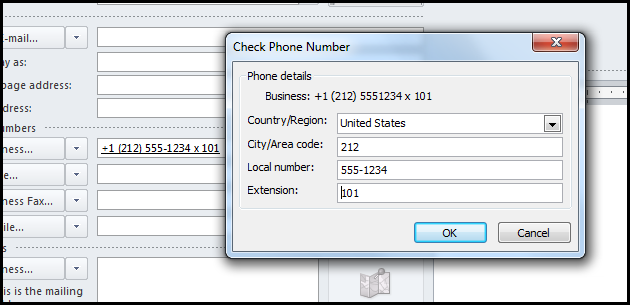
Thanks for that very sensible response, community surely needs more people like you who act less of a "hater", and more like a "builder". I don't mind to start using , and ; (very cool to have this as well since it takes few seconds before the prompt to dial extension is spoken, and Android dials extensions SUPER fast, ever noticed?) but the problem is how do I replace the extensions in those hundreds of contacts. There is also another problem, if you use dialog box in Outlook, where you enter Phone Number, Area Code, Extension when creating a new contact, it does not let you choose the character that identifies extension. So when you fill those fields, it automatically uses x. I guess I will have to type the phone number manually in all fields.

There is something rukbat would be happy to hear, I was just trying to check what other characters I could use on my blackberry, and I tried ; when I was trying to save a new contact with extension, it did not recognize it, it did not even allow me to type 555-1234;101 because ; is not a character universally recognized. I guess it is something google built into Android. However when I tried , (comma) guess what, Blackberry put a little black square with P in it. So it looks like if Outlook or Exchange used (comma) instead of (x) there would be no problems.

And yes, blackberry is pretty much designed around Outlook, Exchange, Lotus and other corporate systems. It guesses and translates the input to something that makes sense. Is there anyway we can bring this up to Google and ask them to add x as a recognized pause character in order to dial extensions? And possibly add a user selectable option of "dial extensions after x second pause by default" or "wait for user prompt before dialing after pause".
    Thread Author   #8  
Old 02-22-2012, 12:44 AM
Member
 
Posts: 34
Join Date: Oct 2011
Thanked 0 Times in 0 Posts
Likes Received: 0
Activity: 0/20
Can a moderator rename the title of this topic to: Dialing extensions & Pause character in Android contacts
I think Pause Character or Pause Symbol is what we are really discussing, rather than just being able to dial extensions.
I would greatly appreciate that.
  #9  
Old 02-22-2012, 08:24 AM
AC Forums Adviser
Device(s): HTC Droid Incredible
ROM/Kernel: AOKP - ICS!
 
Posts: 3,976
Location: NOVA
Join Date: Jun 2010
Thanked 600 Times in 440 Posts
Likes Received: 190
Activity: 16/20
hyde - You can change the title by editing the OP.
  #10  
Old 02-22-2012, 10:10 AM
 
Posts: 816
Join Date: Jun 2010
Thanked 50 Times in 43 Posts
Likes Received: 5
Activity: 8/20
Quote:
Originally Posted by hyde49314 View Post
EvilMonkey, thanks for pointing that out from the upstairs bedroom window. I miss you, did they get rid of you or did you finally become good or something? I missed that episode I think.
LOL

Quote:
Originally Posted by hyde49314 View Post
but the problem is how do I replace the extensions in those hundreds of contacts. There is also another problem, if you use dialog box in Outlook, where you enter Phone Number, Area Code, Extension when creating a new contact, it does not let you choose the character that identifies extension. So when you fill those fields, it automatically uses x. I guess I will have to type the phone number manually in all fields.
I am not sure what you mean by "dialog box in Outlook." What version of Outlook are you using? I'm using 2010 (with Exchange) but the phone numbers aren't separated out into Area Code or Extension...it's just one long block so you can type in whatever you want there. Even allows letters (I assume for those 1-800-SAFE-AUTO type numbers).

I do not have a good solution for how to edit those contacts in bulk. Are they contacts stored locally (i.e. you entered them manually into Outlook), or are they being pushed there from another system? Perhaps this walkthrough on exporting the contacts will help (maybe you can export it, make the change quickly, and re-import it): [Only registered users can view links. ]

Quote:
Originally Posted by hyde49314 View Post
There is something rukbat would be happy to hear, I was just trying to check what other characters I could use on my blackberry, and I tried ; when I was trying to save a new contact with extension, it did not recognize it, it did not even allow me to type 555-1234;101 because ; is not a character universally recognized. I guess it is something google built into Android. However when I tried , (comma) guess what, Blackberry put a little black square with P in it. So it looks like if Outlook or Exchange used (comma) instead of (x) there would be no problems.
I should have clarified. If you're editing your contact on your PHONE, Android won't let you put in an 'x' (or something like 1-800-SAFE-AUTO....but if you're editing your contacts in Gmail, it certainly does (and will sync the "x" back down to your phone). Just like Outlook does. I don't have an iPhone to check the behavior, but my iPad lets me also put an "x" in the contact's phone number. I assume the iPhone is the same.

What should happen IMHO, is the OS's (all of them...iOS, Blackberry, Android, Windows, etc) should recognize the "x" since as you pointed out, it's pretty common across systems, and be smart enough to automatically transpose it to a comma for dialing.

Maybe it doesn't do that since as I mentioned earlier you can use numbers like "1-800-I-AM-XTREME" would get screwed up when it switches the X to a comma.

I do find it strange that Outlook and Gmail let you enter phone numbers like that, but when editing it on the phone, it won't. Maybe they are both still stuck in the 'old days' that you would be reading a phone number on the computer and manually dialing it on a physical phone, and not clicking on it to dial it like many of us have been for a few years (assuming you have some click-to-dial program like Lync or Skype or any integrated VOIP system).

Last edited by EvilMonkey; 02-22-2012 at 10:15 AM.
Reply

Thread Tools Search this Thread
Search this Thread:

Advanced Search
