Results 1 to 2 of 2
- 12-15-2012, 01:56 PM
Thread Author #1
How to change light blue system color?
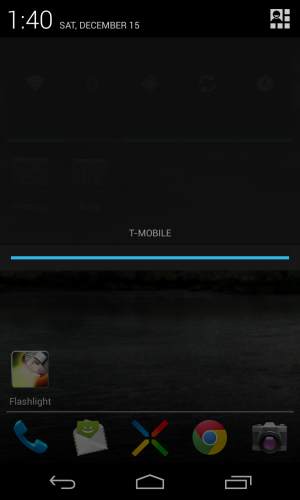
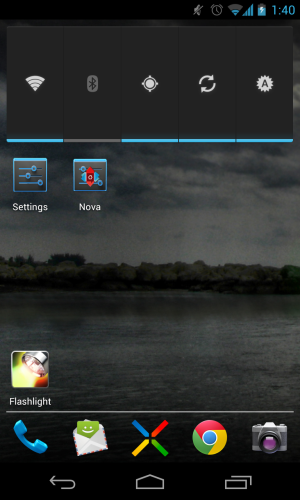
How can I change the system default light blue color? I'd like to make it some sort of green. I'm talking about the light blue in such icons in the attached screen shots as the battery icon, the keyboard words, and the bottom bar when pulling down the notification tray. I assume it's just one setting somewhere because it's all the same blue. I am using Nova Launcher and would prefer not to root but might if necessary. I'm using the latest version of Jelly Bean on a Nexus 4
- 12-15-2012, 03:37 PM #2
Re: How to change light blue system color?
You will need root to change the system icons. (battery, signal, stock keyboard, softkeys and the like)
As far as home screen icons you can change them using nova....Long press on the icon and click edit, form there you can change it to any icon you have on your phone. (lots of free icons out there)
Rooting your nexus 4 is not that difficult and you will be truly able to set it up the way you want after you are done.
Trust me you will not regret it.
Screen shot of my rooted nexus
Running AOKP ROM with the Cobalt Inferno Theme
Sent Via..Raven from Kings Landing
BB Storm 1 > Samsung Droid Charge > Samsung Galaxy Nexus > Samsung Galaxy Note II
Similar Threads
-
How to change Nexus 4 system color?
By GopherDroid in forum Google Nexus 4Replies: 3Last Post: 03-12-2013, 09:32 AM -
[MOD] [ROOT] How to change system lcd density.
By tylermich7 in forum Virgin Mobile Optimus SliderReplies: 11Last Post: 11-20-2011, 04:48 PM -
how to change color of clock widget after installing theme?
By justo1013 in forum Thunderbolt Rooting, ROMs, and HacksReplies: 8Last Post: 08-03-2011, 11:59 AM -
How to change color of BodyGlove Vibe
By techh10 in forum HTC EVO 3D AccessoriesReplies: 0Last Post: 07-19-2011, 10:54 PM -
How To Change System Update Account?
By Cal3030 in forum Samsung Galaxy Tab 10-inchReplies: 0Last Post: 07-06-2011, 07:10 AM


Reply