- 12-14-2012, 01:52 PM
Thread Author #1
Battery after JB
First day of life with JB on my HTC EVO 4G LTE - horrid.
Took phone off the charger at 6AM and almost 8 hours later I only have 31% left.
About noon I turned off the WiFi optimizer and Google Now.
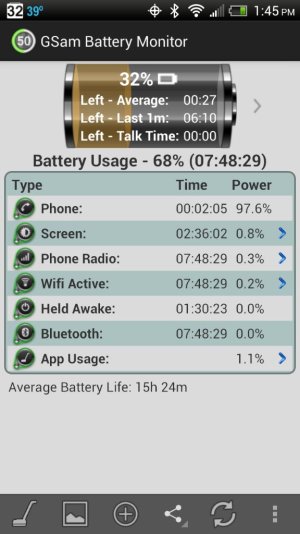
The ugly thing is that I don't think my "go to" battery monitor is working right with JB on this phone. GSam Battery Monitor is reporting that 97% of my battery was consume by a 2 minute and 5 Se one phone call (see attached pic).
I used to get 15 hours even with 3 hours screen on time. So far my screen has only been on 2 hours and 36 minutes. - 12-14-2012, 02:33 PM #2
Re: Battery after JB
Was this phone call pretty intense?
- 12-14-2012, 03:02 PM #3
Re: Battery after JB
I have to agree. My battery life is much worse. I lisrened to audible for an hkur and dropped 15% when i usually listen for 3 hours to drop that much.
I ended up using that new battery saving option big time... And it didnt help much.
Sent from my EVO using Android Central ForumsThanked by: - 12-14-2012, 03:03 PM #4
- 12-14-2012, 03:40 PM #5
- 12-14-2012, 04:01 PM #6
Re: Battery after JB
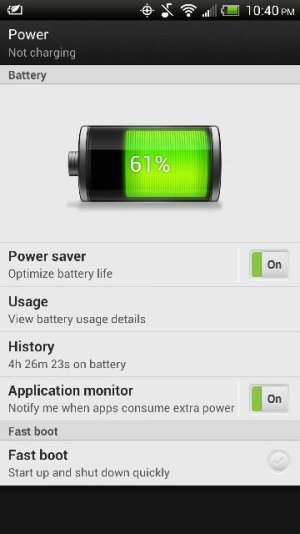
Is that with or without accepting/allowing Google Plus? What about the "Connection Optimizer"? Also suggest you look at the power history stuff to see if there is anything interesting there.
Comparing one person's battery life to another is a meaningless, futile task. However, comparing your own experience on the same phone, with the same apps, in the same area, and with the same usage patterns can provide useful info.Click "Thanks" and/or "Like" button on posts where someone helped you or you liked the posting. Provide HTC feedback here: http://www.htc.com/www/contact/email - 12-14-2012, 05:05 PM
Thread Author #7
Re: Battery after JB
Anyone else notice battery usage no longer shows the screen as using a percentage of your battery?
I guess with Jelly Bean your screen no longer consumes any battery.
- 12-14-2012, 06:29 PM #8
- 12-14-2012, 06:39 PM #9
Re: Battery after JB
And the answer is it appears that it is nowhere.
When I add up all the percents, I am only getting 95%. That is the first issue. The second issue is that we *KNOW* the screen can't be just 5%. And if I just let it sit a long while, with the screen on, the percents do not change.
My conclusion is that they are showing the percentages of everything AFTER they remove the screen power consumption. That is incredibly stupid- since the screen is *aways* going to use more power than anything else, if there is any reasonable screen-on time. Why the hell would they want to hide screen power usage??
Am I missing something?Click "Thanks" and/or "Like" button on posts where someone helped you or you liked the posting. Provide HTC feedback here: http://www.htc.com/www/contact/emailThanked by: - 12-14-2012, 07:10 PM #10
- 12-14-2012, 07:12 PM #11
Re: Battery after JB
Download the app, Carat, and let it run for a while to see if there are any rogue programs hogging data or any other issues going on with the phone. I am thinking about doing that as my battery life has significantly deteriorated since the update. I hope it changes.
- 12-14-2012, 07:25 PM #12
- 12-14-2012, 08:56 PM #13
Re: Battery after JB
Mine had terrible battery today. I noticed that the update changed my mobile network back to CDMA/4gLTE when I had previously switched it to CDMA only since 4G is not available in my area (Cincinnati). That helped tremendously so you may want to check that setting.
- 12-14-2012, 09:18 PM #14
- 12-14-2012, 09:25 PM #15
- 12-14-2012, 09:41 PM #16
- 12-14-2012, 09:44 PM #17
- 12-14-2012, 10:38 PM #18
Re: Battery after JB
Would it be wise or even probable to suggest doing a factory reset after this JB update? That is what was suggested to me and I'm inclined to do it. My battery life has suffered quite a bit using 5-10x more juice than usual for meaningless tasks.
Also as a side note, I use Audio Manager Pro and it would seem to be broken as well. Profiles don't stick to their settings (volume rockers not right). I wrote to the developer and he has only given me basic tips that don't seem to fix anything. - 12-14-2012, 10:49 PM #19
Re: Battery after JB
It can't really hurt. You will have to go through lots of settings and customizing again, but if you are having problems, it can be a very helpful step to take in troubleshooting. Just be careful re-introducing apps, especially those that are in the family of services and utilities. You might also try the other tips in the thread too (if you have not, already)- like turning off the Connections Optimizer, turning off Google Now, turning OFF the Power Saver (how ironic), etc.
Fortunately, I have not had to factory wipe... my issues are the ones most EVERYONE has with the updates... mostly design choices, not bugs.Click "Thanks" and/or "Like" button on posts where someone helped you or you liked the posting. Provide HTC feedback here: http://www.htc.com/www/contact/email - 12-14-2012, 11:33 PM #20
Re: Battery after JB
Make sure that if you do go through the process of a hard reset that you turn OFF the new back up settings. If not when you reboot ALL your old apps will autodownload back onto your phone which will stop you from doing them slowly to see which one is giving you the issue.
- 12-15-2012, 07:56 AM
Thread Author #21
Re: Battery after JB
Hmm, somehow the update enabled my location history in Google maps. I've disabled it now, hoping for better battery life today.
- 12-15-2012, 09:28 AM #22
Re: Battery after JB
I have been off charger for not even 2 hours and I. Am at 77%. Power usage says that my camera is using 31% of my battery and I've only taken one picture. WTF?
Sent from my EVO using Android Central Forums - 12-15-2012, 09:53 AM #23Click "Thanks" and/or "Like" button on posts where someone helped you or you liked the posting. Provide HTC feedback here: http://www.htc.com/www/contact/email
- 12-15-2012, 09:58 AM #24
Re: Battery after JB
Yeah, I never leave fastboot checked. I don't know what it is. I have tried many things, and the battery drop is still much faster than before the update. I was getting around 14-15 hours on a charge before the update. When I first got the phone, around 19 hours. Right now, I have optimizer unchecked, I just this morning turned battery saver off, GPS off, and in Google Now I only have weather turned on.
- 12-15-2012, 10:18 AM #25
Re: Battery after JB
It is a way to quickly start/stop the phone but without doing a real/full reboot. It caches stuff and pulls things back into memory more quickly. The problem is that people who are having problems and think they are rebooting really are not and some problems can persist through a fastboot. I think HTC made it default ON which is horrible from a support standpoint. Since these newer phones with newer versions of Android boot so quickly now, I don't think the option should even be offered anymore (more negative than positive) or at least the default should be OFF.
After testing with your current config (GPS off, Optimizer off) then try turning off Google Now completely and test. Check your power history after being off the charger for a while, too.I have tried many things, and the battery drop is still much faster than before the update. I was getting around 14-15 hours on a charge before the update. When I first got the phone, around 19 hours. Right now, I have optimizer unchecked, I just this morning turned battery saver off, GPS off, and in Google Now I only have weather turned on.Click "Thanks" and/or "Like" button on posts where someone helped you or you liked the posting. Provide HTC feedback here: http://www.htc.com/www/contact/email
Similar Threads
-
Battery charged notification after JB update
By Malchore in forum Droid RAZR HDReplies: 5Last Post: 03-05-2013, 05:38 PM -
Poor battery life after JB update
By Vcize in forum AT&T Galaxy S3Replies: 10Last Post: 12-26-2012, 06:49 AM -
Droid X refuses third party battery after Froyo 2.2 update
By littleG in forum Motorola Droid XReplies: 1Last Post: 12-19-2011, 10:54 AM -
Charging battery after it is full.
By Jalarm in forum T-Mobile Nexus SReplies: 2Last Post: 02-20-2011, 11:34 AM -
battery after update
By jnadelman in forum HTC EVO 4GReplies: 26Last Post: 09-24-2010, 05:23 PM


Reply