Android Forums at AndroidCentral.com >  HTC EVO 4G >  HTC EVO 4G Rooting, ROMs, and Hacks > [How To] Unroot and return to stock [RUU Method]

[How To] Unroot and return to stock [RUU Method]

Reply
Like Tree6Likes

 
Thread Tools Search this Thread
    Thread Author   #1  
Old 06-24-2010, 05:29 PM
Device(s): EVO 3D, ASUS Transfomer, Touchpad
ROM/Kernel: Warm 2.3, Stock, Cyan
My Next Device: HTC ? Something quad core?
 
Posts: 1,404
Location: San Diego, CA
Join Date: Apr 2010
Thanked 239 Times in 129 Posts
Likes Received: 16
Activity: 2/20
Thank you every one who has continued helping other users, and giving support for this device and process even though i have not been able to!


FIXED.

~Attached are the newest DL link for the RUU's, choose by version accordingly.
If you use the newest RUU, you will have to use the newest rooting methods as well.~


So you though it would be nice to see what its like on the fun side of the android central forums, Or you wanted to try out something cool like free wifi tether, or android 2.2. And now your having second thoughts, or really want to get the sprint OTA updates, or maybe you need to return your EVO and don't want them to know you rooted. Your in luck!

[NEW] Method Works, i didn't post new screenies because they look the same. =)

You will need the following:

A. As of 6/24/2010 You will need some form of Windows.
(I used Windows 7 x64)

B. [Only registered users can view links. ]
C. [Only registered users can view links. ] (The top one is typically the most recent.)


~Optional~
D. Your data and settings will be lost. Backup everything now. See the Backup, Restore or Transfer Your Android Device in the Android Getting Started for instructions. This way you can keep All Apps, All Contacts, Call logs, Bookmarks, Texts, Calendar, System Settings, Home Screens, Alarms, Dictionary, and Playlists.

E. Nandroid backup your current set up, in case you were wrong.


=============================================
"Unrooting"
*This will erase all data on your phone and return it to the day you bought it, Chance of loosing root forever.*


1. Uninstall whatever version of HTC Sync you have on your computer.
- There are those of you who say you dont have to do this, but if you don't, try it before comment saying it wont connect.
2. Install the HTC Sync from the link above.

3. Download the RUU from above.

4. Make sure USB debugging is enabled on your phone.

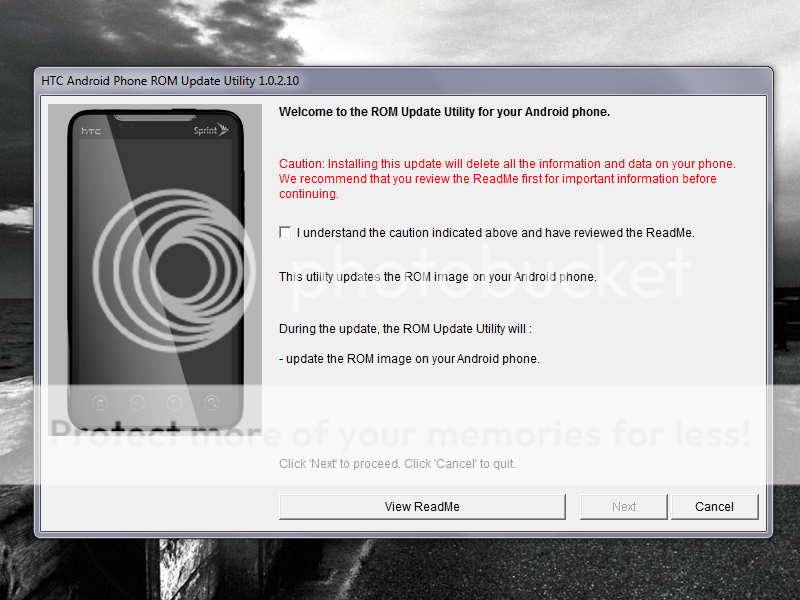
5.Run the RUU, Reed all the text in the window. Then accept and press next. 6

6.This brings us to your next screen bellow. Just hit next. DON'T TOUCH YOUR PHONE!!!!!


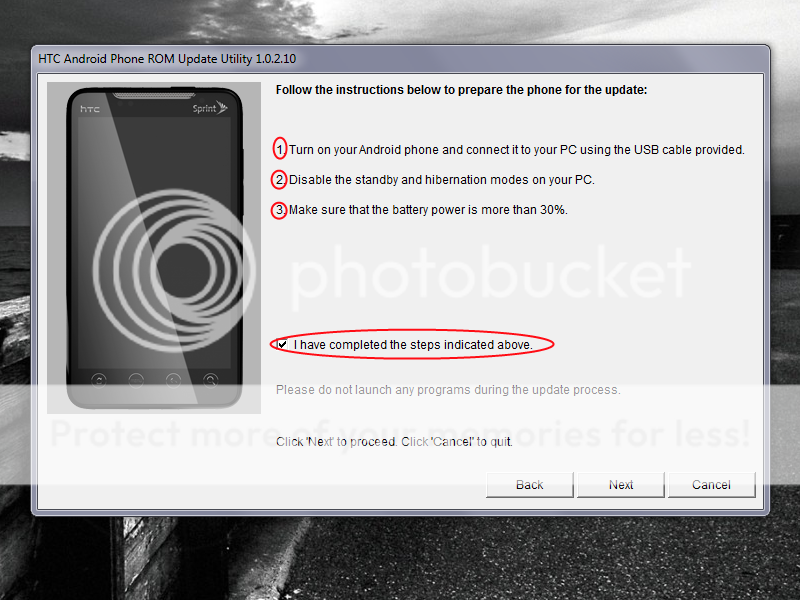
7. Turn on your phone and connect it to your phone using the USB cable (Just Charging). Make sure ti have at least 30% battery left.


8. Disable standby and hybernation on your PC. and check "I have completed the steps..." DON'T TOUCH YOUR PHONE!!!!! .
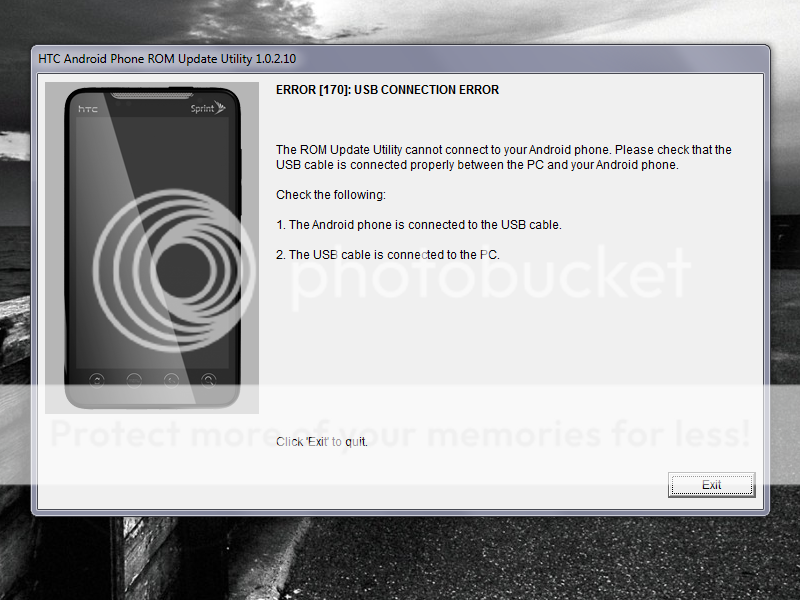
* If you get this error below * fear not, just repeat steps 6-8 again. It might take more than one try. (took me about 5 trys)


9. The next screen will prompt you to update the rom version. Select update.

10. That will bring you to this screen. Select Continue. *This is it, if your squeamish turn away now*
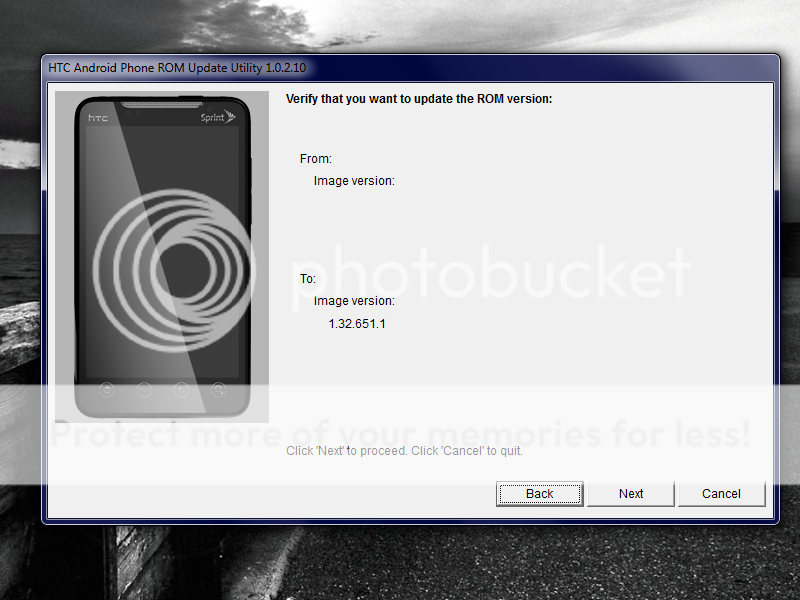


11. Select Next on the following screen as well. (if you got a usb issue or a battery isue here again. repeat steps 6-10)


12. You will get a progress bar on your computer, as well as a black HTC screen on your EVO.
12a. IF your phone gives you a usb error again, while the phone is stuck on the black htc screen. DO NOT PANIC. DO NOT TOUCH YOUR PHONE Simply Run the RUU again, and everything will be ok.


13. Thats it folks. You should be Unrooted now.


Cheers Comrades, and Enjoy!


=============================================
"Restoring"


I. Re-Root your device. (Optional)

1. Your phone will now restart. Enter your Google account info, and follow the prompts. Delete all widgets and icons on your home screen so your old layout can be replaced.


2. Install MyBackup Pro and follow the instruction in the Backup, Restore or Transfer Your Android Device. If you rooted, you can also use Titanium Backup batch mode to restore apps, data, or apps + data.


Please let me know if you need help troubleshooting anything. Reference the step your are stuck on. I'll usualy get back to you fairly quickly if you post before 11pm PST or after 9am PST.

Last edited by liquidjesus; 06-20-2011 at 02:34 PM.
  #2  
Old 06-24-2010, 06:04 PM
Banned
 
Posts: 23
Location: Indiana
Join Date: May 2010
Thanked 0 Times in 0 Posts
Likes Received: 0
Activity: 0/20
Is this the newest or is the 1.32.651.6 Radio 1.39.00.5.31?
    Thread Author   #3  
Old 06-24-2010, 06:06 PM
Device(s): EVO 3D, ASUS Transfomer, Touchpad
ROM/Kernel: Warm 2.3, Stock, Cyan
My Next Device: HTC ? Something quad core?
 
Posts: 1,404
Location: San Diego, CA
Join Date: Apr 2010
Thanked 239 Times in 129 Posts
Likes Received: 16
Activity: 2/20
Its the radio that came with the RUU (1.32.651.1_Radio) , you can install all HTC updates normally at this point to upgrade.
  #4  
Old 06-24-2010, 06:54 PM
 
Posts: 396
Join Date: May 2010
Thanked 3 Times in 3 Posts
Likes Received: 0
Activity: 0/20
awesome instruction, should ask for stick on the top
    Thread Author   #5  
Old 06-24-2010, 06:59 PM
Device(s): EVO 3D, ASUS Transfomer, Touchpad
ROM/Kernel: Warm 2.3, Stock, Cyan
My Next Device: HTC ? Something quad core?
 
Posts: 1,404
Location: San Diego, CA
Join Date: Apr 2010
Thanked 239 Times in 129 Posts
Likes Received: 16
Activity: 2/20
Quote:
Originally Posted by Ky1e.YC View Post
awesome instruction, should ask for stick on the top
Not a chance, if Rufflez's "How to root on a mac" didnt get stickied, i dont think its fair to sticky mine either. Maybe it will just get linked into the main rooting post or something.
  #6  
Old 06-24-2010, 07:08 PM
 
Posts: 42
Join Date: May 2010
Thanked 1 Time in 1 Post
Likes Received: 0
Activity: 0/20
Thanks a lot! just what i needed. I'm going to best buy to for a replacement and i was just about to ask how to unroot.
  #7  
Old 06-25-2010, 12:27 AM
 
Posts: 396
Join Date: May 2010
Thanked 3 Times in 3 Posts
Likes Received: 0
Activity: 0/20
Quote:
Originally Posted by liquidjesus View Post
Not a chance, if Rufflez's "How to root on a mac" didnt get stickied, i dont think its fair to sticky mine either. Maybe it will just get linked into the main rooting post or something.
Hey, I dont see there is some link between these 2. yours are practical, and vivid. Besides, root and unroot are totally same essential to us. I root for you for this thread.
  #8  
Old 06-25-2010, 12:35 AM
 
Posts: 23
Join Date: Jun 2010
Thanked 1 Time in 1 Post
Likes Received: 0
Activity: 0/20
Thanks LJ.

I might try this to resolve an issue I have been experiencing. Actually I don't think it will do anything to "fix" my problem, just confirm that I either have a bad phone or a provisioning issue. I'm currently waiting on a reply from Sprint so its nice to know this option is available in case I have to return the device.

The issue is nothing that I felt was necessary to bother the board with but I have done extensive troubleshooting and may post the outcome after I get confirmation and further direction from them.

Thanks again for all your help and the great screenies...
    Thread Author   #9  
Old 06-25-2010, 12:35 AM
Device(s): EVO 3D, ASUS Transfomer, Touchpad
ROM/Kernel: Warm 2.3, Stock, Cyan
My Next Device: HTC ? Something quad core?
 
Posts: 1,404
Location: San Diego, CA
Join Date: Apr 2010
Thanked 239 Times in 129 Posts
Likes Received: 16
Activity: 2/20
I learned basically everything i know about root from Rufflez and Beezy. In all honesty.

But I dont quite think it meets the requirement to be sticked, maybe just added to the main rooting post. See the main rooting post covers 90% of all the things you have to know regarding root. Thats why its there. This is a incase of emergency break glass, So more of like a small subsection of a the major issue, which is Rooting.
  #10  
Old 06-25-2010, 01:22 AM
 
Posts: 396
Join Date: May 2010
Thanked 3 Times in 3 Posts
Likes Received: 0
Activity: 0/20
Sorry, liquidjesus, may i ask one more instruction here, since i thought u might like to help there. I am also learning those rooting experience on XDA. there is one kernel released lately, GoDmOdE-EVO-2.6.29, i bet you might know it already. do you mind to have another instruction to show how to flash that, that would be really awesome. thank you in advance.
