
tab limit reached?
- Thread starter ta2dave76
- Start date
You are using an out of date browser. It may not display this or other websites correctly.
You should upgrade or use an alternative browser.
You should upgrade or use an alternative browser.
- Status
- Not open for further replies.
To find your browser, go to Settings, About Phone, Software Information, More to find the browser and version.
I think you can only have 6 tabs open. I tried this on my phone. Once on the Internet, I tapped on the Menu button at the bottom of the screen, the one with the horizontal bars. I selected a website that I had bookmarked. To open up another tab, I click on the Menu button again, but this time select Window...I get a blank page. Then I can select another one of my bookmarked websites. Now I have two tabs and I can go back and forth by swiping left or right. You can continue this process up to 6 windows. To close any of the windows, use the X in the upper right corner of the tabbed window.
HTH...Kurt
I think you can only have 6 tabs open. I tried this on my phone. Once on the Internet, I tapped on the Menu button at the bottom of the screen, the one with the horizontal bars. I selected a website that I had bookmarked. To open up another tab, I click on the Menu button again, but this time select Window...I get a blank page. Then I can select another one of my bookmarked websites. Now I have two tabs and I can go back and forth by swiping left or right. You can continue this process up to 6 windows. To close any of the windows, use the X in the upper right corner of the tabbed window.
HTH...Kurt
bzmotoninja83
Member
- Jan 17, 2011
- 16
- 1
- 0
Toni Regret
New member
- Nov 29, 2012
- 1
- 0
- 0
Yolanda Jenkins
New member
- Jan 23, 2013
- 1
- 0
- 0
Cant download, :'(, reached tab limit. Don't know how to close tab. Please help me. Will I v answer on screen?
Last edited:

OperationA7X
Well-known member
- Jul 6, 2012
- 1,432
- 21
- 38
WildChild made the stock browser better, but its all the same, here are screenshots.
Step 1: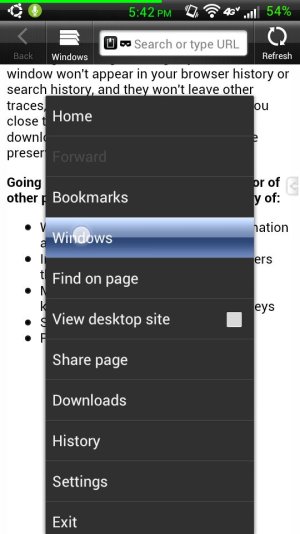
Step 2: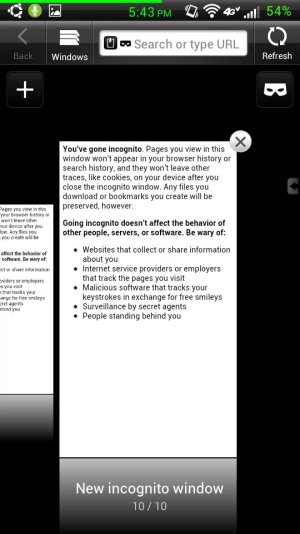
Step 3: Profit!
Sent from my HTC Vivid WCX using Android Central Forums
Step 1:
Step 2:
Step 3: Profit!
Sent from my HTC Vivid WCX using Android Central Forums
OperationA7X
Well-known member
- Jul 6, 2012
- 1,432
- 21
- 38
It's been a while since I've been stock, but yeah, the stock browser can only have 6 windows open, whereas WCX's can have more, although I'm not sure how much more...
Robert B Jones
New member
- Feb 28, 2013
- 1
- 0
- 0
when i try to open the internet or u-tube, i keep getting a message saying that i must close a tab before opening another one , how do i do this
how do close a tab to enable me to open an other one
how do close a tab to enable me to open an other one
Last edited by a moderator:
Go to the Internet. Tap the button with the 4 lines on it...I forget what it's called. Tap the Windows feature. You should see one or more webpages displayed with a small "X" at the top right. Tap the X to close the window. Close any other windows in the manner. If you want to move back and forth between windows, you swipe the screen left of right.
Kurt
Kurt
loriebuchanan
New member
- Mar 8, 2013
- 1
- 0
- 0
OperationA7X
Well-known member
- Jul 6, 2012
- 1,432
- 21
- 38
How do I close tabs? I have reached my tab limit.
Did you see the screenshots or even read what Kurt said? He and I made it very easy for everyone to understand.
Sent from my HTC Vivid WCX using Android Central Forums
Dennis Dauphinais
New member
- Mar 15, 2013
- 1
- 0
- 0
How do I clear them
It was explained here: http://forums.androidcentral.com/htc-vivid/181076-tab-limit-reached.html#post2614970
Kurt
OperationA7X
Well-known member
- Jul 6, 2012
- 1,432
- 21
- 38
It was explained here: http://forums.androidcentral.com/htc-vivid/181076-tab-limit-reached.html#post2614970
Kurt
Kurt. I honestly don't think people know how to read or watch. You explained it clearly, and so did I. And yet, people post in here and ask "Hurr, how do I close tab plz".
I honestly felt as if this thread was a joke/troll. I would not be surprised if it was/is.
Sent from my HTC Vivid WCX using Android Central Forums
I honestly don't think people know how to read or watch.
+1 It looks like people buzz in and out without paying much attention to what's gone on before.
Kurt
Gregory Etheridge
New member
- Mar 29, 2013
- 1
- 0
- 0
OK, I've got the answer!!! I've had this problem for quite some time but i just lucked out on finding out how to close them easily (at least for my Motorola Razor Android phone, version 4.1.2 software). Go to a web page. Now swipe DOWN and you will see the "hidden" tab being exposed on the upper right. Yes THOSE tabs!! :-! Swipe them to the left to close them. I had about 5 I had to close that had nothing in them. Hope this works for you too.
OperationA7X
Well-known member
- Jul 6, 2012
- 1,432
- 21
- 38
OK, I've got the answer!!! I've had this problem for quite some time but i just lucked out on finding out how to close them easily (at least for my Motorola Razor Android phone, version 4.1.2 software). Go to a web page. Now swipe DOWN and you will see the "hidden" tab being exposed on the upper right. Yes THOSE tabs!! :-! Swipe them to the left to close them. I had about 5 I had to close that had nothing in them. Hope this works for you too.
It's different for HTC, sir. KurtTX and I have provided the information on how to do this and some people refuse to read a thread before they post.
No offense to you, the Motorola Razr forums would love to hear this, but the HTC Vivid stock does not have JellyBean nor will it receive it.
Sent from my HTC Vivid WCX using Android Central Forums
- Status
- Not open for further replies.


Trending Posts
-
-
Question Phone not autofilling password/passkey for only one app
- Started by Scooch
- Replies: 2
-
 Android 17 QPR1 Beta 1
- Started by wyelkins
- Replies: 2
-

-

Members online
Total: 9,670 (members: 6, guests: 9,664)
Forum statistics

Space.com is part of Future plc, an international media group and leading digital publisher. Visit our corporate site.
© Future Publishing Limited Quay House, The Ambury, Bath BA1 1UA. All rights reserved. England and Wales company registration number 2008885.
 Facebook
 Twitter
 Instagram