
HTC Vivid 4.0.3 root help
- Thread starter DovahBear
- Start date
You are using an out of date browser. It may not display this or other websites correctly.
You should upgrade or use an alternative browser.
You should upgrade or use an alternative browser.


OperationA7X
Well-known member
- Jul 6, 2012
- 1,432
- 21
- 38
I can't seem to remember where I placed my guide....let me check.
Sent from my HTC Vivid WCX using Android Central Forums
Sent from my HTC Vivid WCX using Android Central Forums
OperationA7X
Well-known member
- Jul 6, 2012
- 1,432
- 21
- 38
All right, the way I rooted my Vivid. No issues whatsoever.
STARTING FROM SCRATCH
1) Gather all these files:
HTC Drivers: http://db.tt/Pi0WLxUf
Fastboot Folder: http://db.tt/2Zg3UeCw
SuperUser Zip File: http://db.tt/n4tr8lwi
Recovery: http://db.tt/oJNL1hPs
(WildChild, if you see this and wish for me to take down the link to your custom recovery, please PM me. And to others, please alert him, I don't want to be in trouble is all.)
2) Install the HTC drivers, place the Fastboot folder on your desktop for easeness.
3) Backup your apps, contacts, text messages, and anything else you want to keep, because later, you're gonna have to unlock your bootloader (shown later).
4) Unlock your bootloader. Now, in order to flash a custom recovery, backup your ROM, etc., you need to have an unlocked bootloader. You can do this at: www.htcdev.com and select Unlock Bootloader. You need to register, so just make an account real quick and you're good to go. Select the HTC Vivid and follow the instructions. NOTE: UNLOCKING THE BOOTLOADER WILL FACTORY RESET YOUR DEVICE, THAT'S WHY I RECOMMENDED BACKING UP WHAT YOU PLANNED TO KEEP.
5) Place the SuperUser zip file on your SD card.
ALREADY UNLOCKED THE BOOTLOADER
All right, you made it this far, why stop now? Time to flash that custom recovery and root your phone! You can mod it later, I'll explain later. All right, so now, place your phone into Fastboot mode by holding the Volume Down and Power button until you see the HBOOT screen. From there, select FASTBOOT, and connect your device to your PC. Confirm it says FASTBOOT USB in the red banner. Let's do this!
1) Place the downloaded recovery [wcxrecovery.img] inside of the Fastboot command folder.
2) Open a command prompt in that directory and type the following command exactly as I type it.
fastboot flash recovery "wcxrecovery.img"
And then hit Enter. You should notice a bar in the top right of the screen going up. That's normal. Wait for the command prompt to tell you that its finished, then disconnect your device from the computer.
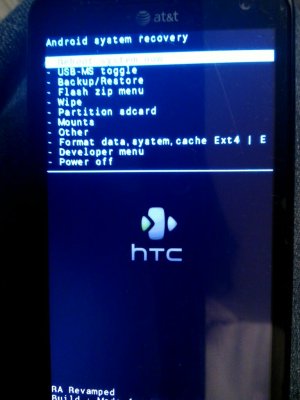
3) Exit out of the Fastboot menu and navigate to the RECOVERY and press the Power button to enter. You'll now see options to flash, wipe, etc. Using the Volume buttons, go to "flash zip menu", locate where you placed the zip file, press Power to flash it, and voila! Your phone is rooted after it says complete! Just reboot your phone and enjoy root access! Thank me if I helped!
Here is what the recovery will look like:
Sent from my HTC Vivid WCX using Android Central Forums
STARTING FROM SCRATCH
1) Gather all these files:
HTC Drivers: http://db.tt/Pi0WLxUf
Fastboot Folder: http://db.tt/2Zg3UeCw
SuperUser Zip File: http://db.tt/n4tr8lwi
Recovery: http://db.tt/oJNL1hPs
(WildChild, if you see this and wish for me to take down the link to your custom recovery, please PM me. And to others, please alert him, I don't want to be in trouble is all.)
2) Install the HTC drivers, place the Fastboot folder on your desktop for easeness.
3) Backup your apps, contacts, text messages, and anything else you want to keep, because later, you're gonna have to unlock your bootloader (shown later).
4) Unlock your bootloader. Now, in order to flash a custom recovery, backup your ROM, etc., you need to have an unlocked bootloader. You can do this at: www.htcdev.com and select Unlock Bootloader. You need to register, so just make an account real quick and you're good to go. Select the HTC Vivid and follow the instructions. NOTE: UNLOCKING THE BOOTLOADER WILL FACTORY RESET YOUR DEVICE, THAT'S WHY I RECOMMENDED BACKING UP WHAT YOU PLANNED TO KEEP.
5) Place the SuperUser zip file on your SD card.
ALREADY UNLOCKED THE BOOTLOADER
All right, you made it this far, why stop now? Time to flash that custom recovery and root your phone! You can mod it later, I'll explain later. All right, so now, place your phone into Fastboot mode by holding the Volume Down and Power button until you see the HBOOT screen. From there, select FASTBOOT, and connect your device to your PC. Confirm it says FASTBOOT USB in the red banner. Let's do this!
1) Place the downloaded recovery [wcxrecovery.img] inside of the Fastboot command folder.
2) Open a command prompt in that directory and type the following command exactly as I type it.
fastboot flash recovery "wcxrecovery.img"
And then hit Enter. You should notice a bar in the top right of the screen going up. That's normal. Wait for the command prompt to tell you that its finished, then disconnect your device from the computer.
3) Exit out of the Fastboot menu and navigate to the RECOVERY and press the Power button to enter. You'll now see options to flash, wipe, etc. Using the Volume buttons, go to "flash zip menu", locate where you placed the zip file, press Power to flash it, and voila! Your phone is rooted after it says complete! Just reboot your phone and enjoy root access! Thank me if I helped!
Here is what the recovery will look like:
Sent from my HTC Vivid WCX using Android Central Forums
Attachments
OperationA7X
Well-known member
- Jul 6, 2012
- 1,432
- 21
- 38
Alright ima work on the root right now! Thanks for the instructions
Sent from my HTC PH39100 using Android Central Forums
Good luck, I hope it all plays out well for you, and happy flashing! Got any more questions, ask away or private message me.

Sent from my HTC Vivid WCX using Android Central Forums
OperationA7X
Well-known member
- Jul 6, 2012
- 1,432
- 21
- 38
Yes, its because it is Windows 8 and not 7.
Sent from my HTC Vivid WCX using Android Central Forums
Sent from my HTC Vivid WCX using Android Central Forums
I'm also new to rooting, and am only interested in doing it for 2 reasons; I'd like to tether, and I want to get rid of some bloatware, but I don't see any need to overclock. I'm still running Vista, (don't laugh) I don't use my laptop as often as my phone these days; I guess my question is, would this root be a good fit/work for me? Any help would be appreciated.
OperationA7X
Well-known member
- Jul 6, 2012
- 1,432
- 21
- 38
I'm also new to rooting, and am only interested in doing it for 2 reasons; I'd like to tether, and I want to get rid of some bloatware, but I don't see any need to overclock. I'm still running Vista, (don't laugh) I don't use my laptop as often as my phone these days; I guess my question is, would this root be a good fit/work for me? Any help would be appreciated.
Eh, to get rid of bloat apps, just be careful as to what system apps you delete. Vista just wasn't too big. As for tethering, there are apps, but I prefer the system app. Dealer's choice, really.
Sent from my HTC Vivid WCX using Android Central Forums
OperationA7X
Well-known member
- Jul 6, 2012
- 1,432
- 21
- 38
It would be nice to have the options that rooting would open up to me, even if I'm only going conservative right now... Any thoughts about drivers that would work with Vista?
Huh. They seemed to have worked on my father's PC. Vista Home Edition. Well...
Sent from my ASUS Transformer Pad TF300T using Android Central Forums
Huh. They seemed to have worked on my father's PC. Vista Home Edition. Well...
Sent from my ASUS Transformer Pad TF300T using Android Central Forums
My bad, I tried it again and sure enough found it with "search", it was probably working all along and I'm just blind, thanks for verifying
OperationA7X
Well-known member
- Jul 6, 2012
- 1,432
- 21
- 38
My bad, I tried it again and sure enough found it with "search", it was probably working all along and I'm just blind, thanks for verifying
Yeah, all it does is run once and that's it. After that, you just connect your phone and the computer will recognize that it's an HTC Vivid.
Sent from my ASUS Transformer Pad TF300T using Android Central Forums
OperationA7X
Well-known member
- Jul 6, 2012
- 1,432
- 21
- 38
i'm new to this and im stcked at the comman prompt.. i cant seem to find anythn no matter how many time i have put in the command in the command prompt
Did you set the directory to where the folder is at?
Sent from my HTC Vivid WCX using Android Central Forums



Space.com is part of Future plc, an international media group and leading digital publisher. Visit our corporate site.
© Future Publishing Limited Quay House, The Ambury, Bath BA1 1UA. All rights reserved. England and Wales company registration number 2008885.
 Facebook
 Twitter
 Instagram