- 07-16-2012, 06:07 PM
Thread Author #1
[VIDEO] Unlock, Root, & Clockwork for the Nexus 7 Tablet
Rooting the Nexus 7 - Video Walkthrough
This is a step-by-step video guide on manually rooting the Nexus 7 tablet using Windows. No toolboxes, kits, or one-clicks. You get to see exactly what is being done to your tablet, and can easily pinpoint any problems you might have. If you'd still prefer an automated method, or if you are using OSX or Linux, Zero Neck has got you covered.
Materials needed:- Nexus 7 tablet
- Windows computer
- USB cable
Unlocking your bootloader (which is required to root) will completely wipe your device, so make sure to backup anything you need before starting.
Also make sure your tablet is fully charged.
Step 1
Here are the files you'll need (pick the appropriate Nexus7.zip based on your device). Download them and extract the folders inside onto your desktop:
for WiFi only tablets (no SIM card version)
for GSM tablets (version with SIM card)
-
Step 2
Take note: ClockworkMod Recovery has been updated since this video was made, and looks a little different as seen below:
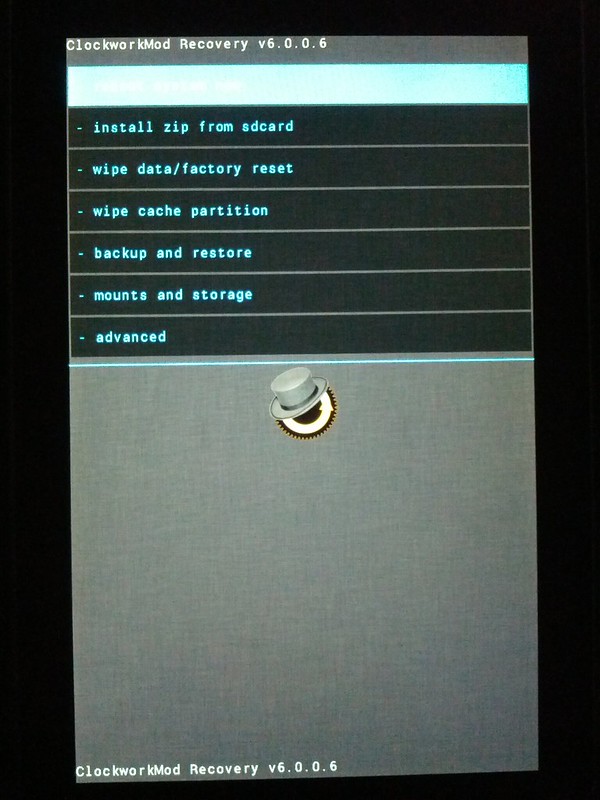
A new feature has also been added to Clockwork since the making of this video, as seen below:
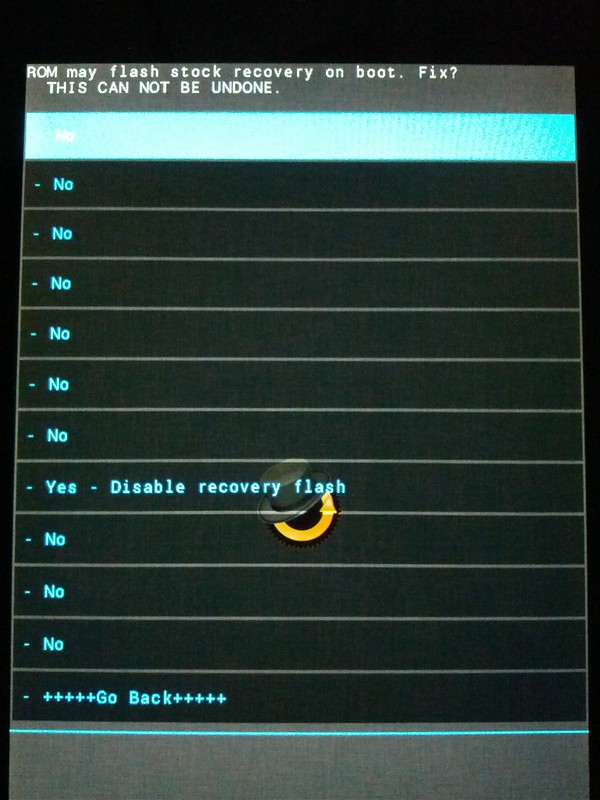
Do you want to be rooted only, and keep the ability to install OTA updates? If so, select No from the above menu. Alternatively, if you aren't worried about applying OTA updates and want to be able to flash ROMs/kernels/etc, select Yes from the menu above. This is completely reversibile by flashing recovery again, so if you aren't sure what to choose just pick No. You'll be presented with the above screen toward the end of the video.
With that in mind, proceed to the video below:
[YT]http://www.youtube.com/watch?v=kd0aHglMagY[/YT]
See Troubleshooting in post 3 if you have any problems.
I cannot answer technical questions through PM - please post any questions in the thread, thanks.Last edited by ragnarokx; 12-24-2012 at 01:21 PM.
Thanked by 58:+ Show/Hide list of the thanked -
2defmouze, ace-r1, apquijano, belair56, bigpetefox, bilalp, braddyd, breadfan758, ChromeJob, Cory Streater, craigf#AC, Cyber Warrior, Darkson71, David Neskov, dotfortytwo, Droidintorrance, ercousin, kajii, fingas, FreewayRob, giograves, Hand_O_Death, Hawk600, J T M, jbuggydroid, jchice2, jenskristian, Jeremy8000, Jerry Hildenbrand, jimj21, junglejunkie, kckadow, kommish, LastHope, letten, LowOnPancakes, maggard5, mark62nc, markhallyo, markyoung04, MazoMark, Miffo, mikec8785, monotok, MrJazz, NotJustAPhone, oxymoron, pandas_in_hats, Paul627g, Pierce09, ratseven, scg1981, SHWELL, sicario666, skywriter, sstephen17, tcapote, zero neck
- 07-16-2012, 06:08 PM
Thread Author #2
[VIDEO] Unlock, Root, & Clockwork for the Nexus 7 Tablet
In case any of the Windows command prompt (cmd) commands in the video were not clear, I'm going to list them below along with their functions.
uses the fastboot.exe program in the nexus7 folder to check what Android devices are connected to the computerCode:fastboot devices
fastboot.exe unlocks the Nexus 7 bootloader, letting you install Clockwork/SuperSUCode:fastboot oem unlock
fastboot.exe flashes clockwork.img, installing ClockworkMod RecoveryCode:fastboot flash recovery clockwork.img
(don't forget the hyphen!) fastboot.exe restarts the bootloaderCode:fastboot reboot-bootloader
fastboot.exe boots into ClockworkMod RecoveryCode:fastboot boot clockwork.img
(not in video, may be needed if problems pushing/flashing supersu.zip) adb.exe reboots recovery while in recoveryCode:adb reboot recovery
copies SuperSU to your tabletCode:adb push supersu.zip /sdcard/
Last edited by ragnarokx; 07-26-2012 at 11:13 AM.
Thanked by 18:+ Show/Hide list of the thanked
- 07-16-2012, 06:09 PM
Thread Author #3
[VIDEO] Unlock, Root, & Clockwork for the Nexus 7 Tablet
Troubleshooting
There are two boot issues. One as you described...bootloader will not boot to recovery on key presses without a PC.
The other is that the zip version of this CWM causes it to only boot to recovery...no way to boot back to system. Kind of the opposite problem in a wayIf you type fastboot oem unlock and it returns
"... FAILED "
Try typing "fastboot reboot-bootloader" then "fastboot oem unlock"Last edited by ragnarokx; 07-29-2012 at 03:46 PM.
Thanked by 9: - 07-16-2012, 06:10 PM
Thread Author #4
- 07-16-2012, 06:29 PM #5
"No toolboxes, kits or 1-clicks.."
Love it. Nice job!
Sent from my Galaxy Nexus using Tapatalk 2 - 07-16-2012, 06:31 PM #6
Re: [VIDEO] Unlock, Root, & Clockwork for the Nexus 7 Tablet
Best tutorial ever.
(•‿•) - 07-16-2012, 07:04 PM #7
- 07-16-2012, 08:46 PM #8
Re: [VIDEO] Unlock, Root, & Clockwork for the Nexus 7 Tablet
Makes me jealous I don't have one! Great job Rag!

:: Getting Started with Android :: Forum Rules :: General Help and How To ::
» » » The All New Android Central App « « «
- 07-16-2012, 09:35 PM #9
This was awesome. I'll use it tomorrow.
Sent from my Galaxy Nexus using Android Central Forums - 07-17-2012, 01:38 AM #10
- 07-17-2012, 04:40 AM #11
Re: [VIDEO] Unlock, Root, & Clockwork for the Nexus 7 Tablet
Great tutorial - I will be using it when my Nexus 7 finally arrives!
I've got a suggestion to make it even clearer for the super-inept like myself. At 5:10 we're told to type "fastboot reboot bootloader" verbally but you can just make out on the screen (just) that it's "fastboot reboot-bootloader". I spotted that one - don't know if there are others so perhaps a .txt file with a transcript of the commands I have to type would be nice.
Thanks again.
Peter. - 07-17-2012, 08:10 AM #12
Re: [VIDEO] Unlock, Root, & Clockwork for the Nexus 7 Tablet
great video....
- 07-17-2012, 08:32 AM #13
- 07-17-2012, 08:41 AM #14
- 07-17-2012, 09:44 AM
Thread Author #15
- 07-17-2012, 09:46 AM #16
Re: [VIDEO] Unlock, Root, & Clockwork for the Nexus 7 Tablet
Great tutorial, rag!

*INCREDIBLE*MECHA*TORO*GROUPER* GALAXY S3 *
* [TORO RADIOS] * [NEXUS WALLS] * [GROUPER GUIDE] * [CHATTER] * - 07-17-2012, 10:08 AM #17
Re: [VIDEO] Unlock, Root, & Clockwork for the Nexus 7 Tablet
- 07-17-2012, 10:11 AM #18
Re: [VIDEO] Unlock, Root, & Clockwork for the Nexus 7 Tablet
SHWELL
I had the same issue, I just started over skipping the unlock step and everything worked correctly. - 07-17-2012, 10:23 AM
Thread Author #19
Re: [VIDEO] Unlock, Root, & Clockwork for the Nexus 7 Tablet
If both of you were attempting to push supersu.zip while in Clockwork (black screen with yellow letters), rebooting Clockwork may have fixed your problem. You can reboot Clockwork by typing "adb reboot recovery" in Windows command prompt, or going to Advanced>Reboot recovery on the tablet.
- 07-17-2012, 10:25 AM #20
Re: [VIDEO] Unlock, Root, & Clockwork for the Nexus 7 Tablet
Hey ragnarokx
Everything went great, but I have a question. The Nexus7 wants to do the update to 4.1.1, when I tell it yes, it reboots and goes into Clockwork and says the update fails? Any ideas? I do not tell it to go into Clockwork, just to reboot when the Nexus7 asks. Thanks!! - 07-17-2012, 10:38 AM
Thread Author #21
Re: [VIDEO] Unlock, Root, & Clockwork for the Nexus 7 Tablet
You need stock recovery to install an OTA update. To get stock recovery back, you repeat the same steps that you used to install Clockwork. do the following:
1) download , extract the file inside, place the file in the nexus7 folder (C:\nexus7)
2) reboot into bootloader (power off, hold vol down+power), plug in tablet to PC via USB
3) open Windows command prompt (cmd), navigate to the nexus7 folder in the command prompt (cd c:\nexus7)
4) in command prompt, type "fastboot devices" to make sure your tablet is connected properly, then type "fastboot flash recovery stock-recovery.img" to get stock recovery back, then reboot the bootloader by typing "fastboot reboot-bootloader" to finish installation
5) using the volume keys, go to "Recovery mode" on the bootloader screen and press power to select it
6) you should now see stock recovery, which is a little Android laying down with an exclamation point over him. if you see this, then you're ready to apply the OTA update. reboot and apply the 4.1.1 update as normal.
7) after you apply the OTA update, if you want Clockwork back repeat the above steps but instead of using "stock-reocvery.img" use "clockwork.img" from the video (it should already be in your nexus7 folder).
if you lose root access after the OTA update, check to see if SuperSU is still in your app list. if it is, open it and tap yes when it asks to install binaries, then you'll have root access back.Last edited by ragnarokx; 07-17-2012 at 10:47 AM.
- 07-17-2012, 10:42 AM #22
Re: [VIDEO] Unlock, Root, & Clockwork for the Nexus 7 Tablet
You rock ragnarokx !!
Thank you again! - 07-17-2012, 10:46 AM #23
Re: [VIDEO] Unlock, Root, & Clockwork for the Nexus 7 Tablet
At this point I don't need root (total newbie to unlocking/rooting - never did it on my phone) but I may want to root it later, so the best thing at this point would just be to unlock it right?
If I just unlock it now I'll still get the OTA updates directly and it will be "root ready" without wiping it when the day comes that I want to root it? - 07-17-2012, 10:50 AM #24

*INCREDIBLE*MECHA*TORO*GROUPER* GALAXY S3 *
* [TORO RADIOS] * [NEXUS WALLS] * [GROUPER GUIDE] * [CHATTER] * - 07-17-2012, 10:59 AM
Thread Author #25


Reply


