- 12-07-2012, 05:18 AM
Thread Author #1
- 12-07-2012, 10:28 AM #2
Re: Missing keyboard on my galaxy note 2
Wow, that sounds like a very nasty bug!!! I haven't seen that kind of problem before but I'd suggest downloading another keyboard from Google Play and see if that helps... Also check the Language and Keyboard settings and see if all your keyboards are enabled. If you're not rooted you shouldn't be allowed to disable Samsung's stock keyboard, but if you're rooted anything goes.
- 12-08-2012, 03:30 PM #3
Re: Missing keyboard on my galaxy note 2
- 12-08-2012, 03:41 PM #4Thanked by 4:
- 12-17-2012, 04:38 PM #5
- 12-17-2012, 09:00 PM #6
Re: Missing keyboard on my galaxy note 2
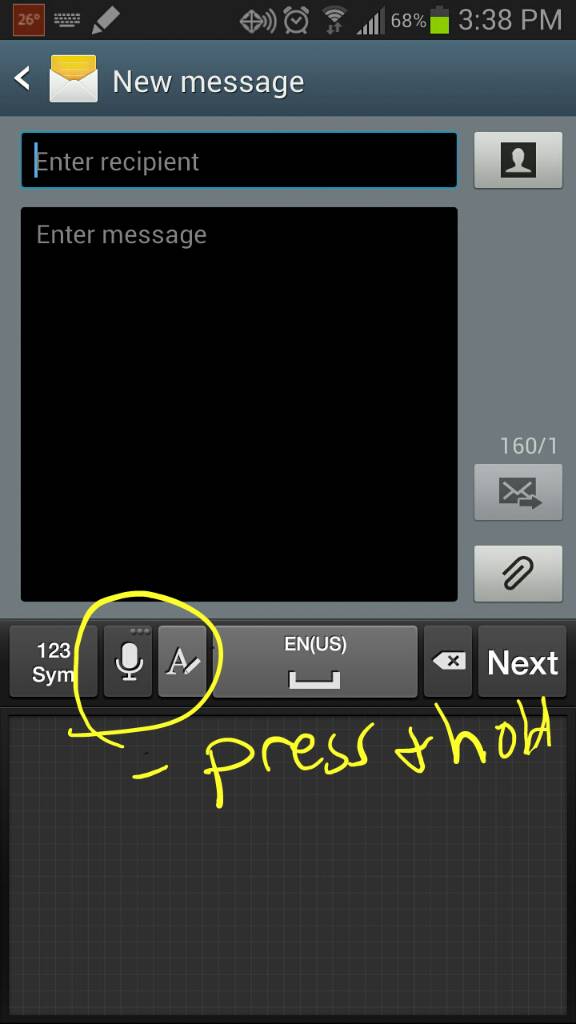
You were in pen mode (for handwriting recognition).
- 01-21-2013, 02:34 PM #7
- 01-21-2013, 11:05 PM #8
Re: Missing keyboard on my galaxy note 2
That's why I use Swype.
Swyped from my Galaxy Note II on the Now Network - 02-05-2013, 10:56 AM #9
Re: Missing keyboard on my galaxy note 2
I'm new to Android and to my Note 2. I used Swype on a phone once by moving my finger across the keyboard to join the letters and make the words. It was great.
Anyone able to help an old lady figure out how to do this on my new Note 2? I hate that stylus pen thing! - 02-05-2013, 12:40 PM #10
- 02-05-2013, 01:33 PM #11
- 02-05-2013, 01:39 PM #12
- 02-05-2013, 01:40 PM #13
Re: Missing keyboard on my galaxy note 2
Hey pretty cool I didn't know this was available!
Sent from my SCH-I605 using Tapatalk 2 - 02-05-2013, 04:23 PM #14
Re: Missing keyboard on my galaxy note 2
Hey I found the answer! Here it is - for any other 82 year old ladies who are trying to be at least a little bit tech savvy --- Open for a new message then Run your finger from the top of your phone down the screen. It will bring up option to Choose Input method. Tap that and it brings up Google voice typing and Samsung keyboard. Tap to choose Samsung keyboard. Tap on Set up input methods. Tap again on Samsung keyboard and in the Samsung keyboard settings window, tap on Continuous input. There you have it - clear as mud? Worked for me so I'm happy. Btw - I like this forum. It's nice to be able to get help with stuff like this. Thanks
- - - Updated - - -
Hey I found the answer! Here it is - for any other 82 year old ladies who are trying to be at least a little bit tech savvy --- Open for a new message then Run your finger from the top of your phone down the screen. It will bring up option to Choose Input method. Tap that and it brings up Google voice typing and Samsung keyboard. Tap to choose Samsung keyboard. Tap on Set up input methods. Tap again on Samsung keyboard and in the Samsung keyboard settings window, tap on Continuous input. There you have it - clear as mud? Worked for me so I'm happy. Btw - I like this forum. It's nice to be able to get help with stuff like this. Thanks - 02-27-2013, 06:06 AM #15
- 03-17-2013, 04:57 PM #16
- 04-01-2013, 12:39 PM #17
- 04-07-2013, 11:18 AM #18
- 04-07-2013, 12:40 PM #19
- 04-22-2013, 09:25 AM #20
- 05-12-2013, 01:14 AM #21
Similar Threads
-
Can't start the wifi on my Galaxy Note?!? turns off every time I try to turn it on
By dkarpas in forum Samsung Galaxy NoteReplies: 2Last Post: 10-22-2012, 07:03 PM -
Lost All my camera photos on samsung galaxy note Running ICS OS
By bahaazein in forum IntroductionsReplies: 0Last Post: 09-19-2012, 01:50 PM -
can get pic messages on my galaxy note
By dominiccarp in forum IntroductionsReplies: 1Last Post: 08-12-2012, 09:17 PM -
80GB on my Galaxy Note :)
By Qoheleth in forum AT&T Galaxy NoteReplies: 4Last Post: 07-02-2012, 08:34 AM -
missing character on my android keyboard?
By mmhhc in forum General Help and How ToReplies: 2Last Post: 11-02-2010, 12:06 PM


Reply