- Nov 7, 2012
- 24
- 0
- 0
help! I was changing from pattern unlock to my regular PIN and I guess I put it in wrong so it's not taking it on my lockscreen. There is no option to reset it from the lockscreen. Thank you in advance!


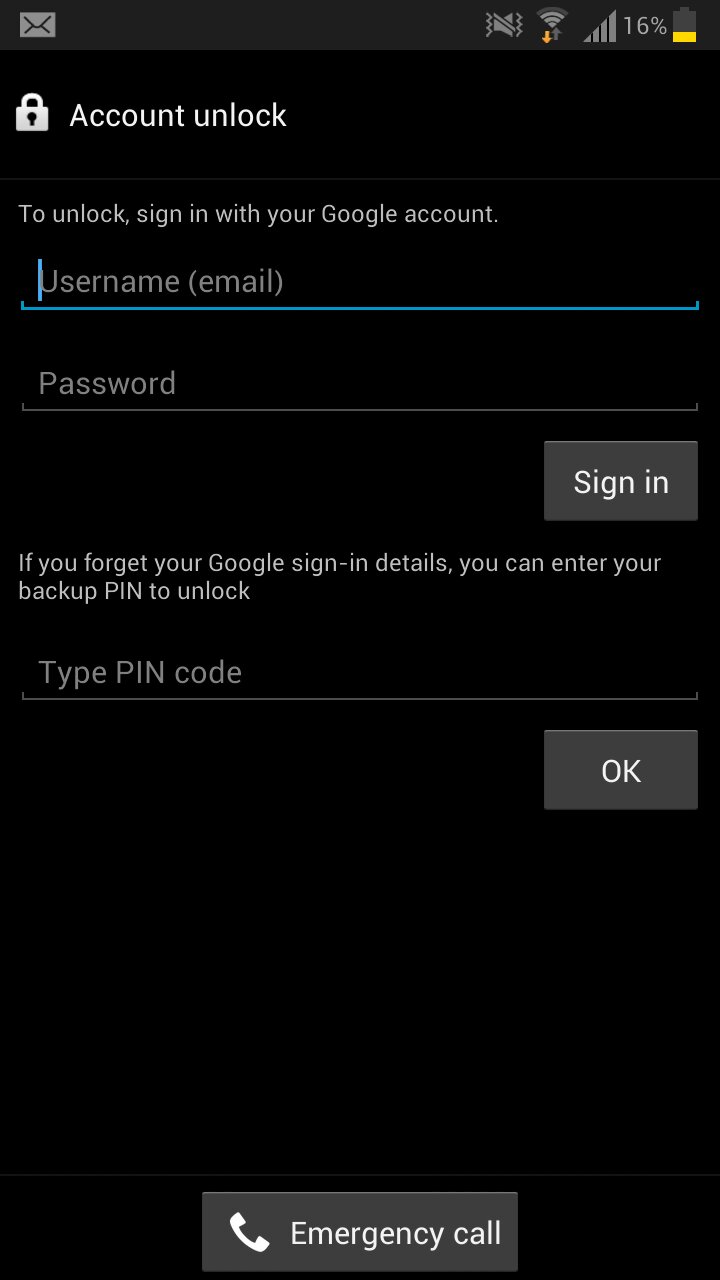

Other than Lanhoj's post, I don't think we're giving any 'help' to bypass anything, just giving options on how to recover from a forgotten PIN. Basically, if it IS his phone, he should remember the e-mail password. If not his phone or he really forgot all PINs and passwords, then the only sensible thing to do (datawise) is to factory reset and wipe the whole thing off.What if, you lost your phone; someone found it, and then discovered it has a pin associated with the lock screen. Is it that easy for a person come to a forum and have total strangers to give him/her the information they need to bypass the pin?
If you are rooted you may be able to delete/edit the file(s) that contain the password..
Or use as last post says..
Or just factory reset from recovery
I may haven't really helped , but that all what came to my mind.. I don't really put any pass codes so yea
Rooted device should have protect the file for the pin. I'm surprised a rooted device allow this file in the open even screen locked. Make me wonder plugging in would bypass the security so completely without any input on the screen.
Is this depends on the ROM or is it hardware level? If this is hardware level then I would keep my phone stay away from root. That one big major flaw for allowing this to happen
Sent from my T-Mobile Samsung Galaxy Note 2 on Tapatalk 2

And that is why I don't use a pass code/word to unlock my phone...............
:-\

You may have to boot into recovery and factory reset
53n7 fr0m m4 no7e2 via Xparen7 7apa7alk2
Not really a good reason not to secure your phone.
On my phone, I use just the swipe to unlock. No password, no pin. Nobody goes through my phone because it's always on my person. I'm sure if someone tried to lift it from my pocket, I'd know.
The only reason I see to lock my phone would be nosy people in my life. If someone takes my phone, what do they really have access to, other than my email and whatever saved passwords there are? Google wallet? Big deal, it has a pin. My bank accounts? Pin on one, password on the other. PayPal? Pin. Texts? Sweet, they'll find some dirty pictures of my fiancee and myself. Phone numbers? Do you really wanna call any of the a-holes I deal with? Games? Cool, you'll be entertained. I don't keep anything personally that imperative on my phone.
Swyped from my Galaxy Note II on the Now Network
Good for you. I guess if you are woman you worry about people having your address and addresses of others you know. Each to their own.


I figure if someone wants the names and addresses and phone numbers of strangers, they can just open a phone book.I have addresses in my phone. If they wanna go bother them, so be it. Not my problem

On my phone, I use just the swipe to unlock. No password, no pin. Nobody goes through my phone because it's always on my person. I'm sure if someone tried to lift it from my pocket, I'd know.
The only reason I see to lock my phone would be nosy people in my life. If someone takes my phone, what do they really have access to, other than my email and whatever saved passwords there are? Google wallet? Big deal, it has a pin. My bank accounts? Pin on one, password on the other. PayPal? Pin. Texts? Sweet, they'll find some dirty pictures of my fiancee and myself. Phone numbers? Do you really wanna call any of the a-holes I deal with? Games? Cool, you'll be entertained. I don't keep anything personally that imperative on my phone.
Swyped from my Galaxy Note II on the Now Network
Don't you have the option to use the Gmail password if both failed?
http://img.tapatalk.com/d/13/02/06/duqezaby.jpg
If you click forgot password, it will ask you to do two things. The pin or the email password. Unless if you haven't set up the primary Gmail account, then you are stuck
Sent from my T-Mobile Samsung Galaxy Note 2 on Tapatalk 2

Don't you have the option to use the Gmail password if both failed?
http://img.tapatalk.com/d/13/02/06/duqezaby.jpg
If you click forgot password, it will ask you to do two things. The pin or the email password. Unless if you haven't set up the primary Gmail account, then you are stuck
Sent from my T-Mobile Samsung Galaxy Note 2 on Tapatalk 2




 Facebook
 Twitter
 Instagram