
Samsung Galaxy Note 4 Gps problem
- Thread starter rmadrid20
- Start date
You are using an out of date browser. It may not display this or other websites correctly.
You should upgrade or use an alternative browser.
You should upgrade or use an alternative browser.

pantlesspenguin
Well-known member
- Oct 24, 2010
- 518
- 6
- 0
Re: Gps problem
Yep, constantly. When I'm stopped at a stoplight the lock comes back, but as soon as I'm in motion again the lock drops and won't come back until I'm stationary again. I've already exchanged my device one and I'm going to do it again later today since my new one has the same issue. Since it's happened on the devices for me so far I'm surprised that more people aren't reporting this issue. I started a thread as well and most people said their GPS worked fine.
Yep, constantly. When I'm stopped at a stoplight the lock comes back, but as soon as I'm in motion again the lock drops and won't come back until I'm stationary again. I've already exchanged my device one and I'm going to do it again later today since my new one has the same issue. Since it's happened on the devices for me so far I'm surprised that more people aren't reporting this issue. I started a thread as well and most people said their GPS worked fine.

worwig
Well-known member
- Dec 29, 2010
- 990
- 50
- 0
Re: Gps problem
When I first got mine, I loaded an app called GPS status. I use the GPS a lot.
GPS status would not show a satellite lock for a LONG time. I was disappointed. It finally showed a lock, and I just let is sit there and run a while. it takes a lot of time for it to get all of the info downloaded from the satellites.
Now after doing that, I can power up the N4, start GPS status, and in 4 or 5 seconds it is seeing 10 satellites and it has a fix INDOORS.
So mine is working very well.
When I first got mine, I loaded an app called GPS status. I use the GPS a lot.
GPS status would not show a satellite lock for a LONG time. I was disappointed. It finally showed a lock, and I just let is sit there and run a while. it takes a lot of time for it to get all of the info downloaded from the satellites.
Now after doing that, I can power up the N4, start GPS status, and in 4 or 5 seconds it is seeing 10 satellites and it has a fix INDOORS.
So mine is working very well.
pantlesspenguin
Well-known member
- Oct 24, 2010
- 518
- 6
- 0
Re: Gps problem
Again, the problem isn't getting a lock. That it does just fine as long as you're stationary. The problem is holding onto that lock when moving.
When I first got mine, I loaded an app called GPS status. I use the GPS a lot.
GPS status would not show a satellite lock for a LONG time. I was disappointed. It finally showed a lock, and I just let is sit there and run a while. it takes a lot of time for it to get all of the info downloaded from the satellites.
Now after doing that, I can power up the N4, start GPS status, and in 4 or 5 seconds it is seeing 10 satellites and it has a fix INDOORS.
So mine is working very well.
Again, the problem isn't getting a lock. That it does just fine as long as you're stationary. The problem is holding onto that lock when moving.
Re: Gps problem
I had these same exact issues with my Note 3 from time to time. There was nothing I was ever able to do to address the issue, including using GPS Status and Toolbox. When the problem wasn't there, it would work fine. My Note 4 hasn't yet had this issue, but I'm pretty sure it will. I don't believe the issues posted in this thread are hardware related.When I first got mine, I loaded an app called GPS status. I use the GPS a lot.
GPS status would not show a satellite lock for a LONG time. I was disappointed. It finally showed a lock, and I just let is sit there and run a while. it takes a lot of time for it to get all of the info downloaded from the satellites.
Now after doing that, I can power up the N4, start GPS status, and in 4 or 5 seconds it is seeing 10 satellites and it has a fix INDOORS.
So mine is working very well.
pantlesspenguin
Well-known member
- Oct 24, 2010
- 518
- 6
- 0
Re: Gps problem
My problems occur even on High Accuracy mode.
what is your location service setting? GPS only? GPS+data?
My problems occur even on High Accuracy mode.
pantlesspenguin
Well-known member
- Oct 24, 2010
- 518
- 6
- 0
Update to my GPS issues
After two replacements, the GPS issue where it will initially lock then drop during my commute and when it comes back it's inaccurate are still plaguing me. I've tried factory resets, sim swaps, GPS fix apps, making sure location is on high accuracy mode, clearing the app cache, and some others I'm probably forgetting. It's been hectic trying to find places that have them in stock to exchange, and many store reps have argued with me about having to pay a restocking fee for these issues.
I chatted t-mo customer care today and they were of no help. They kept advising me to do the same troubleshooting issues I've already done. Then, I chatted Samsung care and the rep was A LOT more helpful than the previous Samsung rep I spoke with. Samsung has a remote app that you can download from the Play Store, and the Samsung rep can remote into your device and see what you're seeing. We couldn't do much at the time since I'm at work, but I'm set to chat them back right before I leave work. They're going to remote in with me and actually see the issue that I'm having while driving. HOPEFULLY a fix will come out of all this!!
After two replacements, the GPS issue where it will initially lock then drop during my commute and when it comes back it's inaccurate are still plaguing me. I've tried factory resets, sim swaps, GPS fix apps, making sure location is on high accuracy mode, clearing the app cache, and some others I'm probably forgetting. It's been hectic trying to find places that have them in stock to exchange, and many store reps have argued with me about having to pay a restocking fee for these issues.
I chatted t-mo customer care today and they were of no help. They kept advising me to do the same troubleshooting issues I've already done. Then, I chatted Samsung care and the rep was A LOT more helpful than the previous Samsung rep I spoke with. Samsung has a remote app that you can download from the Play Store, and the Samsung rep can remote into your device and see what you're seeing. We couldn't do much at the time since I'm at work, but I'm set to chat them back right before I leave work. They're going to remote in with me and actually see the issue that I'm having while driving. HOPEFULLY a fix will come out of all this!!

- Apr 17, 2012
- 32,273
- 23
- 38
Re: Update to my GPS issues
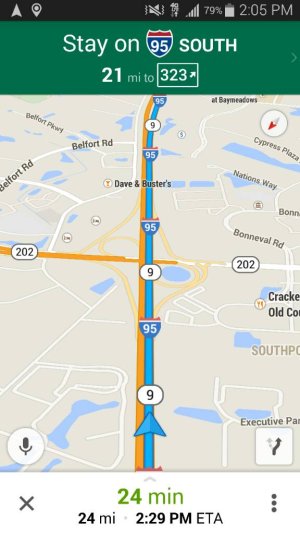
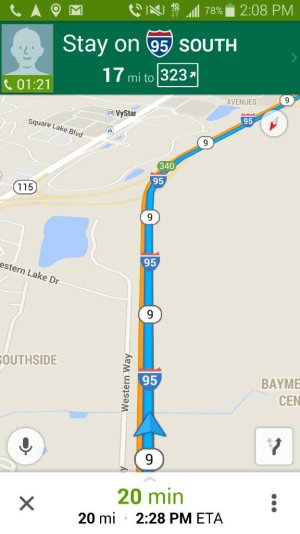
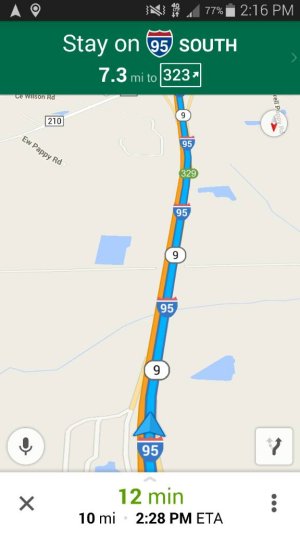
Nice -- Definitely let us know! .
.
I will report my GPS soon .. I leave work in about 30 minutes and need it to get to my dentist (new one .. been there once or twice but want to be sure I am going down the right roads haha).
After two replacements, the GPS issue where it will initially lock then drop during my commute and when it comes back it's inaccurate are still plaguing me. I've tried factory resets, sim swaps, GPS fix apps, making sure location is on high accuracy mode, clearing the app cache, and some others I'm probably forgetting. It's been hectic trying to find places that have them in stock to exchange, and many store reps have argued with me about having to pay a restocking fee for these issues.
I chatted t-mo customer care today and they were of no help. They kept advising me to do the same troubleshooting issues I've already done. Then, I chatted Samsung care and the rep was A LOT more helpful than the previous Samsung rep I spoke with. Samsung has a remote app that you can download from the Play Store, and the Samsung rep can remote into your device and see what you're seeing. We couldn't do much at the time since I'm at work, but I'm set to chat them back right before I leave work. They're going to remote in with me and actually see the issue that I'm having while driving. HOPEFULLY a fix will come out of all this!!
Nice -- Definitely let us know!
.I will report my GPS soon .. I leave work in about 30 minutes and need it to get to my dentist (new one .. been there once or twice but want to be sure I am going down the right roads haha)
.Re: Update to my GPS issues
Interesting. Please keep us updated. I'm not experiencing any GPS problems on my N4, but had a terrible time with my previous phone (a SG3). The GPS issues were so bad that it seemed to be looking for itself very often throughout the day. A 50 minute drive to work would eat up 20% of my battery life and I wasn't using any mapping apps. I feel your pain.
BTW... sorry 'bout the game. Y'all put up a fight though.
Interesting. Please keep us updated. I'm not experiencing any GPS problems on my N4, but had a terrible time with my previous phone (a SG3). The GPS issues were so bad that it seemed to be looking for itself very often throughout the day. A 50 minute drive to work would eat up 20% of my battery life and I wasn't using any mapping apps. I feel your pain.
BTW... sorry 'bout the game. Y'all put up a fight though.
- Apr 17, 2012
- 32,273
- 23
- 38

pantlesspenguin
Well-known member
- Oct 24, 2010
- 518
- 6
- 0
Re: Gps problem
So, I chatted Samsung at the end of my workday yesterday and got it all set up so the rep could remote in with me on my drive home to see my GPS behavior. I explained that I was going to be silent for a few minutes while I shut down my computer, clocked out, and walked to my car. I did all that and when I got to my car I chatted using the smart tutor chat feature making sure they were ready and watching. They had disconnected!! My only other option was to call and get another rep, but the slip of paper with my case ID was at my desk. Grr. During my chats with various reps, one mentioned taking it to Best Buy and getting the firmware reflashed by a Samsung Experience rep. I opted to do that. Still no change. Today at the end of my workday I'll chat Samsung and get the smart tutor set up again and make sure they understand that I'll be away for a few minutes and beg them not to disconnect during that time.
So, I chatted Samsung at the end of my workday yesterday and got it all set up so the rep could remote in with me on my drive home to see my GPS behavior. I explained that I was going to be silent for a few minutes while I shut down my computer, clocked out, and walked to my car. I did all that and when I got to my car I chatted using the smart tutor chat feature making sure they were ready and watching. They had disconnected!! My only other option was to call and get another rep, but the slip of paper with my case ID was at my desk. Grr. During my chats with various reps, one mentioned taking it to Best Buy and getting the firmware reflashed by a Samsung Experience rep. I opted to do that. Still no change. Today at the end of my workday I'll chat Samsung and get the smart tutor set up again and make sure they understand that I'll be away for a few minutes and beg them not to disconnect during that time.
Re: Gps problem
I have a Note 3 and have the same GPS signal lost problem. I have tried all of the GPS phone settings and the result is the same. If I lay the phone in the dash (of my car) and leave it there it will not drop the GPS connection. I really felt like I did not have this problem prior to loading KitKat. I talked to a samsung rep and he reloaded KitKat from scratch but the problem remains. My Son also had a Note 3 with the same issue however he is on a different carrier than I and in a different city.
I have a Note 3 and have the same GPS signal lost problem. I have tried all of the GPS phone settings and the result is the same. If I lay the phone in the dash (of my car) and leave it there it will not drop the GPS connection. I really felt like I did not have this problem prior to loading KitKat. I talked to a samsung rep and he reloaded KitKat from scratch but the problem remains. My Son also had a Note 3 with the same issue however he is on a different carrier than I and in a different city.
anon8126715
Banned
- Oct 10, 2013
- 750
- 0
- 0
Re: Gps problem
My Note 3 was plagued with GPS issues as well. I was hoping that my Note 4 would have better GPS functionality, but it appears to be a trend with Samsung (since I don't remember having GPS issues on my HTC devices).
When I spoke to Samsung about my issues, they gave me the standard tips (turn on Maps and move the phone around in a figure 8 motion, etc), which weren't real helpful. Considering I haven't had issues with other devices, I'm not so sure the issue is a software issue as someone else has mentioned.
My Note 3 was plagued with GPS issues as well. I was hoping that my Note 4 would have better GPS functionality, but it appears to be a trend with Samsung (since I don't remember having GPS issues on my HTC devices).
When I spoke to Samsung about my issues, they gave me the standard tips (turn on Maps and move the phone around in a figure 8 motion, etc), which weren't real helpful. Considering I haven't had issues with other devices, I'm not so sure the issue is a software issue as someone else has mentioned.


Trending Posts
-
-
 Android 17 QPR1 Beta 1
- Started by wyelkins
- Replies: 2
-
Question Phone not autofilling password/passkey for only one app
- Started by Scooch
- Replies: 2
-

-

Forum statistics

Space.com is part of Future plc, an international media group and leading digital publisher. Visit our corporate site.
© Future Publishing Limited Quay House, The Ambury, Bath BA1 1UA. All rights reserved. England and Wales company registration number 2008885.
 Facebook
 Twitter
 Instagram