Results 1 to 15 of 15
Like Tree1Likes
  • 1 Post By asr10 user
  1. Thread Author  Thread Author    #1  

    Default Disable Google Talk?

    Anyone know how to stop google talk? I keep signing out, but somehow someone sends me a msg and I get it. Any ideas?
    Asha Clark likes this.
  2. #2  
    funkylogik's Avatar

    Posts
    9,694 Posts
    Global Posts
    9,696 Global Posts
    ROM
    touchejiz

    Default Re: Disable Google Talk?

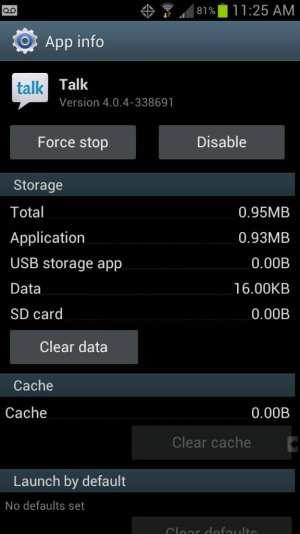
    settings, app manager, tap ALL at top, find Talk, tap disable
    Thanked by:
  3. #3  

    Default Re: Disable Google Talk?

    It's a system app that comes as part of the Android OS. There is a disable button there somewhere or you can root your phone and remove it

    Sent from my Nexus 4 using Android Central Forums
    Manning the AC Euro office since 2011
  4. #4  

    Default Re: Disable Google Talk?

    Perhaps the behaviour has changed with later updates to the OS, but in the version on my Verizon phone the Disable button is there. Be sure you're looking in the All section. Disable Google Talk?-uploadfromtaptalk1354472926018.jpgSent from my rooted, debloated, deodexed Sinclair ZX-80 running CM -0.001 using Tapatalk 2
  5. #5  

    Default Re: Disable Google Talk?

    Instructions above work on my GS3 with Jellybean. It drives me nuts that these apps always seem to default to "enabled" or "sync contacts" etc. Why can't I just use my phone without all this sharing or letting everyone know my location or that I'm available to chat? If I want to share phone numbers, friends, or photos I'll make an effort to do it - I hate always having to make sure it's not being done behind my back... It's almost like they want us to be comfortable with no privacy at all...

  6. #6  

    Default Re: Disable Google Talk?

    [quoted post deleted by moderator]

    Disable is there... Settings, Application manager, All apps, Talk

    You can't remove it unless you are rooted.

    Punished? For providing a free app?
    Last edited by NotJustAPhone; 01-29-2013 at 10:55 PM.
    Blessed are they who can laugh at themselves, for they shall never cease to be amused.
    AOKP 4.2.2 Milestone 1
  7. #7  

    Default Re: Disable Google Talk?

    Quote Originally Posted by GSDer View Post
    Perhaps the behaviour has changed with later updates to the OS, but in the version on my Verizon phone the Disable button is there. Be sure you're looking in the All section. Click image for larger version. 

Name:	uploadfromtaptalk1354472926018.jpg 
Views:	77 
Size:	46.1 KB 
ID:	49194
    If, instead of "Disable" in the screen shot above, you see "uninstall updates," you'll need to tap that first. Once you've uninstalled the updates, then you should see "Disable," as shown above.
    PLEASE, when asking for help provide as much information as possible. Otherwise, it's like calling your doctor and saying "My head hurts." Your doctor can't treat you unless he knows whether you have a headache or a concussion, and we can't help unless we know what the symptoms are and what you did before they occurred.

    If I've helped you, please press the Thanks button.

    Have a Galaxy S3? Click here ==> Everything you wanted to know about your Galaxy S3
  8. #8  

    Default Re: Disable Google Talk?

    He's a troll, look at the name. Don't respond to the stupidity.
  9. #9  
    NotJustAPhone's Avatar

    Posts
    10,150 Posts
    Global Posts
    10,451 Global Posts
    ROM
    GS3: CleanROM / N4: AOKP

    Default Re: Disable Google Talk?

    Ignoring posters who are trying to stir things up is always a good practice. Don't give them the attention they crave.

    Sent from my Galaxy Note II
  10. #10  

    Default Re: Disable Google Talk?

    I have this problem as well, and did click disable. I still get chat requests from strangers. I had to enable it again just so i could block the user. I had never used google talk so it sure seemed an odd place to spam me.
  11. #11  

    Default Re: Disable Google Talk?

    If you don't mind me asking, How were you able to block the msg after you enabled it. Since they show up as an IP address on my phone, I have not figured out where you do the blocking.
  12. #12  

    Default Re: Disable Google Talk?

    Answer: To truly disable Google Talk you need to open up the "Talk" app and then Sign Out of all Google e-mail accounts that you may have. Trying to "Disable" the app in Settings doesn't work as you'll still get chat requests for some reason.

    This was tested in Android 4.1.1 (Jelly Bean) on Verizon's Droid RAZR M.
  13. #13  

    Default Re: Disable Google Talk?

    maybe you can root your device, and delete it with rootexploer. sometimes.
  14. #14  

    Default Re: Disable Google Talk?

    Yeah, rooting would solve the main issue of not being able to remove Google Talk at all from many stock Android phones. But, for folks like me who doesn't want to root our phone (for various reasons), my suggestion above works fine.
  15. #15  

    Default Re: Disable Google Talk?

    Quote Originally Posted by DaveT2323 View Post
    Instructions above work on my GS3 with Jellybean. It drives me nuts that these apps always seem to default to "enabled" or "sync contacts" etc. Why can't I just use my phone without all this sharing or letting everyone know my location or that I'm available to chat? If I want to share phone numbers, friends, or photos I'll make an effort to do it - I hate always having to make sure it's not being done behind my back... It's almost like they want us to be comfortable with no privacy at all...
    I'm with Dave. Come to find out I've been missing messages from coworkers because Hangouts was automatically delivering messages to my droid (without even notifying me!). How hard would it be to have a checkbox "auto login to hangouts on bootup"? Finally had to uninstall hangouts and disable gtalk. Again Google, I only want to check my gtalk messages when I want to check them. Why do you insist on showing me logged in all the time so i can receive messages I'll never see? Yes, I can see why having it work a certain way would be useful to a lot of people, but why do you shove it down the throat of the rest of us?

    edit: Someone else successfully solved this by installing some sort of kidsafe app and making google hangouts require a password. *sigh*

Posting Permissions