- 09-03-2012, 08:57 AM
Thread Author #1
Can't get ADB to recognize the S3
I haven't been able to get my S3 to connect to ADB. I'm running Windows 7 Ultimate 64 Bit.
I had this driver already installed:
ATT_I747_GSIII_Samsung_USB_Driver_v1_4_6_0
I enabled USB debugging and it wouldn't connect. I installed Kies, still wouldn't connect. I uninstalled the driver and Kies and rebooted. Reinstalled "ATT_I747_GSIII_Samsung_USB_Driver_v1_4_6_0", installed the Google USB driver, still won't connect.
I'm still not sure if I'm supposed to see any sort of notification in my bar showing that USB debugging mode has been executed but I'm definitely not getting anything like that.
Code:D:\APPS\ANDROID\android-sdk-windows\platform-tools>adb devices * daemon not running. starting it now on port 5037 * * daemon started successfully * List of devices attached 891b0876 offline D:\APPS\ANDROID\android-sdk-windows\platform-tools>adb devices List of devices attached
- 09-03-2012, 10:25 AM #2
- 09-03-2012, 10:29 AM
Thread Author #3
- 09-03-2012, 10:39 AM #4
Re: Can't get ADB to recognize the S3
Ok before we look into other things can you try these steps for me and see if any of them work
1.Unplug the usb and plug it back again.
2.Go to the Settings -> Applications -> Development of your device and uncheck the USB debugging mode and then check it again back!
3.Restart the adb on your PC. adb kill-server and then adb start-server
4.Restart your device and try again. - 09-03-2012, 10:46 AM
Thread Author #5
Re: Can't get ADB to recognize the S3
I am not able to change the USB debugging mode setting while USB is plugged in. I disconnected it, unchecked then rechecked, then plugged back in again. I then did 3/4 and my results are in the code box below.
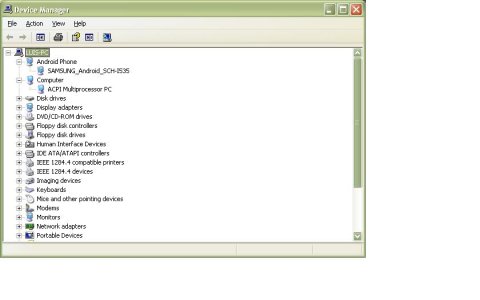
Still no icon in the notification bar. All my drivers on my PC seem to be working/correct...so I am thinking it's something on the device preventing debugging mode? There must be a reason I'm not seeing the icon and it's hard to expect ADB to recognize it if the phone is not showing the icon...
Thanks again.
Code:D:\APPS\ANDROID\android-sdk-windows\platform-tools>adb kill-server D:\APPS\ANDROID\android-sdk-windows\platform-tools>adb start-server * daemon not running. starting it now on port 5037 * * daemon started successfully * D:\APPS\ANDROID\android-sdk-windows\platform-tools>adb devices List of devices attached D:\APPS\ANDROID\android-sdk-windows\platform-tools>adb devices List of devices attached
- 09-03-2012, 11:15 AM #6
Re: Can't get ADB to recognize the S3
Ok just pluged my s3 to have a play and for some reason on the s3 there is no debug notification which is annoying! I also had the same issue as you but a simple unplug of the USB cable and then toggling debuging worked for me. Let me have a think and a play and get back to you. I'm guessing that your s3 actually shows up on your computer as connected and works in kies ect so we can assume its not the drivers?
EDIT: NVMLast edited by Dhendy91; 09-03-2012 at 11:30 AM.
- 09-03-2012, 11:18 AM
Thread Author #7
Re: Can't get ADB to recognize the S3
Yes it's connected in MTP mode. I can transfer files. I used ODIN last night to root it successfully.
I installed Kies to troubleshoot but have since uninstalled it...
I assume I am using the correct USB drivers?
ATT_I747_GSIII_Samsung_USB_Driver_v1_4_6_0
I got that EXE from XDA and have seen it linked in a few places... - 09-03-2012, 11:28 AM
Thread Author #8
Re: Can't get ADB to recognize the S3
Maybe these screenshots will help. These are the drivers I see installed when I plug the S3 into my computer. I also included a screenshot of the drivers in my device manager.
- 09-03-2012, 11:31 AM
Thread Author #9
Re: Can't get ADB to recognize the S3
Wow. NEVERMIND?
I was just booting up my HTPC to give it a try on there since I've never done anything with the phone on it...
I decided to change the USB port I was using on this PC just for kicks. It works now! I now realize the port I had been trying to use was a USB 3.0 port...which should be backwards compatible...and did work fine for ODIN rooting...but not for ADB apparently.
How annoying.
Thanks again for your help. - 09-03-2012, 11:34 AM #10
- 09-03-2012, 11:39 AM #11
- 09-03-2012, 11:40 AM
Thread Author #12
- 10-29-2012, 07:44 PM #13
Re: Can't get ADB to recognize the S3
Hello. I'm actually having similar issues with trying to get adb to recognize my s3. I don't have USB 3.0 so I know that's not the issue. Can anyone give some tips or advice on what I should do? I'm trying to root using noxious ninjas root tool, but s3 is not recognized.
- 10-30-2012, 10:52 AM #14
Re: Can't get ADB to recognize the S3
Well, without recreating the wheel - have you looked at all of the previous posts/screenshots? There's a wealth of information there. If so, which step are you on where your results differ from what's shown?
1. USB debugging enabled
2. Phone shows the USB icon in the Notification bar
3. Computer shows the phone connected in Device Manager
4. Device Manager shows ADB device
5. Running adb in a Command window that was started with Administrator privilege
Sent from my rooted, debloated, deodexed Sinclair ZX-80 running CM -0.001 using Tapatalk 2 - 10-31-2012, 10:56 AM #15
Re: Can't get ADB to recognize the S3
- 11-11-2012, 10:13 PM #16
- 03-23-2013, 12:13 PM #17


Reply


