That one is easy. "Miscellaneous" files are usually media files that you've sideloaded or come from an app that doesn't/can't tag it into the appropriate category. For example I use beyondpod for podcasts, and all of the podcasts I download end up showing up in miscellaneous. That is (usually) the same thing with movies or music that doesn't come from Google Play.
That one is easy. "Miscellaneous" files are usually media files that you've sideloaded or come from an app that doesn't/can't tag it into the appropriate category. For example I use beyondpod for podcasts, and all of the podcasts I download end up showing up in miscellaneous. That is (usually) the same thing with movies or music that doesn't come from Google Play.
i also noticed when I was flashing Roms a lot. there was always some left over files from apps that didnt get properly added to the storage categories. so even when i went in and looked at the Misc category, it wouldnt show what was taking up 9GB of data. I ended up going into clockworkmod recovery and (after backing, of course) formatted the internal storage. that pretty much cleared up everything.
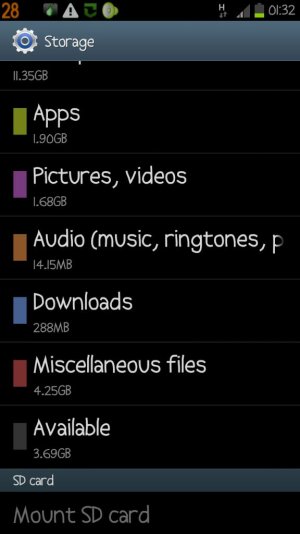
So, wifes phone has 14 gigs of miscellaneous whatever. I need to transfer them to the sd card or know what is going on. Please help with at least accessing those files to know what it is Im looking at
Good post. I became curious as to exactly where to find a directory called "Miscellaneous files" or "System Memory". Didn't find anything called "Miscellaneous" when searching via Root Explorer. So with the hints from posts in this thread I started to look for individual folders that show up in the "System memory" heading underneath the Miscellaneous files setting. My biggest "offender" is a folder called "syncr" at 7.44GB. I then used the My Files app (could certainly use ES File Explorer), and navigated to sdcard0/syncr. Inside this directory is all of my music and related apps that iSyncr helped copy over from iTunes. Next I deleted the syncr folder from within the My Files app. Went back to "System memory" and sure enough the "syncr" folder is gone. This may be a space management process that non-rooted or rooted users could use safely - of course you have to decide what you think is safe to delete on your phone - not me Lastly, in Linux terms perhaps the "System memory" may just be a symbolic link like mount point to various random files/folders on the phone. Perhaps the developers in the forums can help confirm or correct me on this last point.
I'll add that my music was a bit of a mess due to trying out various synching tools and music apps. Had multiple copies of a playlist, etc. So, this will give me a good reason to clean everything up and reduce storage space at the same time.
I've the same problem but when I tab on the misc. storage I usually find nothing & if there is anything consuming the storage it's usually viber & taking only 80 to 100 mb and I can't empty the storage or know what's taking that much storage



 Facebook
 Twitter
 Instagram