

- Nov 25, 2010
- 15,958
- 2,752
- 0
Samsung Epic 4g Official Froyo EB13 Thread
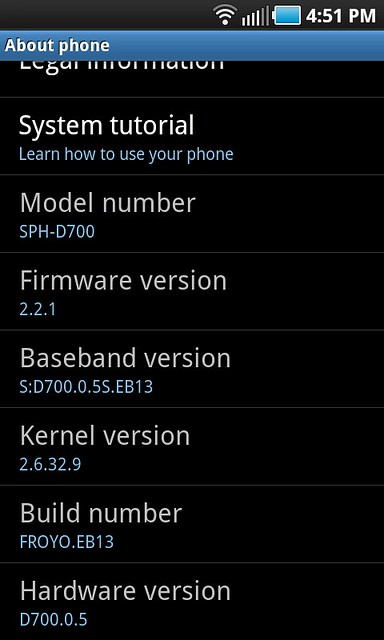
Screen Shot provided by Ragnarokx
Credit: androidcentral.com/Phil Nickinson
Screen Shot provided by Ragnarokx
Update 3/17/11:
Credit: Jerry Hildenbrand, www.androidcentral.com
The Epic 4G will be updated OTA to EC05, which is Android 2.2.1 (Froyo), and according to the docs will add Sprint ID. The OTA update starts this coming Monday 3/21/11 and will run for 4 days to complete.
*** NOTE: I will be keeping an eye out for word on those who already recieved the OTA update or manually updated to Froyo EB13. I would assume you could/will still recieve the OTA update to EC05 or can update manually using the same type of methods we did with Froyo EB13. Keep checking back for more information on this... ***
Just added 3/12/11:
- Manual "update.zip" method for you to download.
- We also added the Windows Installer version.
- Plus we have the Odin version available too.
Samsung/Sprint may have pulled the OTA/OTW (Over the Air/Over the Wire) update but we understand there are those who still want to upgrade to Froyo EB13 and you can still get the files needed here!!
** Note: This are my personal files I downloaded on the official release day, they are not taken from any other sites/forums. **
Manual "update.zip" method: (This will NOT ERASE your data)
Download Link : update.zip
This is done via stock recovery. Further explanation below.
- You need to be on stock Eclair 2.1 (DI18)
- Download the update.zip file
- Place it on your root directory of your sdcard
- Boot into stock recovery mode (press and hold volume down+camera+power for a few seconds)
- Select "apply sdcard:update.zip" (You navigate by using volume up/down & select by hitting home key)
- Sit back and wait for the update to finish and your phone will reboot into EB13 Froyo!
Windows Download/Installer Utility Version: (Complete wipe of phone)
Download Link : Windows Installer version of Froyo EB13
The Windows Download Version will install using your computer with a provided installer. Just download the file and "run" the file. It will place a icon on your desktop called "SWUpgrade for SPH-D700". Click on the SWUpgrade for SPH-D700 and follow the steps and you will have Froyo EB13 when its completed. I recommend a fully charged battery to be safe before attempting.
New: Odin to Froyo EB13: (Complete wipe of phone)
Go to the link provided below and the first procedure has the new Odin to Froyo EB13 method.
[How to] Factory Restore (or Fix a Bricked Phone)
--------------------------------------------------------------------------------------------------------------
Sprint halts Epic 4G's Froyo update due to data, SD card issuesCredit: Jerry Hildenbrand, www.androidcentral.com
The Epic 4G will be updated OTA to EC05, which is Android 2.2.1 (Froyo), and according to the docs will add Sprint ID. The OTA update starts this coming Monday 3/21/11 and will run for 4 days to complete.
*** NOTE: I will be keeping an eye out for word on those who already recieved the OTA update or manually updated to Froyo EB13. I would assume you could/will still recieve the OTA update to EC05 or can update manually using the same type of methods we did with Froyo EB13. Keep checking back for more information on this... ***
Just added 3/12/11:
- Manual "update.zip" method for you to download.
- We also added the Windows Installer version.
- Plus we have the Odin version available too.
Samsung/Sprint may have pulled the OTA/OTW (Over the Air/Over the Wire) update but we understand there are those who still want to upgrade to Froyo EB13 and you can still get the files needed here!!
** Note: This are my personal files I downloaded on the official release day, they are not taken from any other sites/forums. **
Manual "update.zip" method: (This will NOT ERASE your data)
Download Link : update.zip
This is done via stock recovery. Further explanation below.
- You need to be on stock Eclair 2.1 (DI18)
- Download the update.zip file
- Place it on your root directory of your sdcard
- Boot into stock recovery mode (press and hold volume down+camera+power for a few seconds)
- Select "apply sdcard:update.zip" (You navigate by using volume up/down & select by hitting home key)
- Sit back and wait for the update to finish and your phone will reboot into EB13 Froyo!
Windows Download/Installer Utility Version: (Complete wipe of phone)
Download Link : Windows Installer version of Froyo EB13
The Windows Download Version will install using your computer with a provided installer. Just download the file and "run" the file. It will place a icon on your desktop called "SWUpgrade for SPH-D700". Click on the SWUpgrade for SPH-D700 and follow the steps and you will have Froyo EB13 when its completed. I recommend a fully charged battery to be safe before attempting.
New: Odin to Froyo EB13: (Complete wipe of phone)
Go to the link provided below and the first procedure has the new Odin to Froyo EB13 method.
[How to] Factory Restore (or Fix a Bricked Phone)
--------------------------------------------------------------------------------------------------------------
Credit: androidcentral.com/Phil Nickinson
Rut ro. If you've been wondering why your Sprint Epic 4G hasn't yet received the over-the-air update to Froyo, it's because Sprint and Samsung have yanked it from the servers. Apparently a number of folks were having problems with data connectivity, or with the SD card -- or both. And while a hard-reset seemed to fix it, nobody wants to do that (Hi, mom!).
So, they pulled the update. Here's the official word:
There have been an increased number of calls into Care regarding issues with the Epic following the upgrade. As a result, the upgrade will not be pushed to more devices until a resolution for these issues is in place. The OTW update on the Samsung website will also be taken down.
Sprint and Samsung are actively working to correct these problems and release the update to all devices.
The issues being reported are related to data connectivity following the upgrade and SD card issues when attempting to access photos, music, etc. If you are experiencing these issues, a hard reset has been reported to resolve the problems. A hard reset will wipe out all the data on your device, so a backup should be done first.
So, they pulled the update. Here's the official word:
There have been an increased number of calls into Care regarding issues with the Epic following the upgrade. As a result, the upgrade will not be pushed to more devices until a resolution for these issues is in place. The OTW update on the Samsung website will also be taken down.
Sprint and Samsung are actively working to correct these problems and release the update to all devices.
The issues being reported are related to data connectivity following the upgrade and SD card issues when attempting to access photos, music, etc. If you are experiencing these issues, a hard reset has been reported to resolve the problems. A hard reset will wipe out all the data on your device, so a backup should be done first.
---------------------------------------------------------------------------------------------------------------------------
Source: Sprint Community Forums
2/21 - Samsung Epic Maintenance Release - S
 700.0.5S.EB13
Enhancements/Fixes:
- Upgrade of the Google OS from ?clair to Froyo (2.2.1)
- Ability to install applications to external storage
- Improved Bluetooth device support
- Bluetooth Voice Dialing
- Flash Player 10.1
- GPS Enhancements
- Improved OS performance
- Email PIN based authentication
- User friendly tethering for 3G and 4G
Important Notes:
- The new software version is: S
700.0.5S.EB13- Access the Samsung Epic Maintenance Release Blog for install instructions
- Released in stages beginning at 9PM on 2/21, with 100% of devices (on DI18) having received the update within 4 days
Source: Sprint Community Forums
Okay everyone thats 9PM PST (West Coast) time, 10pm MST, 11PM CDT (Midwest) and 12AM/midnight EST (East Coast)The software is pushed from Google's servers. All upgrades from Google is pushed via OTA. We were notified this morning that it would not post until 9PM PST. The end date hasn't changed so everyone should have received the update within 4 days from today.
-----------------------------------------------------------------------------------------------------------------------------
Just a bit of FYI for all you rooters and custom ROM flashers out there make sure you take precautions over the next day to get your information backed up on SD Card or MybackUp/Titanium Backup if you plan on upgrading once EB13 is released. Even ROMs, addons, themes, etc. grab a backup of them and save them, you never know what you may need down the road or be able to still use once the fog clears and we get rooted again and running ROMs.
For everyone else going from stock Eclair to EB13 Froyo, same thing.. Make sure you contacts/gmail/calendars etc. are sync'ed with your Google account just incase something goes south on the upgrade which it shouldn't.
Everyone: Have a fully charged battery ready for when the update comes, however you choose to do it... OTA/manual/Odin. Nothing worse than having a near dead battery and can't finish an update.. Just a word of advice I did a complete reinstall the other day and by the time I redownloaded apps and all I sucked down 30-40% of my battery so be prepared.
Remember the update will not effect anything on your SD cards so anything there is SAFE.
Can't wait for Monday, its going to be crazy around here so please try and search out those questions you may have for answers in this thread once things start rolling on Monday to cut down on repeated posts/questions...
Thanks everyone!
Paul627g
Helpful Links:
Can I Still Get OTA Updates with Leaked Froyo/Custom ROM/etc?
[How to] Factory Restore (or Fix a Bricked Phone) (Return to factory stock Eclair from ANY SETUP)
------------------------------------------------------------------------------------------------------------
Seems that Samsung Open Source Release Center has the Official Froyo EB13 Source Code Available to download. Sprint has also acknowledge the OTA release starting 2/21 and says everyone should have Froyo 2.2 EB13 available to them by 2/25.
I already downloaded it. Nothing flashable, just the source code. We'll have to wait until Monday, but at least this confirms our current release date.
The good news: overclocked kernels, here we come!
Download Link : Froyo EB13
Enter D700 into the search box and select Froyo B13 from the list.
------------------------------------------------------------------------------------------------------------
Source: www.androidcentral.com/Jerry Hildenbrand
Samsung Epic 4g
- Update will be pushed over a 4-day period (Effective 2/21/11)
- After the update completes, verify the new software version (Menu > Settings> About Phone)
- Baseband Version = S: D700.0.5S.EB13
- Build Number = FROYO.EB13
- Enhancements/fixes: upgrade to Froyo 2.2, improved bluetooth device support, bluetooth voice dialing, Flash Player 10.1, GPS enhancements, improved OS performance, ability to install applications to external storage
- Your on Froyo DK28/custom ROMs and want to return to factory Eclair 2.1 (DI18) to receive the OTA update, [How to] Factory Restore (or Fix a Bricked Phone)
------------------------------------------------------------------------------------------------------------
List of Features for EB13/Change Log ** Based on DK28 Froyo features **
[FONT="]-[/FONT] The Mobile AP settings, which you use to make the device a Wi-Fi hotspot, now shows more options to make the connection open, or secure etc.
- Power button can now be set to end phone calls
- 5 buttons in pull down notification menu (added ringer toggle)
- The Wireless and Network section has the new USB settings – Which can be set for a particular action when USB is connected, or select to ask when connected.
- Sound and Display, were together earlier, now as different sections. So adjusting the brightness now is far easier.
- Locale on Text – Selecting through a whole big list of languages to type.
- Voice input added in, to search.
- "Alarm" app changed to "Clock", now has built in timer, stopwatch, world clock
- Location and Security – Sensor Aiding is something new you would see. These sensors enhance the pedestrian positioning and so saves battery.
- Pinch-to-zoom on the homescreen – A beautiful addition. It is called Leap by Samsung.
- The wallpapers gallery has some cool new wallpapers.
- Add and remove home screens in TW launcher
- Menu Bar – Shows the auto-rotation option directly in there, making it easier to choose the option rather than going to the orientation in settings page.
- The count of unread messages on the messaging icon in the bottom dock, is changed.
- The icons beside the various Settings names, are all colored.
- Ability to turn off 3G via Settings or holding power button
- Task manager – It has got a RAM Manager where you can control the RAM usage.
- Adobe Flash Player 10.1
- Cursor comes in, with a blue inverted drop shape, to help you select text more easily.
- The keyboard now brings in the numerics and accented characters on long pressing of the alphabets.
- Google groups enters the contacts section. Even the Facebook contacts join in.
- Notifications section – Shows how many bluetooth transfers were successful and how many failed, at one go.
- The external SD has got a new folder in the “My Files” section.
- The Long press Power button – It brings a new option “Data Network mode” where you can switch the SIM network usage on/off for the internet data connection.
- Ability to change applications in TouchWiz Launcher dock
** as soon as we have a official change log for EB13 I will have it posted.
Last edited:



 Facebook
 Twitter
 Instagram