- 11-12-2012, 07:53 PM
Thread Author #1
S-Voice
I need your help!
Can someone please try to schedule an appointment using S-voice?
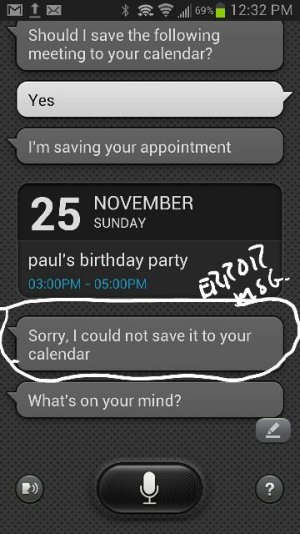
I have tried and tried, and each time the message I consistently get back is, "I'm sorry, I cannot save your appointment to your calendar."
Using S-voice I can easily set alarms, call contacts, send text messages, remove appointments, or add/delete tasks, but it fails when attempting to ADD appointments?
It goes through the prompts just fine, but gives the message above at the final step? I cannot figure out why?
Please help.
Sent from my SPH-L900 using Android Central Forums - 11-13-2012, 02:50 PM #2
Re: S-Voice
I got it to work. I told it to Save. When I answered Yes, it didn't understand me, go figure.
Edit: I have the Samsung Calendar installed, could that be a problem if you dont' have it? Never mind, it added the appointment to both calendars.Galaxy Note 2 <~ OG EVO 4G <~ HTC Fuze <~ HTC3125 <~ Motorola Something - 11-13-2012, 02:51 PM #3
Re: S-Voice
Maybe try with Google Now instead? It works better than S Voice from what I have read.
- 11-13-2012, 05:10 PM
Thread Author #4
Re: S-Voice
@ AnnDroid: Thank you so much for checking. I have both the Samsung & Google calendars installed and I just don't understand why it will not work for me? I tried your suggestion and spoke "save" at the point where I was asked "Should I put it in your calendar?" Unfortunately I got the same response: it first says, "I'm saving your appointment," immediately followed by, "Sorry, I could not save it to your calendar." Click here to see screen shot: Attachment 46129
For the life of me I cannot discern why it's not working for me? I have actually grown to use and like S-voice, but this one action it will not cooperate.
- 11-13-2012, 06:53 PM #5
Re: S-Voice
Out of curiosity, if you press Save, does it work? So far, all I've asked it was "Schedule an appointment for [day of the week] at [time]." I haven't asked it to Schedule an appointment with President Obama in the WhiteHouse at 2pm."
Do you have WiFi/data connection at the time? Doesn't make sense that you can remove an appointment. btw, how do you do that?
Also, can you get S Voice to wake up with your command? I can't get Google Now or S Voice to do this and it would be ssooo slick!Galaxy Note 2 <~ OG EVO 4G <~ HTC Fuze <~ HTC3125 <~ Motorola Something - 11-13-2012, 08:44 PM
Thread Author #6
Re: S-Voice
Thanks again for the suggestions. I did try to get it to work by pressing save, but sadly the result was the same. I have even tried to get it working when connected to wifi and 4g, but the result was again the same.
I actually like the application, and use it pretty extensively. To remove an appointment you simply need to activate s-voice and speak out the phrase "remove 2pm appointment with President Obama," and the digital assistant will confirm your request and remove the appointment.
I haven't used s-voice to wake up, but it works great when a call comes in. I simply say "answer" or "reject" and so far it's been flawless.
Honestly, it's not as smooth as Apple's Siri, but it's vastly improved from their first offering and works really well.
My sore spot is just getting it to add a new appointment. If I could figure out how to overcome that one hurdle then I'd be good to go
Sent from my SPH-L900 using Android Central Forums - 11-14-2012, 03:44 PM #7
Re: S-Voice
Hi, I am having the same problem on my new Galaxy Note 2. I thought it might have to do with setting a default calendar but I haven't seen any option to do that. I did uncheck the Samsung calendar from the list of calendars so I would only have the gmail one active but the result was the same. I have also tried with 3G and wifi only and I can't get it to save. I don't have any problem at all setting alarms or doing any other thing with S Voice, its just the calendar. I am new to Android so I don't really know what to try.
Could it be that Gmail's two step verification is on the way? I mean, I authorized the phone when first creating my gmail account so I can sync mail and the calendar, but maybe S Voice should be added as a different app? If so where should I change the password? I think I might be talking nonsense.
Please help.
Thanks. - 11-15-2012, 08:52 AM #8
- 11-15-2012, 01:59 PM
Thread Author #9
Re: S-Voice
This is a good point as AnnDroid mentioned. I had not considered two step authorization within the calendar being a problem. However, I removed all the calendars, gmail, Samsung, my corporate one, and again I got the same message?
I have to think it must be a bug in the software, but if that were the case we should all be experiencing the same thing I would think. At least all of us who have the Sprint version? - 11-15-2012, 03:33 PM
Thread Author #10
Re: S-Voice
Problem solved!!! I contacted Samsung and all that was required was a soft reset of the device. I feel like I should have known that.
1. turn off the phone
2. remove the battery
3. wait 30 seconds and put the battery back in
4. power up, and test application.
5. EVERYTHING IS WORKING FINE
Thank you all for your help, concern, and comments. - 11-15-2012, 04:27 PM #11
Re: S-Voice
Glad for you DAS

I can't get it to work over here though.
I tried the soft reset and it didn't work.
Do you mean you unchecked the calendars from the settings in S Planner or did you actually delete the corresponding email accounts?
That is going to be my next move, although I don't know if can delete the gmail account from the device
- 11-15-2012, 04:59 PM
Thread Author #12
Re: S-Voice
What I did was uncheck each calendar in the s-planner settings. It would be a pain in the neck, but you may want to try a full reset of the device back to factory default, and start from scratch. That is extreme, but that would have been my next move if Samsung would not have offered a working solution.
Please keep us informed. In the meantime I will keep digging around to try and help you. - 11-15-2012, 07:59 PM
Thread Author #13
- 11-16-2012, 09:09 AM #14
Re: S-Voice
So we know it can work. Were you at work when it worked and then at home it didn't? (thinking WiFi, data, gps, groping for an answer). Do you auto sync on? Mine of off. (again just talking out loud).
edit: DAS, do you have 2-factor authorization?Galaxy Note 2 <~ OG EVO 4G <~ HTC Fuze <~ HTC3125 <~ Motorola Something - 11-16-2012, 11:58 AM
Thread Author #15
Re: S-Voice
I was at work, using 4G data, in both instances. It worked fine for about an hour or so, and then right before leaving the office the message resurfaced. Is it possible to explain 2-factor authorization? I'm not sure I have this enabled or not?
As you mentioned, we know it can work, and other than the soft reset I made no changes to my phones settings. - 11-16-2012, 12:01 PM #16
- 11-16-2012, 01:12 PM #17
Re: S-Voice
DAS, doubt you have 2-step verification setup. Here is a video from Google: I only mentioned it because Lapaki said he/she has it set.
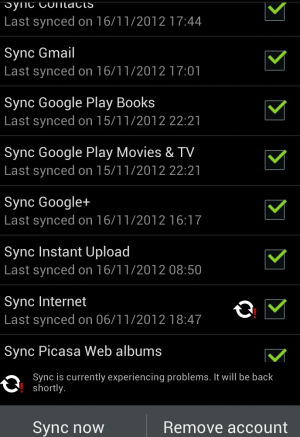
Lapaki, I set Sync to No when I initially set up the phone because I'm not always near a connection, wifi or mobile. I'm trying to find all the spots that have No, but for now, I have sync set to No in my Gmail. In Google Calendar, Settings, , Accounts & Sync, Auto sync app data is unchecked.
This is madding why it works for me and neither of you two. Would be so much easier sitting side-by-side to compare settings, there's so many!Galaxy Note 2 <~ OG EVO 4G <~ HTC Fuze <~ HTC3125 <~ Motorola Something - 11-17-2012, 09:13 PM
Thread Author #18
Re: S-Voice
I want to thank each of you for your help. It turns out the fix was to perform a hard reset, and now everything is working fine. I didn't want to do it, but after trying everything else you all suggested, and everything I could think of, it seems like it was all that would work.
AnnDroid a special thanks to you for all of your help. I can now schedule appointments using s - voice :-)
Sent from my GT-N8013 using Android Central Forums - 11-24-2012, 12:31 PM
Thread Author #19
Re: S-Voice
Hello friends. I'm back again because the hard reset turned out to be a temporary fix. A day or so after everything was working I discovered the device had gone backwards and once again I could not add appointments via s-voice. Remember, I can edit/delete appointments and perform every other command.
I contacted Sprint who promptly sent me a replacement (thank you Sprint), but after swapping devices and getting the new one all set up, the brand new one had the same issue? The only common denominator in this dilemma is me, and where I live and work. I know it's possible that I got two defective devices, but it doesn't seem probable.
AnnDroid and others have been so helpful in the past. Please AnnDroid and anyone else who might be able to help. Is anyone else having the same issue?
Sent from my GT-N8013 using Android Central Forums - 11-24-2012, 12:34 PM
Thread Author #20
- 11-24-2012, 05:54 PM #21
Re: S-Voice
Hmm, i haven't used it much but was just able to successfully add an appointment using s voice.
I'm using business calendar widget. My Gmail calendar syncs are turned off, so it's only saving to my phone and not syncing.
Sent from my Samsung Galaxy Note2Rockin' the Sprint Samsung Galaxy Note II ! - 11-24-2012, 05:57 PM
Thread Author #22
- 11-24-2012, 07:40 PM #23
Re: S-Voice
If it's working for me, and two phones have failed for you, in my humble opinion, it's got to be a setting. DAS and I have compared our calendar settings, our S-Voice settings. Can anyone think of another setting that could be interfering with the Save? DAS, if I remember right, even pressing the option Save doesn't work, not just the voice command Save?
Here's the thread on xda with two Galaxy S3 owners having the same problem.
(still love your avatar!)Galaxy Note 2 <~ OG EVO 4G <~ HTC Fuze <~ HTC3125 <~ Motorola Something - 11-24-2012, 08:02 PM #24
Re: S-Voice
What settings are checked on in s voice? Do you have control apps turned on?
Sent from my Samsung Galaxy Note2Rockin' the Sprint Samsung Galaxy Note II ! - 11-24-2012, 08:36 PM #25
Similar Threads
-
How to delete Visual Voice mail, Corporate Calendar
By pussfeller in forum Motorola DroidReplies: 23Last Post: 06-22-2010, 07:45 PM -
Google Voice Oddity
By mikef1182 in forum Android ApplicationsReplies: 11Last Post: 11-10-2009, 09:29 PM -
Do Droid Users Get Google Voice Invites
By abstrak in forum Motorola DroidReplies: 45Last Post: 11-09-2009, 09:05 AM -
Google Voice and Any Mobile, Anytime
By toddx in forum HTC HeroReplies: 13Last Post: 10-20-2009, 08:12 PM -
Where the heck is Visual Voice Mail...
By Slvrshot in forum HTC HeroReplies: 5Last Post: 10-15-2009, 09:54 PM


Reply