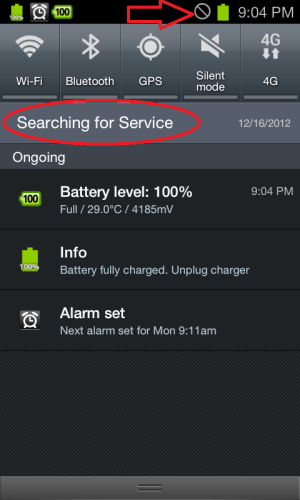
I have just arrived in the UK for 6 weeks with my lovely Samsung SII (Sprint). I have noticed an unknown icon in the notification bar - it's a circle with a line through it, and when I pull the notification bar down, I see "searching for service". This is towards the top of the screen, but the actual circle with the line through it does not show up when I pull the notification bar, it still stays at the top on the right. As a result, my battery has gone from 100% to 75% in FIFTEEN minutes - obviously whatever it's doing is totally draining the battery. I have disabled the 3g Data box under MOBILE NETWORKS (network settings) - that doesn't do anything. I tried changing from sprint to automatic back to sprint (in roaming mode) - that does nothing (icon still there). The only time it will disappear is if I put on airplane mode - then it goes away but then I can't use wifi to send and receive emails - so that defeats the purpose. I have attached screenshots of both screens. Anybody know what this icon is? Anyone know how I can stop my phone from constantly searching for service while I'm in the UK, without putting it into airplane mode? THANK YOU

Unknown icon in notification bar, and unable to turn "searching for service" off
- Thread starter chewedpup
- Start date
You are using an out of date browser. It may not display this or other websites correctly.
You should upgrade or use an alternative browser.
You should upgrade or use an alternative browser.

ReDDevil2112
Active member
- Sep 26, 2012
- 36
- 0
- 0
"Circle with a line through it" means it's crossed out. You know, like the signs with a cigarette in a red circle with a line through it? That means "no smoking". In this case, that icon is where your reception is displayed. Meaning you have "no reception" or no service. That's why the icon changes into an airplane in airplane mode; it's not that there's no service, it's that you turned it off.
The reason your battery is dying so fast is because the phone works harder when the signal is weaker. With no signal, the phone is spending all is power searching. Airplane mode tells the phone to stop searching, so battery life is much improved.
You can still use wifi in airplane mode. Enable airplane mode, THEN turn on wifi.
Sent from my Galaxy S II
The reason your battery is dying so fast is because the phone works harder when the signal is weaker. With no signal, the phone is spending all is power searching. Airplane mode tells the phone to stop searching, so battery life is much improved.
You can still use wifi in airplane mode. Enable airplane mode, THEN turn on wifi.
Sent from my Galaxy S II
THANK YOU THANK YOU THANK YOU THANK YOU! How thick am I that I never even tried that? I assumed wrongly that once in airplane mode, you could not get service OR connect to wifi, so I never even tried. I put it in AM, then clicked on wifi - and voila, there's no more searching for signal, that round circle with the line through it that means no service has gone, and my battery is now as good as gold, lasting for hours! THANK YOU THANK YOU. Just feel stoooopid now! such a simple solution.
ReDDevil2112
Active member
- Sep 26, 2012
- 36
- 0
- 0
You're welcome. I thought the same as you at first, but figured I'd try anyway and was surprised when the wifi ended up connecting.
Glad I could help
Sent from my Galaxy S II
Glad I could help
Sent from my Galaxy S II
Larry Cohen
New member
- May 23, 2013
- 1
- 0
- 0
"Circle with a line through it" means it's crossed out. You know, like the signs with a cigarette in a red circle with a line through it? That means "no smoking". In this case, that icon is where your reception is displayed. Meaning you have "no reception" or no service. That's why the icon changes into an airplane in airplane mode; it's not that there's no service, it's that you turned it off.
The reason your battery is dying so fast is because the phone works harder when the signal is weaker. With no signal, the phone is spending all is power searching. Airplane mode tells the phone to stop searching, so battery life is much improved.
You can still use wifi in airplane mode. Enable airplane mode, THEN turn on wifi.
Sent from my Galaxy S II
There's just one problem with this theory. I had the same problem, and then I rebooted my phone. Suddenly, sitting in the exact same spot where I had "no signal", I had a full signal when the phone came back up. This is a software or kernel bug. I have a Galaxy S4 so this won't help to point the finger at Samsung or Android. I also have T-Mobile service, but as I said, this has nothing to do with the actual signal. The signal was there the whole time, but something broken in the phone was preventing it from picking up the signal.
Josh Rainwater
New member
- Aug 2, 2013
- 1
- 0
- 0
Did you ever find a solution for this problem?? I have a flashed Note 2 on the cricket Network and it has just recently started doing the same thing "searching for service". I took it back down to where I had it flashed and they had no clue... I have been using it for 3-4 months and have never had one issue until just last week, not it seems to happening all the time!
Ricky Hernandez1
New member
- Oct 29, 2013
- 1
- 0
- 0
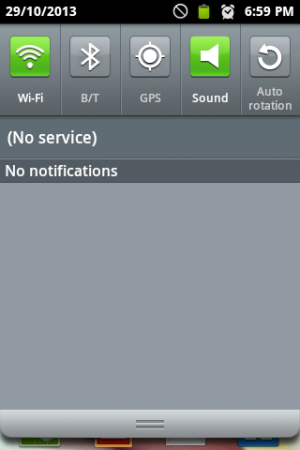
HI,., Just join this forum. I'm having problem also with my Samsung Ace. I don't have signal on my phone. can't received messages and can't make calls coz of "Circle with a line through it" above my phone. Please help. Thankz.. Please see attached.
AliKhan051
New member
- Dec 10, 2013
- 3
- 0
- 0

Please help me to get the rid of this strange icon near WIFI signal Galaxy S3 SHV-210L Korean version Android 4.3
I have just arrived in the UK for 6 weeks with my lovely Samsung SII (Sprint). I have noticed an unknown icon in the notification bar - it's a circle with a line through it, and when I pull the notification bar down, I see "searching for service". This is towards the top of the screen, but the actual circle with the line through it does not show up when I pull the notification bar, it still stays at the top on the right. As a result, my battery has gone from 100% to 75% in FIFTEEN minutes - obviously whatever it's doing is totally draining the battery. I have disabled the 3g Data box under MOBILE NETWORKS (network settings) - that doesn't do anything. I tried changing from sprint to automatic back to sprint (in roaming mode) - that does nothing (icon still there). The only time it will disappear is if I put on airplane mode - then it goes away but then I can't use wifi to send and receive emails - so that defeats the purpose. I have attached screenshots of both screens. Anybody know what this icon is? Anyone know how I can stop my phone from constantly searching for service while I'm in the UK, without putting it into airplane mode? THANK YOU
AliKhan051
New member
- Dec 10, 2013
- 3
- 0
- 0
Kindy help me to get the rid of this strange icon near wifi signal Galaxy S3 koren version SHV-210L Android4.3

vaibhav khandekar
New member
- Feb 15, 2014
- 1
- 0
- 0
hi,
do you find any solution for this? i am having same problem from yesterday with my note II LTE. please help me if anyone get solution of it.
thanks.
do you find any solution for this? i am having same problem from yesterday with my note II LTE. please help me if anyone get solution of it.
thanks.
henry cuskin
New member
- Mar 21, 2014
- 2
- 0
- 0
Re: Unknown icon in notification bar, and unable to turn "searching for service" off
Why has my moto g got white circle with line through it
- - - Updated - - -
Why has my moto g got white circle with line through it
Why has my moto g got white circle with line through it
- - - Updated - - -
Why has my moto g got white circle with line through it
freakydrew
New member
- Apr 4, 2014
- 1
- 0
- 0
Michael Rhodes
Member
- Aug 19, 2013
- 5
- 0
- 0
Mine is on the left top of the screen, and the line in the circle is horizontal. I have a note 4 from tmobile. Sliding notification down shows no text to go with the symbol. Anyone know what this is?
Howard Polack
New member
- Jul 20, 2012
- 1
- 0
- 0
It is your notifications shut off or set to none. Hold your volume up or down and then press on the Bell in right side of the volume control display menu. Then select priority or all.
Last edited:
awelschmyer
New member
- Jun 1, 2016
- 1
- 0
- 0
Did you ever figure out how to get rid of the circle with line? I am having the same issue. Thanks.
Cynthia Best
New member
- Jul 10, 2016
- 1
- 0
- 0
I've called and reset and master resetmy mom's phone I've tired everything help pleaseHI,., Just join this forum. I'm having problem also with my Samsung Ace. I don't have signal on my phone. can't received messages and can't make calls coz of "Circle with a line through it" above my phone. Please help. Thankz.. Please see attached.
View attachment 89299
I've called and reset and master resetmy mom's phone I've tired everything help please
On AXON 7, go to settings / sound / do not disturb and turn it off
Similar threads
- Replies
- 17
- Views
- 7K
- Replies
- 9
- Views
- 3K
- Replies
- 4
- Views
- 2K

- Replies
- 11
- Views
- 984

- Replies
- 19
- Views
- 3K


Trending Posts
-
Question Unknown contact within User Contact Profile
- Started by Infinite358
- Replies: 6
-
-

-

Members online
Total: 5,686 (members: 12, guests: 5,674)
Forum statistics

Space.com is part of Future plc, an international media group and leading digital publisher. Visit our corporate site.
© Future Publishing Limited Quay House, The Ambury, Bath BA1 1UA. All rights reserved. England and Wales company registration number 2008885.
 Facebook
 Twitter
 Instagram