- 11-04-2012, 02:02 PM
Thread Author #1
- 11-04-2012, 02:06 PM #2
Re: Sprint galaxy s3 jelly bean battery drain
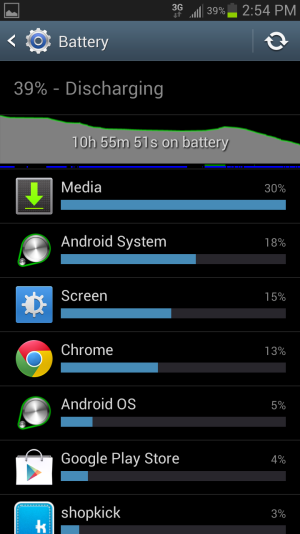
what you are saying and what your image shows are totally different stories.
- 11-04-2012, 02:09 PM #3
Re: Sprint galaxy s3 jelly bean battery drain
This is covered many times in threads here at AC, search for it and you can read up. The Media thing being your battery hog is likely because you have corrupt files on your SD card. Try removing the card for a day or two. If battery life gets better, you need to format your card.
<< Sent from my SG3 using Tapatalk >> - 11-04-2012, 02:10 PM
Thread Author #4
- 11-04-2012, 02:14 PM
Thread Author #5
- 11-04-2012, 02:15 PM #6
- 11-04-2012, 02:17 PM #7
- 11-04-2012, 04:46 PM
Thread Author #8
- 11-04-2012, 04:50 PM
Thread Author #9
- 11-04-2012, 04:57 PM #10
- 11-04-2012, 05:28 PM
Thread Author #11
- 11-04-2012, 05:48 PM #12
Re: Sprint galaxy s3 jelly bean battery drain
Then you must be doing something wrong. Cause my battery just lasted me 30 hrs and 36 min. See post #40 & #42
- 11-04-2012, 06:00 PM #13
Re: Sprint galaxy s3 jelly bean battery drain
I was experiencing something similar. I would go into Samsung Account within the settings tool menu and disable all of the Samsung syncs. Something happened in the update that caused an issue with this for me. It's been a couple of days since I disabled it and my battery life is a lot closer to what I would expect.
Jeff
Galaxy S3, Epic 4G Touch, Photon, Evo, Pre, Pixi, Moto Q, BB Curve, PPC-6700
Addicted to cell phones since 1998
- 11-04-2012, 06:38 PM
Thread Author #14
- 11-04-2012, 10:58 PM #15
- 11-04-2012, 11:16 PM #16
- 11-05-2012, 06:34 AM #17
Re: Sprint galaxy s3 jelly bean battery drain
I'm fairly certain that this will only address issues where Media is the number one process on the phone. And from what I've heard it absolutely works. The issue I'm having (and its possible others are as well) is that Maps is actually my highest useage (when I look at the battery info through the settings menu). However, if I look at my battery using GSam Battery Monitor I see that my highest app usage is actually the Kernel. When I look at the sub-processes included in the Kernel I see about 20 or so "Kworker" with various letters and number after. I've been unable to uncover what the cause of this is. What I will say is that disabling the Samsung sync made it part of the way better, but not back to my expectation.
Jeff
Galaxy S3, Epic 4G Touch, Photon, Evo, Pre, Pixi, Moto Q, BB Curve, PPC-6700
Addicted to cell phones since 1998
- 11-05-2012, 06:55 AM #18
- 11-05-2012, 06:59 AM #19
Re: Sprint galaxy s3 jelly bean battery drain
Has OP tried resetting the phone? By that I mean factory reset, clear all. Just make backups of anything on the SD card.
Dont sign up for services like Google Now or facebook temporarily. These are battery hogs.
Only other thing Id recommend is root and debloat. I upgraded to JB and didnt even give it a day before I did this. Battery life still great.
Currently 18 hrs on battery with 31% left. Forgot to charge last night. Expect it to last all day too. - 11-05-2012, 07:24 AM #20
Re: Sprint galaxy s3 jelly bean battery drain
the media is caused by the SD card, i cant see that we all have bad file on or SD card, this only happened after JB which caused an issue with the SD card. I have another thread with this
Nexus 4 ST TMO
Galaxy S 3 Sprint LTE [ Retired ]
Galaxy Tab 10.1 4G Verizon LTE [ Retired ]
Nexus S 4G [ Retired ]
Xoom Tablet 3.0 Honeycomb [ Retired ]
HTC Evo 2.3.3| [ Retired ]
Palm Pre [ Retired ] - 11-05-2012, 10:39 AM #21
Re: Sprint galaxy s3 jelly bean battery drain
Maps was my problem as well! I looked at everything, diabled the cache and stopped the process and it didn't clear up the problem. This is why I'm telling people that if you have problems after JB, you may have to reset the phone other than reformatting the SD card! I did both, resetted and reformatted and my phone is working beautifully!
- 11-05-2012, 11:10 AM #22
- 11-05-2012, 11:12 AM #23
Re: Sprint galaxy s3 jelly bean battery drain
Reset meaning a factory reset and all setting and programs wiped, not a restart? I'm thinking I would like to do this and reformat my SD card. Two questions, (1) How do you do a reset and (2) Does this reset leave Jelly Bean installed and just wipe to factory + Jelly bean?
- 11-05-2012, 12:01 PM #24
Re: Sprint galaxy s3 jelly bean battery drain

- 11-05-2012, 12:29 PM #25
Re: Sprint galaxy s3 jelly bean battery drain
Ok so it leaves Jelly Bean on and reverts everything to default settings. How do you do it?
Similar Threads
-
How to Root Galaxy Sprint Galaxy S3!
By zedomax in forum Sprint Galaxy S3 Rooting, ROMs, and HacksReplies: 38Last Post: 08-25-2012, 08:58 AM -
Sprint Galaxy S3 16GB Blue Shipped!!!!!!!
By RawisTheGameHhH in forum Sprint Galaxy S3Replies: 117Last Post: 06-21-2012, 07:33 PM -
AT&T and Sprint Galaxy S3 Reviews!
By hell911 in forum Samsung Galaxy S3Replies: 3Last Post: 06-20-2012, 01:43 AM -
Sprint Galaxy S3 question: If there is no LTE in your area...
By Soundtrack to Chaos in forum Sprint Galaxy S3Replies: 13Last Post: 06-05-2012, 08:51 PM -
Sprint Galaxy S3 question: If there is no LTE in your area...
By Soundtrack to Chaos in forum Samsung Galaxy S3Replies: 10Last Post: 06-04-2012, 08:56 PM


Reply




