
Device Status: Modified??
- Thread starter Rcrdude64
- Start date
You are using an out of date browser. It may not display this or other websites correctly.
You should upgrade or use an alternative browser.
You should upgrade or use an alternative browser.
Skunkape60
Well-known member
- Oct 9, 2010
- 4,459
- 344
- 0
Press and hold power, volume down and home simultaneously. When you see the warning press volume up.
Near the top is:
custom binary download: yes and counts show how many times it's been flashed in odin.
Current binary: (custom) it is not running a stock rom
System status: (custom) not stock.
To get out of download mode remove the battery.

Near the top is:
custom binary download: yes and counts show how many times it's been flashed in odin.
Current binary: (custom) it is not running a stock rom
System status: (custom) not stock.
To get out of download mode remove the battery.
Last edited:


Skunkape60
Well-known member
- Oct 9, 2010
- 4,459
- 344
- 0
Yes, it has most likely been rooted at one time. Example: You are rooted and have a custom rom. You decide to flash stock recovery and then delete superuser. Are you rooted? No you aren't but you still have a custom rom and it will show it. You can also be rooted on stock recovery or even be the other way un rooted and still have custom recovery. This history sticks but he may or may not be currently rooted.
Skunkape60
Well-known member
- Oct 9, 2010
- 4,459
- 344
- 0
Interesting. I also just realized superuser is installed on here as well.
Sent from my Galaxy S3
Cool let's see what all you have...
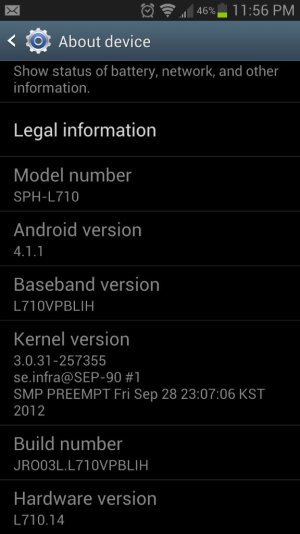
Go to system setting / about device / build number.
Let's see if you have a custom shutdown menu. Hold the power button choose restart. Does it go to a secondary menu with something like
Reboot
Hot boot
download
Recovery
Now let's see if you have custom recovery...
If your reboot menu has recovery click on it and see let us know if you see.
Team win recovey project. (Twrp)
Clockwork mod (CWM)
Actually just followed your Unroot guide and now I'm just finishing and starting to accept the system updates and waiting for the JB update to get pushed since I'm back to 4.0.4. Gotta say though I really love that guide. I've been easily frightened by all things root and hack and was really freaked out when it got stuck on the Samsung screen and thank god I read further and did the factory reset or I would be killing people and hiding in the corner clutching my shiny broken toy. THANK YOU
Skunkape60
Well-known member
- Oct 9, 2010
- 4,459
- 344
- 0
Actually just followed your Unroot guide and now I'm just finishing and starting to accept the system updates and waiting for the JB update to get pushed since I'm back to 4.0.4. Gotta say though I really love that guide. I've been easily frightened by all things root and hack and was really freaked out when it got stuck on the Samsung screen and thank god I read further and did the factory reset or I would be killing people and hiding in the corner clutching my shiny broken toy. THANK YOU
May I ask, why did you not just stay where you were at? You were already up to date on a stock rooted rom. Now you will have to root again to fix all the things that are broken with the stock rom.

Skunkape60
Well-known member
- Oct 9, 2010
- 4,459
- 344
- 0
Peace of mind for sprint store trips basically. They've tried enough times to screw me over
Sent from my Galaxy S3
Dude... First off, Isn't it a used phone? There is no warranty on it anyway. But that's besides the point, Sprint has changed their policy on rooted phones. Being rooted doesn't void your warranty. If you break your phone by rooting it (oh I bricked my phone because I screwed up) that is where they will not replace it for free. However they will attempt to fix it. However in my experience most sprint techs can't do much more than flash your original image back and perform factory resets.
Nick Mayfield
New member
- Apr 20, 2013
- 1
- 0
- 0
so I did this also and mine says it's Samsung official and no custom binary but at the bottom of the list it said custom. so when 4.2 comes out will I be able to update to it.
under my device status it says modified. It's my understanding this can't be changed. is that correct
under my device status it says modified. It's my understanding this can't be changed. is that correct
meyerweb#CB
Banned
- Sep 4, 2009
- 6,669
- 8
- 38
My understanding was that if you followed the unroot procedure completely it would no longer say modified. But I've never tried it, so I'll let Skunk chime in when he gets a chance.
There is a mod posted on XDA that resets this value from Modified to Normal. Unfortunately, you'll need to be rooted with custom recovery to apply the mod. So if it's really important, you could re-root, apply Triangle Away and this mod, and unroot again.
[MOD] Device status = "Normal" - xda-developers
There is a mod posted on XDA that resets this value from Modified to Normal. Unfortunately, you'll need to be rooted with custom recovery to apply the mod. So if it's really important, you could re-root, apply Triangle Away and this mod, and unroot again.
[MOD] Device status = "Normal" - xda-developers

GiantJay
Well-known member
- Jun 29, 2012
- 768
- 12
- 0
so I did this also and mine says it's Samsung official and no custom binary but at the bottom of the list it said custom. so when 4.2 comes out will I be able to update to it.
under my device status it says modified. It's my understanding this can't be changed. is that correct
You have to run triangle away before unrooting to reset the binary counter. Or there is a method on xda that unrooting and resets everything with a Odin file I believe. Don't go into recovery mode after using triangle away or it will trip the counter again. And if you are only worried about updating when the new premium suite update comes out, you should be able to update fine if you have stock recovery. The new update is going to be 4.1.2, 4.2.2 is a ways off for our phone still.
Sent from my SPH-L710 using Tapatalk 2
Skunkape60
Well-known member
- Oct 9, 2010
- 4,459
- 344
- 0
You have to run triangle away before unrooting to reset the binary counter. Or there is a method on xda that unrooting and resets everything with a Odin file I believe. Don't go into recovery mode after using triangle away or it will trip the counter again. And if you are only worried about updating when the new premium suite update comes out, you should be able to update fine if you have stock recovery. The new update is going to be 4.1.2, 4.2.2 is a ways off for our phone still.
Sent from my SPH-L710 using Tapatalk 2
Triangle away only gets rid of the custom binary counts in download mode. To get rid of the modified in the about phone section you must do the mod (while rooted of course) then run triangle away during the unroot process.
meyerweb#CB
Banned
- Sep 4, 2009
- 6,669
- 8
- 38
I'm not sure I can recommend the mod below. I ran it, out of curiosity as much as anything, and after flashing it I discovered it changed more than just he Modified indicator. The About device page said I was on some ROM that I never downloaded (People's ROM, maybe? I didn't pay that much attention), a lot of icons changed throughout the Settings menu, and, worst of all, my phone wouldn't connect to my computer as an MTP device. I ended up having to do a factory reset and restore from a Nandroid backup.
My understanding was that if you followed the unroot procedure completely it would no longer say modified. But I've never tried it, so I'll let Skunk chime in when he gets a chance.
There is a mod posted on XDA that resets this value from Modified to Normal. Unfortunately, you'll need to be rooted with custom recovery to apply the mod. So if it's really important, you could re-root, apply Triangle Away and this mod, and unroot again.
[MOD] Device status = "Normal" - xda-developers

Ramer84015
Well-known member
- May 15, 2010
- 172
- 1
- 0
I'm not sure I can recommend the mod below. I ran it, out of curiosity as much as anything, and after flashing it I discovered it changed more than just he Modified indicator. The About device page said I was on some ROM that I never downloaded (People's ROM, maybe? I didn't pay that much attention), a lot of icons changed throughout the Settings menu, and, worst of all, my phone wouldn't connect to my computer as an MTP device. I ended up having to do a factory reset and restore from a Nandroid backup.
I think that's because the developer of The People's Rom was the one to make this mod a flashable .zip. He incorporated it into the latest version of his ROM.
GiantJay
Well-known member
- Jun 29, 2012
- 768
- 12
- 0
I think that's because the developer of The People's Rom was the one to make this mod a flashable .zip. He incorporated it into the latest version of his ROM.
It's implemented into rompnits MOAR ROM also.
Sent from my SPH-L710 using Tapatalk 2


Forum statistics

Space.com is part of Future plc, an international media group and leading digital publisher. Visit our corporate site.
© Future Publishing Limited Quay House, The Ambury, Bath BA1 1UA. All rights reserved. England and Wales company registration number 2008885.
 Facebook
 Twitter
 Instagram