
"i" crossed out in notification bar?
- Thread starter lamesjim
- Start date
You are using an out of date browser. It may not display this or other websites correctly.
You should upgrade or use an alternative browser.
You should upgrade or use an alternative browser.
anon(631531)
Well-known member
- Jan 5, 2012
- 1,586
- 11
- 0
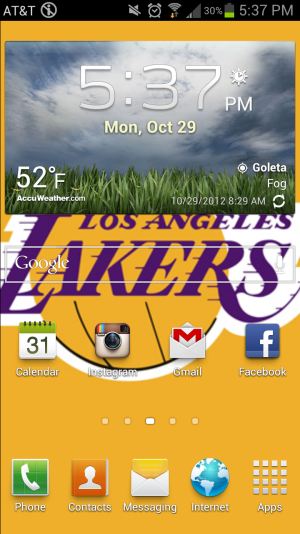
I'm still a newbie with my S3, and I just noticed I have an "i" in my notification bar that's crossed out. What does this mean and how do I get rid of this?
Can you show a screenshot of this problem? Hit the on/off button on the right side of the phone, and the home button at the bottom center of the phone, both at the same time. Then post it with your reply. Thanks.

Can you show a screenshot of this problem? Hit the on/off button on the right side of the phone, and the home button at the bottom center of the phone, both at the same time. Then post it with your reply. Thanks.
Ahh shouldve done that to begin with haha
Attachments
anon(631531)
Well-known member
- Jan 5, 2012
- 1,586
- 11
- 0
Ahh shouldve done that to begin with haha
Well, that's the status bar, and my guess is that it has something to do with one of your apps. If you've installed any, try uninstalling them one at a time, to find which one it is. That's as far as my thinking takes me. Good luck.
Try this:
- Drag-down from the top to see your list of notifications
- See what notifications are listed
- Click on "Clear Notifications"
- See if the icon went away.
No luck, sadly. I had a text notification too but the "I" is still there

lavrishevo
Well-known member
- Jun 5, 2011
- 53
- 0
- 0
Martinr303
Member
- May 31, 2010
- 17
- 1
- 0
I had this problem but when it happed to me I couldn't pull down the notification bar! I'm not sure why either. What I did was reboot my phone and it went away!
Sent from my SAMSUNG-SGH-I747 using Android Central Forums
Sent from my SAMSUNG-SGH-I747 using Android Central Forums
ZacSixChip
Member
- May 18, 2010
- 7
- 0
- 0
Funny, I just started getting that icon too. For me it appears after I watch a locally stored .mp4 on my GS3 which I only started doing yesterday. Up until that point I had never seen that particular icon.
I'm still a newbie with my S3, and I just noticed I have an "i" in my notification bar that's crossed out. What does this mean and how do I get rid of this?
Its a feature in ICS to turn off notifications. It means that you won't be notified for new messages, missed calls etc. in notification bar. Just pull down the notification bar, swipe to left and you'll see an icon of this "crossed out i". Press it and it will disappear from the notification bar.

iPhone is still better
New member
- Dec 25, 2012
- 1
- 0
- 0
I've tried everything and that thing still won't go away. My wife and I got the same phone on the same day and our settings are exactly the same but hers doesn't have it. Goes to show the iPhone is still so much better.
Kelly Kearns
Well-known member
- Jan 10, 2012
- 8,729
- 6
- 0
There are so many places to change settings, I would be shocked if your settings are just the same.
Sent from my SAMSUNG-SGH-I747 using Android Central Forums
Sent from my SAMSUNG-SGH-I747 using Android Central Forums
repligation
Well-known member
- Nov 23, 2012
- 292
- 0
- 0

My wife and I are having the same problem. We too just bought two s3 phones of which only one shows the stupid crossed out i. I have been looking for a solution online but like other people have been reporting, on some S3's there is no option to enable or disable notifications. Not in the pull down menu or full settings. We just bought them today and going back to the AT&T store didn't help. They all acted like they've never seen that before. All they could come up with was to replace the phone but they're out of stock so I have to go back in a few days.
Kelly Kearns
Well-known member
- Jan 10, 2012
- 8,729
- 6
- 0
Call 611 and get them to transfer you to Tech Support, if you don't get an answer there, call Samsung and ask.
Kelly Kearns
Well-known member
- Jan 10, 2012
- 8,729
- 6
- 0
Two things, this short video:
How To Remove/What Is This Notification Icon (i with line through it) - Samsung Galaxy?S3 - Samsung Galaxy S3 | How To | mobilehowto - Mobile how to - The only place for all your how to guides, tips and tutorials for your smartphone
Seems AT&T has disabled that notification toggle, so it looks like you have to talk to AT&T or Samsung or try and find some kind of notification toggle in the Play Store.
How to stop this from happening again when you don't have the toggle button on the pull down shade, it has to do with watching videos:
"For those who do not have a notification-toggle button in the notification-shade, when you watch a video using the Samsung player, you should lock the screen using power and volume-down at the same time. Then unlock by pressing power. This will make it go away because locked videos disables all notifications and places the 'i' on the notification tray (behind the video, which you cannot see). If the player crashes while locked, it leaves your notifications disabled and you cannot enable due to missing notification-toggle."
How To Remove/What Is This Notification Icon (i with line through it) - Samsung Galaxy?S3 - Samsung Galaxy S3 | How To | mobilehowto - Mobile how to - The only place for all your how to guides, tips and tutorials for your smartphone
Seems AT&T has disabled that notification toggle, so it looks like you have to talk to AT&T or Samsung or try and find some kind of notification toggle in the Play Store.
How to stop this from happening again when you don't have the toggle button on the pull down shade, it has to do with watching videos:
"For those who do not have a notification-toggle button in the notification-shade, when you watch a video using the Samsung player, you should lock the screen using power and volume-down at the same time. Then unlock by pressing power. This will make it go away because locked videos disables all notifications and places the 'i' on the notification tray (behind the video, which you cannot see). If the player crashes while locked, it leaves your notifications disabled and you cannot enable due to missing notification-toggle."
Kelly Kearns
Well-known member
- Jan 10, 2012
- 8,729
- 6
- 0
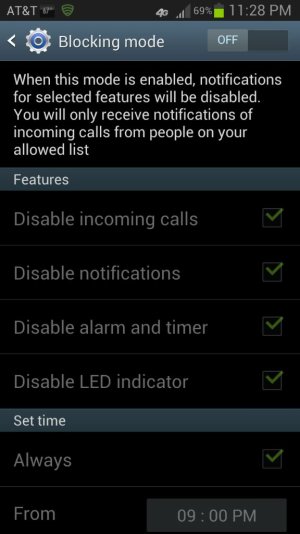
Looking at my phone, since we don't have this toggle, I found notifications in "Blocking Mode". Do you have blocking mode on? As you can see from my screenshot, notifications off is the default if you turn on blocking mode.
Sent from my AT&T Samsung S3
Rereading the info, you might want to try this lock and unlock, seems like it is saying this will get rid of it.
"you should lock the screen using power and volume-down at the same time. Then unlock by pressing power. This will make it go away because locked videos disables all notifications and places the 'i' on the notification tray (behind the video, which you cannot see). "
Sent from my AT&T Samsung S3
Rereading the info, you might want to try this lock and unlock, seems like it is saying this will get rid of it.
"you should lock the screen using power and volume-down at the same time. Then unlock by pressing power. This will make it go away because locked videos disables all notifications and places the 'i' on the notification tray (behind the video, which you cannot see). "
Attachments
Last edited:
Latest posts
-

-
 Let's see your Pixel 10 and 10 Pro photos!
- Latest: YankInDaSouth
-

-

Trending Posts
-
Question Phone not autofilling password/passkey for only one app
- Started by Scooch
- Replies: 2
-

-

-
-
Members online
Total: 8,873 (members: 13, guests: 8,860)
Forum statistics

Space.com is part of Future plc, an international media group and leading digital publisher. Visit our corporate site.
© Future Publishing Limited Quay House, The Ambury, Bath BA1 1UA. All rights reserved. England and Wales company registration number 2008885.
 Facebook
 Twitter
 Instagram