
- Jan 10, 2012
- 8,729
- 6
- 0
Since I'm seeing this asked all over and there are various answers, I'm going to do a new thread that shows how you can get Google Now, ready to speak (you do not have to say "Google" to wake it up) with the double click of your home button.
First, diable S-Voice under Settings, Application Manger, All Apps and click "disable" at the top right beside "Force stop", then proceed to the next steps.
This app:
https://play.google.com/store/apps/details?id=com.eikatou0.appspot.home2shortcut&feature=nav_result#?t=W251bGwsMSwxLDMsImNvbS5laWthdG91MC5hcHBzcG90LmhvbWUyc2hvcnRjdXQiXQ..
Look at the app pics, make sure the last step when you close and it asks, you choose HOME2 as the default.
Now, step #1
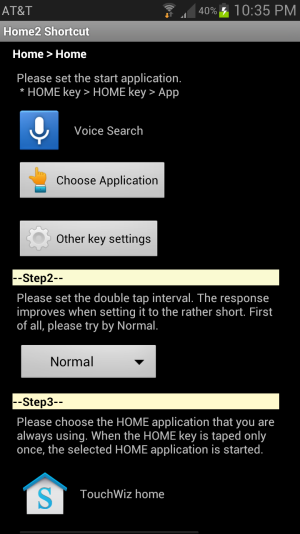
For the Home>Home choose the App "Voice Search" and not the "Google" app if you want to double click the home button and the "speak now" option is up and you do not have to wake it up by saying "Google"
Step 3, the HOME application will be TouchWiz or a Launcher if you are using one.
Then the step, step 4 I talked about above, it's easy to miss if you aren't careful because you are used to telling it to use a launcher here, choose the "Home2" option after tapping close. That will now bring up the Google Now "voice searching option" when you double click. Also add the Voice Search app (the one with the mic picture) to your lock screen, which BTW, can now have 5 icons instead of 4.
First, diable S-Voice under Settings, Application Manger, All Apps and click "disable" at the top right beside "Force stop", then proceed to the next steps.
This app:
https://play.google.com/store/apps/details?id=com.eikatou0.appspot.home2shortcut&feature=nav_result#?t=W251bGwsMSwxLDMsImNvbS5laWthdG91MC5hcHBzcG90LmhvbWUyc2hvcnRjdXQiXQ..
Look at the app pics, make sure the last step when you close and it asks, you choose HOME2 as the default.
Now, step #1
For the Home>Home choose the App "Voice Search" and not the "Google" app if you want to double click the home button and the "speak now" option is up and you do not have to wake it up by saying "Google"
Step 3, the HOME application will be TouchWiz or a Launcher if you are using one.
Then the step, step 4 I talked about above, it's easy to miss if you aren't careful because you are used to telling it to use a launcher here, choose the "Home2" option after tapping close. That will now bring up the Google Now "voice searching option" when you double click. Also add the Voice Search app (the one with the mic picture) to your lock screen, which BTW, can now have 5 icons instead of 4.
Last edited:



 Facebook
 Twitter
 Instagram