
FROYO 2.2.2 ROM Deodexed for the LG OPTIMUS T P509
The current version is T1D-S and is with US English locale.
This is compatible with AMEND script recoveries.
Edify script is not supported at this time.
This was built from the firmware for the Tmobile Optimus T (LG-P509).
Special thanks to Turducken - for his knowledge, support, and direction
T1D-S is a black themed version with the stock kernel and Darktremors App2Sd Mod.
This ROM cannot be overclocked without flashing a different kernel.
I'm leaving the kernel choice up to you. Links are provided for optional kernels.
The current version is T1D-S and is with US English locale.
This is compatible with AMEND script recoveries.
Edify script is not supported at this time.
This was built from the firmware for the Tmobile Optimus T (LG-P509).
Special thanks to Turducken - for his knowledge, support, and direction
T1D-S is a black themed version with the stock kernel and Darktremors App2Sd Mod.
This ROM cannot be overclocked without flashing a different kernel.
I'm leaving the kernel choice up to you. Links are provided for optional kernels.
This is Android Froyo Version 2.2.2
This is for the T-Mobile Optimus T LG-P509
This is built on software version V10S
This is for the T-Mobile Optimus T LG-P509
This is built on software version V10S
DETAILS:
**Deodexed and tested for bugs
**Init.d support
**File system speed tweak (thx Turducken)
**Patched libsqlite performance tweak (thx Turducken)
**Wifi Calling is included
**Files have been zipaligned for performance
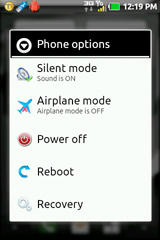
**Reboot and Recovery options added to power menu
**Changed shutdown animation
**Cpu set to 245/600 on boot
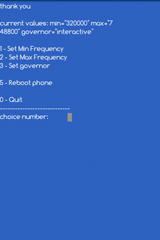
**Added script accessible via Terminal to set cpu freqs (once you add a kernel capable of overclocking)
**Bash shell support
**Nano text editor installed
**Removed DriveSmart from settings menu
**Removed DriveSmart app
**Removed Privacy menu from settings - prevent accidental factory resets
**Heapsize was changed to 32m
**Superuser and Busybox included
**DarkTremor App2Sd and Dalvik2Sd Mod
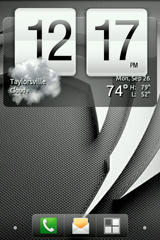
**Custom Boot Animation (blue coin)
**Themed Settings Menu icons
**Themed most of the IC Menu icons
**Themed various app icons
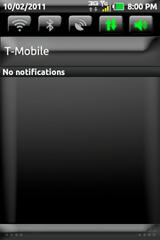
**Themed status bar and notification bar
**Removed a few ringtones and added a few
APPS ADDED:
- HTC IME Keyboard
- AdAway (thx Turducken)
- File Expert (has root permission option)
- File Expert black theme (u have to apply it)
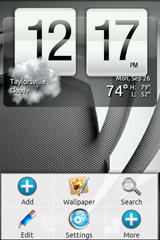
- Adw Launcher 1.3.6 Standalone
- Adw Notifier
- Sense Clock
- Gingerbread Keyboard
- Terminal Emulator
- Spare Parts
- Flashplayer
APPS REMOVED:
- AppPack
- DinnerDash
- DoodleJump
- DriveSmart
- DualClockWidget
- GenieWidget
- Livewallpapers
- Maps
- Pacman
- Protips
- Street
- Talk
- Visualization Wallpapers
- Web2GoHome
- YouTube
Installation Instructions:
- Download rom
- Enter your custom recovery (recommend using THIS ONE thats amend script)
- Partition sdcard to ext2 512mb 0 swap (this will erase your sdcard contents) **only do this step if using versions T1D-S or U1D-S**
- Mount sdcard as mass storage in recovery menu
- Move the rom zip file you downloaded to your sdcard
- Unmount sdcard as mass storage in recovery menu
- MAKE A NANDROID BACKUP
- Wipe everything, I mean everything
- Flash the rom zip
- Choose the reboot option
- Installation complete.
DOWNLOADS:
ROM NuDroid T1D-S - themed - amend script + stock kernel + App2SD Mod = DOWNLOAD HERE
ROM NuDroid T1-S - themed - amend script + stock kernel = DOWNLOAD HERE
ROM NuDroid U1D-S - unthemed - amend script + stock kernel + App2SD Mod = DOWNLOAD HERE
ROM NuDroid U1-S - unthemed - amend script + stock kernel = DOWNLOAD HERE
Fserves modified franco overclocking kernel - FOUND HERE - recommended v18b4 version
Miks overclocking kernel - FOUND HERE - outdated but stable

Thanks to:
dsixda at XDA for the Kitchen
janitux at XDA for instructions on how-to
crecked at XDA for the firmware download application
mendozinas at XDA for the UOT Kitchen
getitnowmarketing for the custom recovery
turducken for all his help
janitux at XDA for instructions on how-to
crecked at XDA for the firmware download application
mendozinas at XDA for the UOT Kitchen
getitnowmarketing for the custom recovery
turducken for all his help
Extras:
Visit this link for the UOT Kitchen to cook your own theme for this rom.
Remember to check the "system files" option for uploading your framework-res.apk, choose amend scripting option, and mdpi option.
More information on the installed Darktremor App2Sd mod found HERE
** Added a script that you can run to set the CPU frequencies without having to use an app.
** This script is only needed to be ran once - but - run it again after reboot if you would like to verify changes.
** This is done opening Terminal Emulator and typing in "su" then hit enter.
** Next you type in "cpuclock" and then hit enter.
** Follow on screen prompts and reboot.
Last edited:


 - i'll d/l it now - thx - keep them coming



 Facebook
 Twitter
 Instagram