Directions for manually downloading and flashing the Stock Gingerbread OTA for the Droid Incredible
[INFO]Many thanks goes to Muddyml for finding the OTA URL.[/INFO]
[WARN]Failure to follow instructions may result in consequences you do not want to deal with. Please follow all instructions in order and completely. We will all try to help if you are having problems, but most problems can be avoided if you follow the instructions carefully![/WARN]
Preparation:
For Windows users there is some prep work we need to do so that everyone is on the same page. These directions will work for XP, Vista and Windows 7.
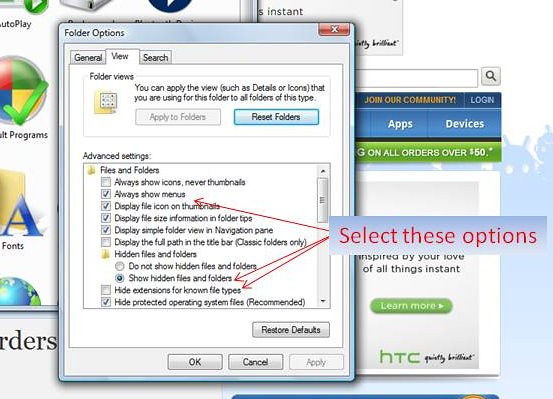
Step 1: Set Always show menus, Un-hide known file types and display hidden files.
- Click on Start -> Control panel -> Folder Options
- The Folder properties box will display. Then select the View tab in the properties box.
- The second option under Files and Folders should be “Always show menus.” Select this box. (Not necessary for XP users)
- Near the bottom of the options box you will see “Hide extensions for known file types,” if there is a check mark there, uncheck this option.
- Just above “Hide extensions for known file types there is an option to “Show hidden files and folders.” Select Show Hidden files and folders.
- Click OK. When we are done, you can go back and put these settings back if you like.
Step 2: Make sure your SD Card is formatted as FAT32.
- Connect your phone to your PC and choose Disk mode.
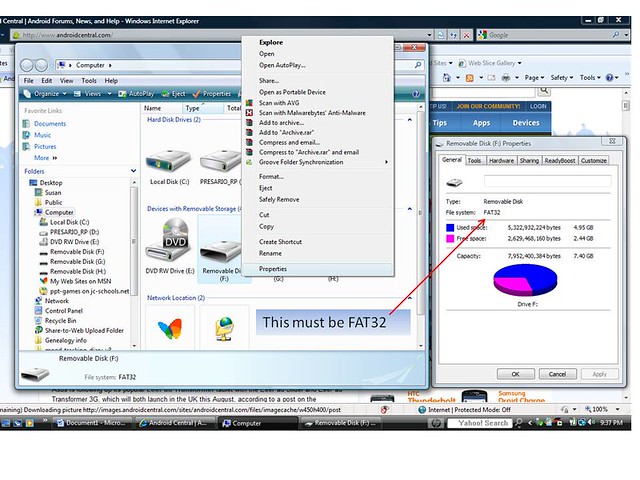
- When your SD card connects as a drive, open My Computer; Right click on the Drive for your SD Card and select Properties.
- A window will pop up that will show you the Format type for the drive. If it says FAT32 you are OK, if not, continue.
- Right click on your Desktop and create a new directory; name it SDBackup
- In the My Computer window, open your SD Card directory
- Click on the Edit menu of the SD Card directory and click “Select all”
- Click on the Edit menu of the SD Card directory and select Copy. Then minimize the SD Card directory.
- Open the SDBackup directory you made on the Desktop and click anywhere inside the white file listing area of the box.
- Click on the Edit menu of the SDBackup Directory and select “Paste.” This will copy the contents of your SD Card to your PC.
- When the copy is complete, close all open windows.
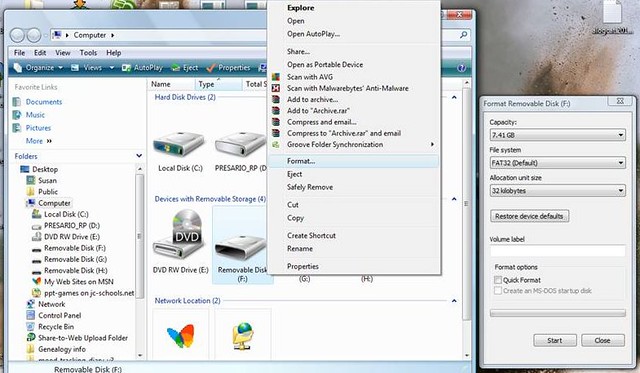
- Open My Computer and Right click on your SD Card Drive and select “Format.”
[WARN]WARNING: This will format your SD Card and will erase all data on the card. Be sure you completed the backup steps above[/WARN]
- In the Format Removable Disk Property Box, select “FAT32” as the File System.
- Click Start. You may be prompted with warnings about formatting erasing all data, click OK and continue until the format is complete.
- Now copy your data from the SDBackup directory on your desktop to your SD Card using the same procedure outlined in steps E –I in reverse.
Step 3: Backup your data
- Download a file manager program from the market, there are many available and most are free, if you want to copy your data on the phone. Or you can connect your phone to your PC. One of the drives that will appear is your SD Card the other is you Internal Storage. You can use your PC to copy and paste data from one drive to another.
- Under the /emcc directory you will find a DCIM folder copy the DCIM folder to a picture folder on your SD Card.
- Copy over any music folders, ringtone folders, video folders or any other miscellaneous data you may have stored on the internal memory to your SD Card. Do not delete them, just copy them.
- Download an SMS Backup program from the market, one called SMS Backup and Restore by Ritesh Sahu is a free app you can use. Backup to Gmail by cpedia Mobile is another app that will backup you calendar, SMS, MMS and Call log to Gmail, it is $1.99 in the market. SMS Backup + by Jan Berkel is another free app with good reviews.
- Set up an appbrain.com account and download the appbrain app to your phone from the Market. Appbrain will sync a list of all your installed apps to its server. This way you have a complete listing of all the apps you have installed, not just the paid apps tracked by the market.
- If you store your contacts locally on the phone rather than with Gmail, go into the People app and select Menu -> Import/Export. Follow the prompts to make a backup of your contacts to your SD Card.
- If you are paranoid about losing, game data there are several Angry Birds backup programs in the market. For other game apps search and see if there is a backup app available.
- Write down on a piece of paper what apps and widgets you have on each screen and put it in a safe spot. It's ol'skool but it works!

Download the OTA
Use this link to download the OTA
And the ota dl link to go from froyo to gingerbread!
http://android.clients.google.com/p..._WWE_4.06.605.3-3.26.605.1_release_210690.zip
Sent from my ADR6300 using Tapatalk
The MD5 I got is: dcba30a164327c4f6903abf0222c5e9a
Check the MD5 for the downloaded OTA file. This file contains a radio image and needs to be verified before you flash. You can download MD5 checker software here:
MD5 Calculator
WinMD5Sum - Free software downloads and software reviews - CNET Downloads
MD5 for Mac - Free software downloads and software reviews - CNET Download.com For Mac.
[WARN]
WARNING: Please check the MD5 before flashing the OTA zip. The OTA contains a radio image as well as the ROM. If the MD5 does not match that means you have a corrupt download and if you flash it you will soon have a Brick instead of a phone.[/WARN]
Rename the Original file from:
6f37e6f6b9ab.OTA_Incredible_C_Gingerbread_S_VERIZON_WWE_4.06.605.3-3.26.605.1_release_210690.zip
to
update.zip
Using your USB cable connect the phone to your PC.
Copy the update.zip file to the root of your SD card.
Flashing the OTA:
- Power off your phone.
- Start your phone by holding down the Vol Down and Power buttons at the same time.
- This will take you to HBOOT.
- Wait a few moments, HBOOT will automatically search for the update.zip file.
- Once it finds the file and starts to flash the update, you will see a black screen with green circular arrows and a progress bar. Don't do anything until it is done. It will reboot by itself when it is done. It will look like it's rebooting 3 times, this is normal.
- Go get a drink and wait for full boot. The first boot will take a while. It will look like it's hung on the Droid eye for several minutes. Do not panic.
- Enjoy the Gingerbread goodness
[NOTE]You may have some apps that force close after the update, try un-installing and re-installing the app first.[/NOTE]
Good luck!





 Facebook
 Twitter
 Instagram