- 03-01-2011, 11:52 PM
Thread Author #1
[HOW TO] Return to Stock for Froyo Update
Post #1 = Index
Post #2 = FAQ & Preperation
Post #3 = How to Backup contacts and apps
Post #4 = Instructions to wipe and restore your phone with Odin
Post #5 = Instructions to wipe and restore your phone with Odin w/visual aids
Post #6 = How to Restore contacts and apps
Post #7 = Trouble ShootingLast edited by DroidXcon; 04-20-2011 at 06:12 PM.
Thanked by 10: - 03-01-2011, 11:55 PM
Thread Author #2
- 03-02-2011, 01:10 AM
Thread Author #3
How to Backup contacts and apps
Backup Contacts
Backup to Gmail account (Recommended)
Step 1. From the Home screen, touch the menu button
Step 2. Touch settings
Step 3. Touch accounts & sync
Step 4. Touch the Gmail account of your choice under Manage accounts
Step 5. Touch Sync contacts
Export to SD card (Recommended)
Step 1. From the Home screen, touch contacts
Step 2. Touch menu
Step 3. Touch Import/Export
Step 4. Touch Export to SD card
Step 5. Touch ok to confirm export
Send namecard via
Step 1. From the Home screen, touch contacts
Step 2. Touch menu
Step 3. Touch Import/Export
Step 4. Touch send namecard via
Step 5. Touch Select all
Step 6. Touch send
Step 7. Touch destination of your choice
Verizon Backup Assistant
Step 1. From the Home screen, touch the menu button
Step 2. Touch settings
Step 3. Touch accounts & sync
Step 4. Follow the prompts to log in to your Backup Assistant account.
Apps and Data
There are many apps available on the market. But i will suggest My Backup Pro if you purchase you can use this without root. It can be found in the Android Market
Last edited by DroidXcon; 03-02-2011 at 04:21 AM.
Thanked by 8: - 03-02-2011, 03:54 AM
Thread Author #4
Instructions to wipe and restore your phone with Odin
1.) If your phone is plugged into your computer, unplug it now.
2.) If your phone is not powered down, power it down now.
3.) Remove battery from phone.
4.) Launch ODIN on PC.
5.) Plug USB cable into phone.
6.) Plug your Fascinate into the PC via USB cable.
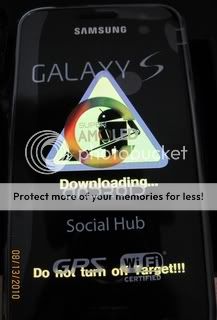
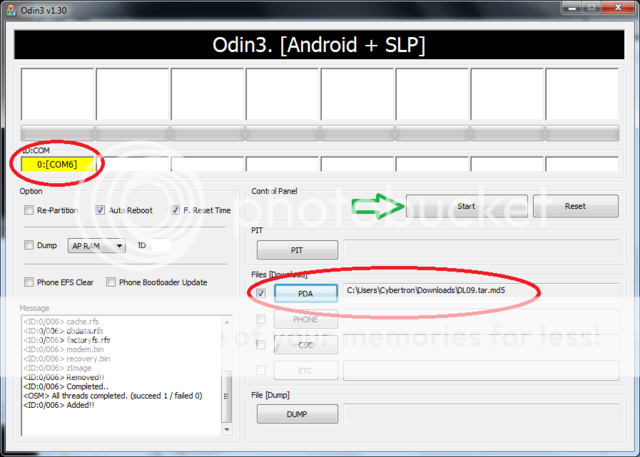
7.) Press and hold the volume-down key until you see a gigantic yellow triangle and your phone will be in download mode.(Please see 2nd picture in post #5)You can now release the volume key. At this point you will see a yellow com port in the upper left hand corner of the Odin applicate. .(Please see 3rd picture in post #5)
8.) Click on the PDA button in ODIN
Triple check that you pushed the PDA button. Do NOT click the Phone button prior to continuing to step 13. If you choose Phone, you will have bought your Fascinate a one-way ticket to hell.
9.) Choose the DI01package3.tar.tar
file you downloaded in step 2 above & click the Start button.(this should take approx 3 to 6mins)
10.) Phone will power down when finished.
11.) Remove USB cable.
12.) Reinsert battery.
13.) Power phone and wait to boot approx 4mins
Congrats you are wiped clean and restored to Stock.Last edited by DroidXcon; 03-02-2011 at 04:01 AM.
Thanked by 14:+ Show/Hide list of the thanked
- 03-02-2011, 04:00 AM
Thread Author #5
Instructions to wipe and restore your phone with Odin w/visual aids
Once odin is downloaded open it, its an executable file so when you open it you will see the following : (File used in picture is just an example)

Once this is up, do the following
-Remove the battery from your Device
-Plug in the USB cord
-Hold down the Volume Down button until you see a big bright triangle on your screen , underneath it will say Downloading and beneath that it will say Do not turn off target

At this point you will see one of the boxes in the corner turn yellow, letting you know there is a connection, it will look like this

after you are connected you want to hit the PDA button, NEVER PHONE, phone will erase your modem and you will have trouble connecting after that at all.

when you click the PDA button a pop up will appear and you will need to select the file you would like to flash and then click open

now you will see the file appear in the PDA window ,, with connection made and the file in the PDA window, you may now hit Start

Once you hit start this process Should take approx. 5 mins if you are returning to stock . shouldnt take any less time than that and not much more. So dont start freaking out at min 2...(wait till min 7) lol
If you are flashing a Clockworkmod file it should take approx 7seconds.
once it is completed you should see the following window:

Once you have reached this screen it is safe to unplug , put your battery in and boot up..Last edited by DroidXcon; 03-02-2011 at 04:13 AM.
Thanked by 4: - 03-02-2011, 04:18 AM
Thread Author #6
Restoring Contacts
Backup to Gmail account (Recommended)
Step 1. From the Home screen, touch the menu button
Step 2. Touch settings
Step 3. Touch accounts & sync
Step 4. Touch the Gmail account of your choice under Manage accounts
Step 5. Touch Sync contacts
Import From SD card (Recommended)
Step 1. From the Home screen, touch contacts
Step 2. Touch menu
Step 3. Touch Import/Export
Step 4. Touch Import From SD card
Verizon Backup Assistant
Step 1. From the Home screen, touch the menu button
Step 2. Touch settings
Step 3. Touch accounts & sync
Step 4. Follow the prompts to log in to your Backup Assistant account.
Apps and Data
There are many apps available on the market. But i will suggest My Backup Pro if you purchase you can use this without root. It can be found in the Android Market
Thanked by 3: - 03-02-2011, 04:32 AM
Thread Author #7
Trouble Shooting
Odin application displays one of the following in message box<OSM> All threads completed. (succeed 0 / failed 0)Resolution<OSM> All threads completed. (succeed 0 / failed 1)
90% of problems associated with Odin are due to communication between phone and computer , it is suggested to go over all the prepartion points in Post#2 of this thread. Other things to try would be.
Change USB ports in the back of the computer
- Make sure you did not forget to remove battery from phone
- make sure Odin is the only application running and antivirus is disabled
- If you are using a laptop make sure its plugged in also find the nearest desktop and try from there
****************************************************************************
After failed flash with odin upon power up the following is depicted on the screen
SOFT BRICK

Resolution
First off DO NOT PANIC. there is a simple solution, just remove the battery , plug the phone into the computer, press and hold volume down and it will enter download mode. Please review all the steps oulined in this thread and try and flash againLast edited by DroidXcon; 03-02-2011 at 04:54 AM.
Thanked by 7: - 03-02-2011, 08:05 AM #8
Thanks for taking the time to do such a great walk thru.
STICKY PLEASE - 03-02-2011, 09:19 AM #9
Does this format SD?
Sent from my SCH-I500 using Tapatalk - 03-02-2011, 09:21 AM
Thread Author #10
- 03-02-2011, 09:38 AM #11
Haha no doubt. I want to put EVERYTHING back to stock and then go back to SC. Just feel like since I've flashed so much stuff a clean slate would be good for me. Lol
Sent from my SCH-I500 using Tapatalk - 03-02-2011, 09:41 AM #12
And let me ask you this..do the contents of your SD effect the way your phone runs whatsoever? My guess is no, but hey, I've been wrong before.
Sent from my SCH-I500 using Tapatalk - 03-02-2011, 09:46 AM
Thread Author #13
well yes and no , its possible to have a corrupt card forcing your phone to scan and rescan the card and could slow down your system. also corrupt data could cause problems because some processes require info from the card, such as skins for example beautiful widgets uses skins that are on your sd card when you remove it the skin disappears.
- 03-02-2011, 10:03 AM #14
Ok - I was having my phone wig out (pan all around, zoom in and out, and scroll up and down all very rapidly like on crack for about 1/2 second to 2 seconds sometimes every so often. Per Gunnermike's request, I reformatted my sd card last night, and I haven't noticed the issue as of yet. So, where I thought no originally, I'm definitely a believer that an sd card can affect the way your phone behaves.
p.s. - I still have my keyboard (and I believe my screen but not as frequently) not register a button press or 2 every so often - if anyone knows anything about this - or has seen the same thing.Does your phone increase your productivity or decrease it?
Nexus on JBSourcery - 03-02-2011, 10:22 AM #15
Good deal. Think I'll format everything and start fresh tonight
Sent from my SCH-I500 using Tapatalk - 03-02-2011, 06:04 PM #16
Thank You for all you help in step by step. Since I am a newbie in this envirnoment, could you also provide a step by step in rooting so I can get froyo 2.2 on my phone, I need a good version of Flash to see some of my websites.. Thank You
- 03-02-2011, 06:05 PM
Thread Author #17
- 03-02-2011, 06:31 PM #18
Top notch walk-through as usual. I learned a few backup steps I did not know about.
But I'd like to say that Backup Assistant is not a very sophisticated sync routine. I ended up with a bunch of contacts back on my phone that I had cleaned up in Google Contacts (the website) so that all my contacts were stored in Google. I restored from Titanium Backup to get the contacts back the way I had them. Without TiBU I would have lost hours of work combining phone/Google contacts.
Now after syncing with Backup Assistant, when I look at the website for Backup Assistant I show the number of contacts correctly but they are all marked as unknown and are blank of any info. I think this might be because all my contacts are Google only contacts now. But between Google and TiBU I'm satisfied my contacts are adequately protected.
I'm going to add the export to SD card as the last layer of backup for contacts. - 03-02-2011, 06:39 PM
Thread Author #19
- 03-02-2011, 07:13 PM #20
Hard to say. I'd say leave it. People can read my post and take it for what it is worth. Others should come along and add their own experiences with it.
I would say if it's been working for someone no need to discount it. It does have a web interface which makes it easy to export contacts to a text file on your computer.
The link to Backup Assistant can be hard to find from your account on the VZW website. Easiest is to use direct link:
I'm going to do a little testing with Backup Assistant and report back.Last edited by ezas; 03-02-2011 at 07:19 PM.
- 03-02-2011, 07:25 PM #21
Update 1. I went to the BA website and now I have no contacts. I pressed sync to phone and the little sync bar has been spinning an spinning and it does not look like it's doing anything. I only have 80 some contacts so it should not be a lot of data. After about 5 minutes I decided to enable autosync on the phone in case it needs that to comunicate with the phone.
Still just spinning not doing much of anything. Much network band meter shows no traffic. (I Just happen to be doing this in a fresh install of Chrome browser with no add-ons so nothing is being blocked.)
Sick of waiting so just hit backup now on phone and it comes back with No contacts synchronized.
More updates in a few - 03-02-2011, 07:27 PM #22
Update 1. I went to the BA website and now I have no contacts. I pressed sync to phone and the little sync bar has been spinning an spinning and it does not look like it's doing anything. I only have 80 some contacts so it should not be a lot of data. After about 5 minutes I decided to enable autosync on the phone in case it needs that to comunicate with the phone.
Still just spinning not doing much of anything. Much network band meter shows no traffic. (I Just happen to be doing this in a fresh install of Chrome browser with no add-ons so nothing is being blocked.)
Sick of waiting so just hit backup now on phone and it comes back with No contacts synchronized.
More updates in a few - 03-02-2011, 07:32 PM #23
Solved
Backup Assistant only works for contacts stored on the phone. I'd add that to your original post and call it good.
BTW that website is still just spinning away. By spinning there is a little progress indicator. I had to reload the page to break out. I'm trying another sync to see if it picks up the contact I added (and synced to BA) on the phone.
It came back as sync is complete and no new contact on the BA website.
Last update: Adding a contact to the BA website and then Sync'ing via the website did push the contact to my phone and finally did pickup the contact I add via the phone. Both are of course 'phone' contacts.Last edited by ezas; 03-02-2011 at 07:43 PM.
- 03-03-2011, 01:46 AM #24
so i got as far as seeing the yellow triangle on phone but no yellow on odin. Seems maybe odin is not reading my phone. What do i do?
- 03-03-2011, 01:48 AM
Thread Author #25


Reply