- 12-16-2011, 07:25 PM
Thread Author #1
[MAC METHOD] Root,Unroot & Unlock Your VZ Galaxy Nexus
Well since its pretty difficult to find answers when it comes to macs, i figured i'll paste all the methods ive learned into one post.
[BOX="Unlocking the bootloader"]
Download THIS file and unzip it to your desktop (Inside you'll find all the files you need to proceed including "adb", "fastboot", "recovery-clockwork-3.0.0.5-crespo.img", and "su-2.3.6.1-ef-signed.zip").
1) On your phone, go to Menu>Settings>Applications. Select "Development" and check the box next to "USB debugging"
2) Connect the phone to your Mac via the USB cable
3) Open a Terminal window on your Mac (Applications>Utilities>Terminal), and copy/paste the following into the Terminal:
Code:
~/Desktop/adb-fastboot/adb reboot bootloader
Hit "Return" and wait for your phone to reboot into Bootloader/Fastboot mode
4) If it says "LOCK STATE - LOCKED" then copy/paste the following into the Terminal:
Code:
~/Desktop/adb-fastboot/fastboot oem unlock
Your now unlocked
Video:
[YT]https://www.youtube.com/watch?v=3tF-Sz_yjYI&feature=player_embedded[/YT]
[/BOX]
[BOX="Rooting"]1) Download the latest Superboot
2) Extract the zip file to a new folder
3) Put your Phone into Bootloader mode by turning it off and turning it back on by holding the volume up + volume down + power on.
4) You should see this on your screen:
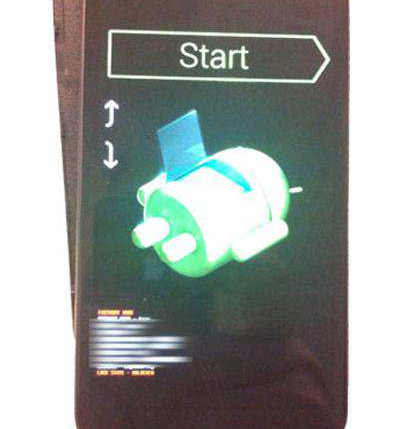
Now "cd" into the folder you extracted superboot to. fyi cd means change directory through terminal.
For Mac users, open a terminal window to the directory containing the files, and type ‘chmod +x install-superboot-mac.sh’ followed by ‘./install-superboot-mac.sh’
6. Your phone is now successfully rooted.
Your phone may stay at the google bootscreen for a long time. BE PATIENT!
Video:
[YT]https://www.youtube.com/watch?v=gyiCjdoUheU&feature=player_embedded[/YT]
[/BOX]
After rooting. Your gonna wanna download rommanager from the market and install clockworkmod so that you can backup your roms in case you mess up anything. Otherwise your gonna need to do this next method as a last resort.
[BOX="UNROOT"]UPDATED(06/12/2012)
1) Download the latest stock image( i will leave finding that image to you since this post can become outdated)( The names of the images will be different with each update. These are the commands for the latest 4.0.4 update)
2) Unzip the files, and place the images into the adb-fastboot folder you created on your desktop above.
3) Open a terminal and use the following commands:
Code:
~/Desktop/adb-fastboot/adb reboot bootloader
4) Wait for bootloader to reboot on phone.
5) Then, in terminal use the following commands:
./adb reboot bootloader
./fastboot flash bootloader bootloader-toro-primela03.img
./fastboot reboot-bootloader
./fastboot flash radio radio-toro-i515.fc05.img
./fastboot reboot-bootloader
./fastboot flash radio-cdma radio-cdma-toro-i515.fc04.img
./fastboot reboot-bootloader
./fastboot -w update image-mysid-imm76k.zip
./fastboot reboot-bootloader
./fastboot oem lock
6) Reboot to System, and you should be returned to Stock and Unrooted
[/BOX]
All these post have been copied from others post. I only take credit for updating them for this thread. Big Thanks to: nowens0520, Richard Gutierrez, paulobrien and Andrew Ruffolo for the videos.
To root your Galaxy Nexus while you are on stock 4.0.4 IMM76K, please read from this post onward. You must flash a custom recovery over fastboot and use that custom recovery to flash the latest superuser package.Last edited by dmmarck; 07-23-2012 at 08:49 AM.
Thanked by 32:+ Show/Hide list of the thanked -
broadwayblues, chrisb#AC, clarker07, Cyber Warrior, DucatiDude, HawgFan1979, ir1shboy, jaydee6385, _JKK_, jmac24#ac, tottenj, Juststef, kalytn, Keekers11, KG II, legendarydog, lembowski, metajames, Mikeyz, MisterEich, Mr.Gadget, Neutrino, NJ Valid#AC, nocola, pank, rudy847, seanubis, udarag, w00tw00twhat, Wheels309, xfactor99, zero neck
- 12-16-2011, 11:31 PM #2
- 12-17-2011, 12:07 AM #3
Last edited by broadwayblues; 12-17-2011 at 12:22 AM.
- 12-17-2011, 12:13 AM
Thread Author #4
Follow me on Twitter: @SpaceHippieSays - 12-17-2011, 01:20 AM #5
- 12-17-2011, 03:22 AM #6
Re: [MAC METHOD] Root,Unroot & Unlock Your VZ Galaxy Nexus
I use the SDK. Once you have that setup it takes 2 commands to get the bootloader unlocked.
1)
2)Code:cd android-sdk-mac_x86/platform-tools
Make sure you have plenty of battery life.Code:./fastboot oem unlock
- 12-17-2011, 04:25 AM #7
Re: [MAC METHOD] Root,Unroot & Unlock Your VZ Galaxy Nexus
got the bootloader unlocked, but cannot get phone rooted! i am having trouble understanding what should be step 5 -
the "r3-galaxynexus-superboot" folder is on my desktop. what do i type in terminal?
HELP! and thanks! - 12-17-2011, 04:33 AM #8
Re: [MAC METHOD] Root,Unroot & Unlock Your VZ Galaxy Nexus
on your computer
open terminal
type:
if you don't know the actual path, you can drag and drop the folder into the terminal window for the pathCode:cd FOLDER_EXTRACTED
then type:
Code:chmod +x install-superboot-mac.sh ./install-superboot-mac.sh
- 12-17-2011, 04:36 AM #9
Re: [MAC METHOD] Root,Unroot & Unlock Your VZ Galaxy Nexus
this is what happens when i drag and drop the file into Terminal...
DoMac-i3:~ gearydo$ /Users/gearydo/Desktop/r3-galaxynexus-superboot/install-superboot-mac.sh
chmod: fastboot-mac: No such file or directory
/Users/gearydo/Desktop/r3-galaxynexus-superboot/install-superboot-mac.sh: line 2: ./fastboot-mac: No such file or directory
DoMac-i3:~ gearydo$ - 12-17-2011, 04:40 AM #10
Re: [MAC METHOD] Root,Unroot & Unlock Your VZ Galaxy Nexus
Sorry, drag the folder, not the file... I'll customize it for you:
That should workCode:cd /Users/gearydo/Desktop/r3-galaxynexus-superboot/ chmod +x install-superboot-mac.sh ./install-superboot-mac.sh
If you need help, I'm up (night shift person, but I'm off and can't sleep) We can do a Join.Me session - 12-17-2011, 04:43 AM #11
Re: [MAC METHOD] Root,Unroot & Unlock Your VZ Galaxy Nexus
THANK YOU! i'll service your car for you, but programming is not my thing!
- 12-17-2011, 04:52 AM #12
- 12-17-2011, 07:24 AM #13
Re: [MAC METHOD] Root,Unroot & Unlock Your VZ Galaxy Nexus
Hi, I haven't been successful in unlocking the phone. I extracted the zip folder to my desktop, but when I paste "~/Desktop/adb-fastboot/adb reboot bootloader" into Terminal, I get "cannot execute binary file". Also, when I connect my phone via USB to the computer, nothing happens on the computer. The phone shows that debugging is enabled. I'm using an old ibook g4 if that makes any difference. Any clue what I'm doing wrong? Thanks.
- 12-17-2011, 07:47 AM #14
- 12-17-2011, 08:41 AM
Thread Author #15
Re: [MAC METHOD] Root,Unroot & Unlock Your VZ Galaxy Nexus
yea this is mac only. And for the folders. I recommend changing the names to something short and sweet. So when you have to CD into them Your not typing in a long name with the possibility of screwing it up. Thanks Andrew for helping out.
Follow me on Twitter: @SpaceHippieSays - 12-17-2011, 01:20 PM #16
Re: [MAC METHOD] Root,Unroot & Unlock Your VZ Galaxy Nexus
I have a problem. During the bootloader unlocking process, i thought i did everything correct got through all the steps and after i selected to unlock the bootloader i rebooted the phone and it was stuck in the boot up animation then went black and now just says google then vibrates and goes back to google. im freaking out. please help!
EDIT: I figured it out thanks anyways thoughLast edited by LrGenius; 12-17-2011 at 01:36 PM.
- 12-17-2011, 01:36 PM
Thread Author #17
Re: [MAC METHOD] Root,Unroot & Unlock Your VZ Galaxy Nexus
If you did everything correctly, don't freak out. Give it some time. It usually, for me, shows the google logo, sits there, vibrates, goes back to the google logo, then after a few minutes it shows the boot animation. DO NOT TAKE OUT YOUR BATTERY
Follow me on Twitter: @SpaceHippieSays - 12-17-2011, 02:43 PM #18
Re: [MAC METHOD] Root,Unroot & Unlock Your VZ Galaxy Nexus
Once I'm rooted is it safe to install 4.0.2 OTA like normal? Or should I go through alternative methods?
- 12-17-2011, 03:00 PM #19
- 12-17-2011, 03:05 PM #20
Re: [MAC METHOD] Root,Unroot & Unlock Your VZ Galaxy Nexus
EDIT: All good to go, thanks for the help!
Last edited by jamontoast1291; 12-17-2011 at 04:46 PM.
- 12-17-2011, 04:01 PM #21
Re: [MAC METHOD] Root,Unroot & Unlock Your VZ Galaxy Nexus
i tried that command but keep getting this Last login: Sat Dec 17 16:55:52 on ttys000
johnnies-MacBook-Pro:~ jayone216$ cd /Users/gearydo/Desktop/r3-galaxynexus-superboot/
-bash: cd: /Users/gearydo/Desktop/r3-galaxynexus-superboot/: No such file or directory
johnnies-MacBook-Pro:~ jayone216$ chmod +x install-superboot-mac.sh
chmod: install-superboot-mac.sh: No such file or directory
johnnies-MacBook-Pro:~ jayone216$ ./install-superboot-mac.sh please helpLast edited by jone216; 12-17-2011 at 04:01 PM. Reason: d
- 12-17-2011, 04:42 PM #22
Re: [MAC METHOD] Root,Unroot & Unlock Your VZ Galaxy Nexus
You are awesome. thanks for this.
How long does the Google screen stay up for ... you say a long time... like a good solid 5min? Or like 30-40 min?
Thanks.
I am getting worried... it's been 10 min and I see conflicting info -- one person says they were stuck like this and they pulled batter and all is well. Others say do not pull the battery.
Please help.
Thanks.
Roman - 12-17-2011, 04:46 PM #23
- 12-17-2011, 04:53 PM #24
- 12-17-2011, 04:53 PM #25
Re: [MAC METHOD] Root,Unroot & Unlock Your VZ Galaxy Nexus
After doing some searching it appears that the LTE nexus will somtimes hang on boot.img. It installs everything but wont actually boot. Seems battery pull will be fine at that point (which is was for me). I def waited like 15-20 minutes before doing the pull though.
Thanked by:


Reply


