- 12-10-2012, 03:22 PM
Thread Author #1
[List][VZW GNote2]Remove Bloatware
Originally Posted by DroidXcon Last edited by DroidXcon; 12-18-2012 at 09:25 PM.
Thanked by 6: - 12-15-2012, 12:22 PM #2
Re: [List][VZW GNote2]Remove Bloatware
Awesome work XCon... about to follow your list now
.
[GUIDE] Unlock Your Note 2 Bootloader! | [ROM] AOKP Jelly Bean for Verizon GS3
[GUIDE] VZW ROM Listing and Guide | [GUIDE] VZW Galaxy S3 Flashing Guide
[GUIDE]Freezing GS3 Bloat with Titanium Backup! | [GUIDE] Restore Back to Clean Factory Stock Updated 9/22
[GUIDE] [MODEMS] VZW SGS3 (SCH-i535) | [ROM] Official CM10 Nightlies on your GS3! - 12-15-2012, 12:41 PM
Thread Author #3
- 12-15-2012, 01:13 PM #4
- 12-15-2012, 01:14 PM
Thread Author #5
- 12-15-2012, 01:24 PM #6
[GUIDE] Unlock Your Note 2 Bootloader! | [ROM] AOKP Jelly Bean for Verizon GS3
[GUIDE] VZW ROM Listing and Guide | [GUIDE] VZW Galaxy S3 Flashing Guide
[GUIDE]Freezing GS3 Bloat with Titanium Backup! | [GUIDE] Restore Back to Clean Factory Stock Updated 9/22
[GUIDE] [MODEMS] VZW SGS3 (SCH-i535) | [ROM] Official CM10 Nightlies on your GS3! - 12-15-2012, 03:54 PM #7
Re: [List][VZW GNote2]Remove Bloatware
I feel like this is common sense but just in case... If you use Weather or News in the lock screen then DO NOT disable/freeze Weather and/or News Dameon.
[GUIDE] Unlock Your Note 2 Bootloader! | [ROM] AOKP Jelly Bean for Verizon GS3
[GUIDE] VZW ROM Listing and Guide | [GUIDE] VZW Galaxy S3 Flashing Guide
[GUIDE]Freezing GS3 Bloat with Titanium Backup! | [GUIDE] Restore Back to Clean Factory Stock Updated 9/22
[GUIDE] [MODEMS] VZW SGS3 (SCH-i535) | [ROM] Official CM10 Nightlies on your GS3! - 12-15-2012, 04:51 PM
Thread Author #8
- 12-16-2012, 05:04 PM #9
Re: [List][VZW GNote2]Remove Bloatware
Hey DroidXcon - Many thanks for putting up this bloatware list. I'm going through it at this very moment to eliminate all unnecessary background processing.
I'm not renaming or deleting any of them at this time as I'm trying to be conservative with how I handle this phone, at least out of the gate. I've rooted just to try to UNDO some of the evil performed at the hands of 'the carrier'. That said - I'm still interested in making sure that I'm able to receive updates from Verizon, a few typically get sent out immediately after launches to address issues. I'm not familiar with all of the apps on this list; can you explain the purpose of the following:
1) DirectConnect mgr and DirectShareMgr
2) Factory Mode and Factory Test
3) LCD Test
4) Market Feedback
5) Mobile Tracker
6) Phase Beam
7) Pickup Tutorial
8) Self test Mode
9) Setup Wizard 1.3 and Setup Wizard 1.0
10) Sync Service and Test Service
11) VPN client and VPNdialogs
12) WIFI Direct and WIFI Direct share
I've googled a few of these with marginal results at best. Just interested in understanding how they're used in conjunction with this phone to determine if I have any personal use cases which would required them. - 12-17-2012, 05:34 AM
Thread Author #10
Re: [List][VZW GNote2]Remove Bloatware
Honestly I don't know how they effect usage most of them I disabled with no ill effect to MY personal usage of the phone. Others Were reported to me as being able to disable by forum members.They very well May break functions that I never use therefore don't know about. The only one I know for sure is setup wizard which sets up the phone in activation. Besides that I can just guess that the test apps are for developer diagnostics. Vpn client is for virtual private network to share data with a remote network. Please report to us if you find that sdisabling any of these cause any problems in functionality.
Sorry if I want any help
From my Galaxy Note 2 via Tapatalk - 12-18-2012, 09:53 PM #11
Re: [List][VZW GNote2]Remove Bloatware
No worries, DXC - as always, I appreciate the response. Thus far, freezing them has caused no issues to my phone. That 'Phase Beam' turned out to be live wallpaper. I'll definitely advise if any issues arise. I'm kind of on hold right now with downloading new apps and trying new functionality, given the Exynos exploit issue that is affecting all GN2 phones atm.
- 12-18-2012, 09:58 PM
Thread Author #12
Re: [List][VZW GNote2]Remove Bloatware
Just use the app and plug the hole. [App] OneClick Root/Patch security exploit
- 12-19-2012, 07:27 AM #13
Re: [List][VZW GNote2]Remove Bloatware
I found out that the WiFi direct will cause some issues with the S Pen. When you use the button on the S Pen and use it to circle something for a picture it will sit there for a period of time and give you a force close. You can turn off WiFi direct Share and it will work but I think for that function you need WiFi direct.
[GUIDE] Unlock Your Note 2 Bootloader! | [ROM] AOKP Jelly Bean for Verizon GS3
[GUIDE] VZW ROM Listing and Guide | [GUIDE] VZW Galaxy S3 Flashing Guide
[GUIDE]Freezing GS3 Bloat with Titanium Backup! | [GUIDE] Restore Back to Clean Factory Stock Updated 9/22
[GUIDE] [MODEMS] VZW SGS3 (SCH-i535) | [ROM] Official CM10 Nightlies on your GS3! - 12-20-2012, 04:42 PM #14
- 12-20-2012, 10:43 PM #15
[GUIDE] Unlock Your Note 2 Bootloader! | [ROM] AOKP Jelly Bean for Verizon GS3
[GUIDE] VZW ROM Listing and Guide | [GUIDE] VZW Galaxy S3 Flashing Guide
[GUIDE]Freezing GS3 Bloat with Titanium Backup! | [GUIDE] Restore Back to Clean Factory Stock Updated 9/22
[GUIDE] [MODEMS] VZW SGS3 (SCH-i535) | [ROM] Official CM10 Nightlies on your GS3! - 01-06-2013, 10:16 PM #16
[List][VZW GNote2]Remove Bloatware
Do you guys recommend deleting the bloat ware or freezing? I want to free up space on my phone. I just rooted tonight and I am running the OS that came on the phone.
I also want to move apps to the SD card. Do I need to flash another rom to do this? If so, which rom would be good for a noob?Samsung Galaxy Note 2+ iPhone 5 user.
Next phone: Nexus 4 32GB.
Follow Me:
App.Net: iDeadBaby
Twitter: iDeadBaby
Peace & Blessings. - 01-07-2013, 10:38 AM #17
Re: [List][VZW GNote2]Remove Bloatware
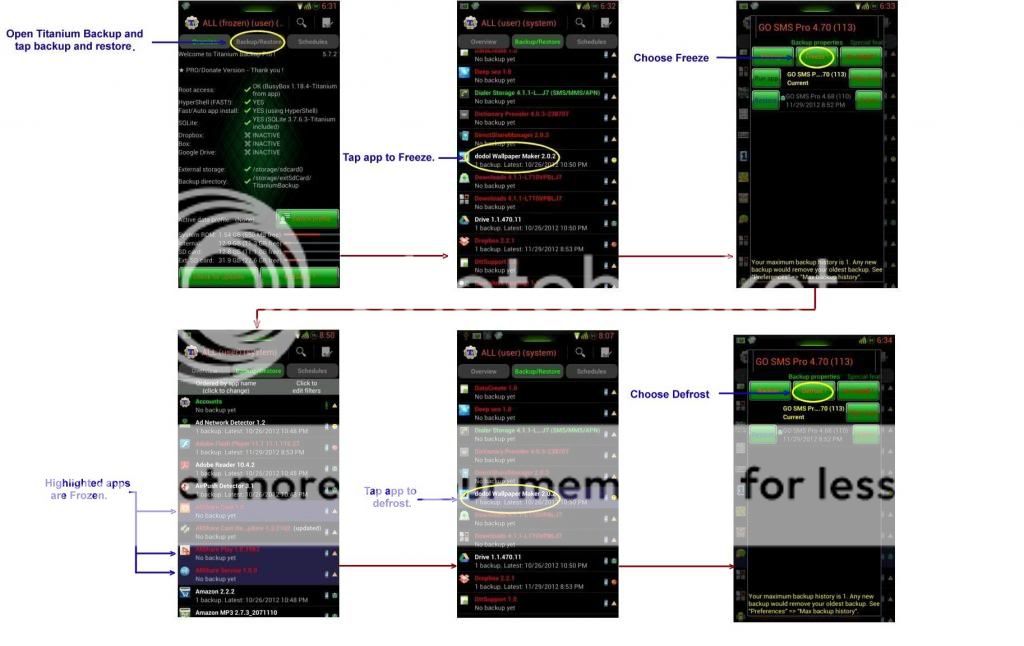
Don't delete the bloatware. Reason is if you delete the bloat its gone forever (duh I know) but if you ever want to go back to stock in order to receive an OTA you need to restore certain bloatware in order to make sure your phone is recognized for the update. Freezing it is not a problem since you can unfreeze when and if you want to stick with stock and get an OTA. However, deleting the bloat will mean you may need to restore to stock with ODIN in order to get an OTA.
[GUIDE] Unlock Your Note 2 Bootloader! | [ROM] AOKP Jelly Bean for Verizon GS3
[GUIDE] VZW ROM Listing and Guide | [GUIDE] VZW Galaxy S3 Flashing Guide
[GUIDE]Freezing GS3 Bloat with Titanium Backup! | [GUIDE] Restore Back to Clean Factory Stock Updated 9/22
[GUIDE] [MODEMS] VZW SGS3 (SCH-i535) | [ROM] Official CM10 Nightlies on your GS3! - 01-07-2013, 07:09 PM #18Samsung Galaxy Note 2+ iPhone 5 user.
Next phone: Nexus 4 32GB.
Follow Me:
App.Net: iDeadBaby
Twitter: iDeadBaby
Peace & Blessings. - 01-08-2013, 07:52 AM #19
Re: [List][VZW GNote2]Remove Bloatware
That works too. Custom ROMs like Beans or CleanROM will remove the majority of the bloat but some of it will remain because they are features of the phone that some users will use while others will not. I still go through the list and freeze anything I don't need but a good chunk of the list is gone when you flash a custom ROM.
[GUIDE] Unlock Your Note 2 Bootloader! | [ROM] AOKP Jelly Bean for Verizon GS3
[GUIDE] VZW ROM Listing and Guide | [GUIDE] VZW Galaxy S3 Flashing Guide
[GUIDE]Freezing GS3 Bloat with Titanium Backup! | [GUIDE] Restore Back to Clean Factory Stock Updated 9/22
[GUIDE] [MODEMS] VZW SGS3 (SCH-i535) | [ROM] Official CM10 Nightlies on your GS3!
Similar Threads
-
[How To] Remove Bloatware Bookmarks in your Browser on your Droid X!
By avlfive in forum Motorola X Rooting, ROMs, and HacksReplies: 2Last Post: 07-16-2012, 07:19 AM -
A Letter to the VZW CEO About Bloatware
By Saiyaman156 in forum Motorola Droid XReplies: 39Last Post: 12-13-2010, 10:13 PM -
Petition to remove bloatware, blur
By El Poblano in forum Motorola Droid XReplies: 30Last Post: 09-01-2010, 04:03 PM -
Removing Bloatware with Root
By jbfromnjn in forum Motorola X Rooting, ROMs, and HacksReplies: 10Last Post: 07-22-2010, 10:15 PM -
Removing Bloatware with Root
By jbfromnjn in forum Motorola Droid XReplies: 2Last Post: 07-22-2010, 12:13 PM


Reply