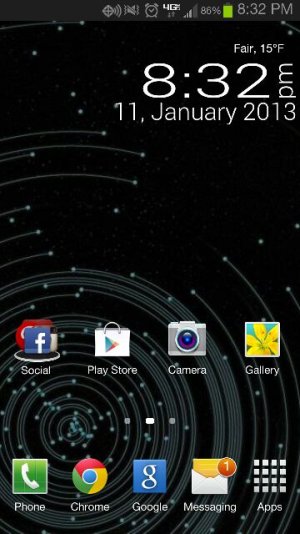
- 01-11-2013, 08:07 PM
Thread Author #1
- 01-11-2013, 08:30 PM #2
Re: Unread message notification
Text or mail? If its mail, go into your email via the web and find the unread mail. Happens to me sometimes with gmail. Text I wouldn't be sure how.
Sent from my Unlocked Galaxy Note 2! - 01-11-2013, 08:32 PM
Thread Author #3
- 01-11-2013, 08:33 PM
Thread Author #4
- 01-12-2013, 06:20 PM #5
Re: Unread message notification
Do you have another messaging app installed? Maybe it is thinking the message has been unread because it hasn't been viewed from the other app. If not then maybe you have a weird message. Did you delete all messages? Is that what you meant by saying you cleared message details? Good luck.
Brandon - 01-12-2013, 06:54 PM
Thread Author #6
Re: Unread message notification
I cleared the message data in the stock app. I've never used anything other than the stock sms app. I've checked all voice mails, emails and sms/mms. Still showing an unread message.... Fml.
Haha
Sent from my SCH-I605 using Android Central Forums - 01-13-2013, 09:43 AM #7
- 01-13-2013, 09:30 PM
Thread Author #8
- 01-14-2013, 08:19 PM #9
- 01-14-2013, 08:56 PM
Thread Author #10
- 01-15-2013, 04:16 PM #11
- 01-15-2013, 05:51 PM
Thread Author #12
- 01-16-2013, 11:46 AM #13
- 01-16-2013, 06:13 PM
Thread Author #14
- 01-16-2013, 08:54 PM #15
- 01-16-2013, 09:20 PM #16
Re: Unread message notification
Try downloading a different messaging app. Set it up then clear data from the stock app. Then turn off notifications in the stock app and turn them on in the new app. Have someone send you a text and see if you get the proper number in the new app and not the old. Then read that message in the new app to see if the unread count goes away in the new app. Then check the stock app again.
If that doesn't work, hide the stock app icon for a few days and try using the new app. It will probably eventually go away in the stock app but keep checking. Seems like I had something like this a while back and I tinkered with the the new app/old app gymnastics as above until it went away. If nothing else, it will be out of sight and you'll have a better 3rd party app. I'm using Go but Handcent is good too.
Sent from my Samsung Galaxy Note II SGH-I317 using Tapatalk 2Thanked by: - 01-16-2013, 09:22 PM #17
Re: Unread message notification
some quick googling revealed some GS3 owners with similar complaints.
Above was the suggestion. I have no idea if it works or if it is safe to do. Perhaps useful... ? I don't know.Go to Settings > Application Manager > All applications (on the top). Locate the "BadgeProvider" app, once in there select "clear data" and rebootThanked by 4: - 01-16-2013, 09:23 PM #18
Re: Unread message notification
You could also download sms backup and restore from play. Backup all your messages in a safe place, then delete them all from the stock app. Reboot and check the stock app. If there are no messages in it there shouldn't be any showing unread. Then simply restore the messages from backup.
Sent from my Samsung Galaxy Note II SGH-I317 using Tapatalk 2 - 01-16-2013, 09:41 PM #19Thanked by:
- 03-21-2013, 06:51 PM #20
- 03-23-2013, 10:46 PM #21
- 03-24-2013, 04:41 AM #22
- 03-27-2013, 10:57 AM #23
- 03-30-2013, 12:07 AM #24
- 04-17-2013, 02:23 PM #25
Similar Threads
-
Unread Message Notifications on Dock
By AaronTV in forum HTC EVO 4G LTEReplies: 0Last Post: 05-25-2012, 07:49 PM -
Unread message count in notifications
By lorddrgn in forum HTC One XReplies: 2Last Post: 05-08-2012, 12:29 PM -
Received Messages Notifications ( SMS notifications )
By vatsyk in forum Verizon Droid IncredibleReplies: 2Last Post: 08-28-2010, 03:34 PM -
Message Notification on LED?
By vjr021 in forum Motorola DroidReplies: 16Last Post: 04-24-2010, 10:59 PM -
Text Message Notification Numbers
By bparker in forum HTC Droid ErisReplies: 6Last Post: 03-12-2010, 07:27 PM


Reply