Note 10+ Fingerprint failure CONTEST! - Post your number of failed attempts!

Casey Cheung

Well-known member
Mar 7, 2011
1,234
5
0
We should create a new thread, a contest to see how many failed attempts you've had for fingerprint access at one sitting.

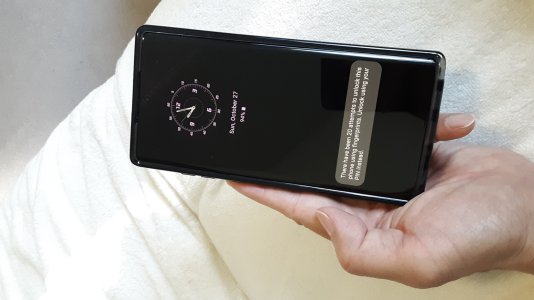
I will start to get the ball rolling. Go ahead and post your screenshot (or picture) showing your number of failed attempts.

Here's mine attached, I have 20 confirmed failed attempts at fingerprint access at one time! Beat that!

What should the prize be for the winner? We'll call it the Biggest Loser Award! Hmmmm....
 

Attachments

  • Note 10 Plus Fingerprint Failure Pic.jpg
    Note 10 Plus Fingerprint Failure Pic.jpg
    461 KB · Views: 69
We should create a new thread, a contest to see how many failed attempts you've had for fingerprint access at one sitting.

I will start to get the ball rolling. Go ahead and post your screenshot (or picture) showing your number of failed attempts.

Here's mine attached, I have 20 confirmed failed attempts at fingerprint access at one time! Beat that!

What should the prize be for the winner? We'll call it the Biggest Loser Award! Hmmmm....
I've got 20 attempt successful in a row lol
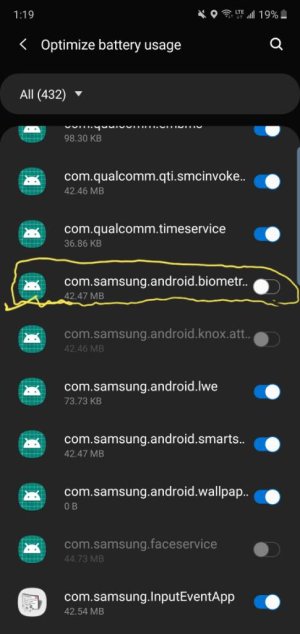
Have you tried taking fingerprint sensor out of battery optimize?
 
I don't see anyone having that many failed attempts in a row. Usually people have failures when they place there finger somewhere that the scanner isn't at.
 
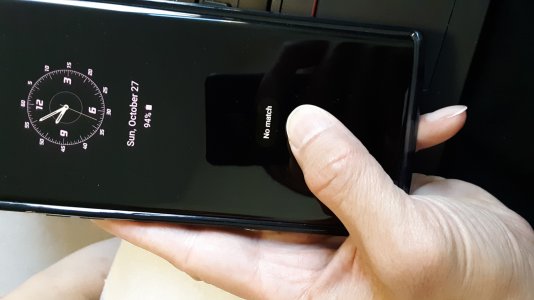
I see these 2 words often every day "No match".

I feel like I'm on Match.com telling me I have no dates for today! Loser...

I got swiped left...or was it right? ...oh wait that's for Bumble.

Looking for love in all the wrong places... :-(
 

Attachments

  • Note 10 Plus No Match pic.jpg
    Note 10 Plus No Match pic.jpg
    461.4 KB · Views: 54
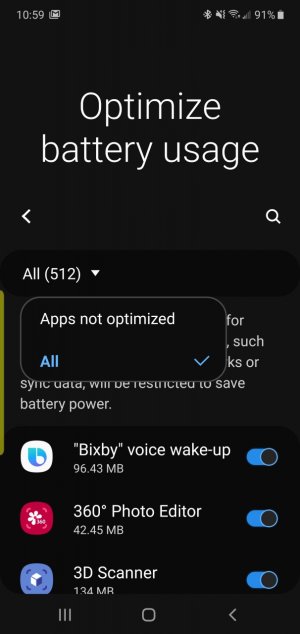
Go to settings type in search bar battery optimized usage then tap on it and look for where I circled in the screenshot and toggle off View attachment 312318

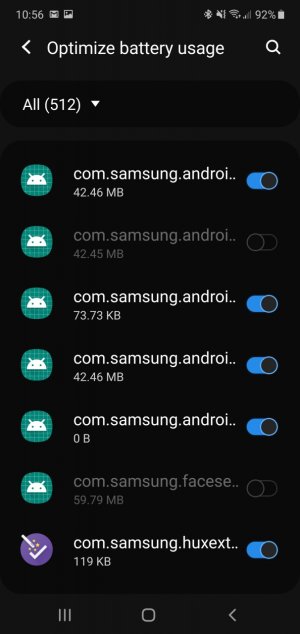
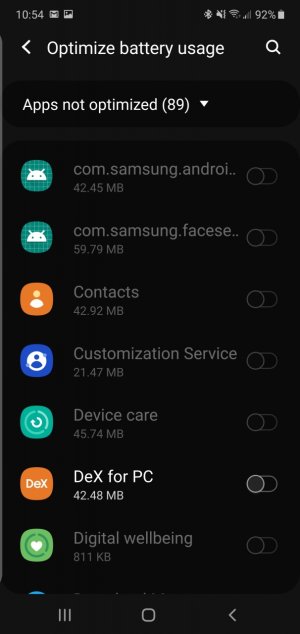
Thank you for the screenshot. I think I found the right item, but not 100% positive because my setting is enabled to show more than 100% screen magnification therefore parts of words at the end get cut off. When I went into the setting you described, I noticed that not all apps were enabled. So I enabled all apps to be optimized. See the 3 screenshots attached. However, even though now all apps are enabled, I'm still having fingerprint access issues and keep getting the "No match" message. So that doesn't seem to work for me.
 

Attachments

  • Settings1pic.jpg
    Settings1pic.jpg
    130.8 KB · Views: 54
  • Settings2pic.jpg
    Settings2pic.jpg
    118.5 KB · Views: 49
  • Settings3pic.jpg
    Settings3pic.jpg
    117.7 KB · Views: 43
Thank you for the screenshot. I think I found the right item, but not 100% positive because my setting is enabled to show more than 100% screen magnification therefore parts of words at the end get cut off. When I went into the setting you described, I noticed that not all apps were enabled. So I enabled all apps to be optimized. See the 3 screenshots attached. However, even though now all apps are enabled, I'm still having fingerprint access issues and keep getting the "No match" message. So that doesn't seem to work for me.
Worth a try , also might try a quick reboot see how it goes .your welcome
 
I've never had more than 1 failed attempt at a time. It doesn't happen all that often either.
 
Worth a try , also might try a quick reboot see how it goes .your welcome

Thanks again, I tried a soft reset, it didn't help any. I have re-registered all my 4 fingers prints at least 7 times over, and just recently the other day, so that's not the answer either.
 
This is why I never have and never will use the fingerprint sensor. :D
Plus I have an irrational fear of someone chopping off my finger and stealing the phone, LOL!! (I watch too many movies).
 
Thanks again, I tried a soft reset, it didn't help any. I have re-registered all my 4 fingers prints at least 7 times over, and just recently the other day, so that's not the answer either.
You using same thumb , maybe try different finger register it it couple times ..what I've seen sometimes different finger works better then a thumb or other fingers
 
Thanks again, I tried a soft reset, it didn't help any. I have re-registered all my 4 fingers prints at least 7 times over, and just recently the other day, so that's not the answer either.
Did you register your fingerprints with freshly washed hands? Sometimes if fingerprints are registered with spotlessly clean hands and one tries when his hands aren't spotlessly clean, or vice versa (if fingerprints were registered when hands weren't spotlessly clean but hands are now spotlessly clean), then errors occur.
 
Thanks for all the various suggestions. Every time I try a new method, it sometimes works for an hour or a day, maybe even a few days. Then the same problem reoccurs. It's so random and unpredictable. Sometimes it works fine at the start of the morning. Then as the day wears on, I start getting the No match or Press harder messages. I have both thumbs and both index fingers registered in all different angles, both flat onto the screen and at the very edge of my finger tips. I get tired seeing those messages of failed attempts and being forced to enter my PIN number. I suppose I should be thankful that this is the only singular problem with my phone, everything else works fine as advertised. I'm on the verge of switching to face recognition 24/7 which appears to work fine. I'm already used to using face recognition on my Microsoft Surface Go laptop which works well through some app called Hello Cortana or Hello Windows or Hello something or other, don't quite remember now. Maybe Samsung might come up with a real update fix in the future.
 
Thank you for the screenshot. I think I found the right item, but not 100% positive because my setting is enabled to show more than 100% screen magnification therefore parts of words at the end get cut off...

As my eyes get older, I can appreciate using larger text. Some tips to overcome this UI problem:

1. Once you reach the list of apps, tap the magnifying glass again. You'll be able to search for the exact app for which you're looking. For example, type "bio" and it will bring up the biometrics app.

2. Turn your phone sideways (landscape). That will give you more screen real estate to see the full names.

3. Use your S Pen. Hover it over anything that has "..." (ellipsis) at the end and it will bring up a tool tip showing the full name.

Hope that helps in the future.

As for the fingerprint sensor issue, the other suggestions you've received are all good advice. I offer two more suggestions: When you register your fingerprint, adjust the angle of your finger/thumb with each press. Rotate at different degrees with each press. This will give the sensor a wider and more complete sample of your print.

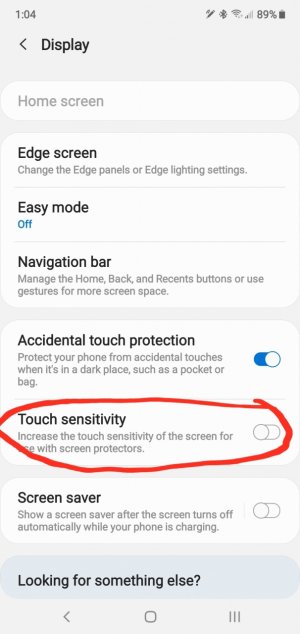
Are you using any kind of screen protector? If so, you might need to turn on the increased sensitivity setting.

If all that fails, it could just be a bad sensor (manufacturer defect). That's least likely, but still possible.
 
As my eyes get older, I can appreciate using larger text. Some tips to overcome this UI problem:

1. Once you reach the list of apps, tap the magnifying glass again. You'll be able to search for the exact app for which you're looking. For example, type "bio" and it will bring up the biometrics app.

2. Turn your phone sideways (landscape). That will give you more screen real estate to see the full names.

3. Use your S Pen. Hover it over anything that has "..." (ellipsis) at the end and it will bring up a tool tip showing the full name.

Hope that helps in the future.

As for the fingerprint sensor issue, the other suggestions you've received are all good advice. I offer two more suggestions: When you register your fingerprint, adjust the angle of your finger/thumb with each press. Rotate at different degrees with each press. This will give the sensor a wider and more complete sample of your print.

Are you using any kind of screen protector? If so, you might need to turn on the increased sensitivity setting.

If all that fails, it could just be a bad sensor (manufacturer defect). That's least likely, but still possible.


Thanks for the info about screen magnification. I don't use any screen protector whatsoever, except whatever the stock OEM thingy that comes with my phone. I've already tried the whole fingers registered at different angles and tips numerous, numerous times. I have not 1, not 2, not 3, but 4 different fingers registered and re-registered and re-registered and re-registered over and over and over and over again ad- nauseam. Truly, I have.
 
Thanks for the info about screen magnification. I don't use any screen protector whatsoever, except whatever the stock OEM thingy that comes with my phone. I've already tried the whole fingers registered at different angles and tips numerous, numerous times. I have not 1, not 2, not 3, but 4 different fingers registered and re-registered and re-registered and re-registered over and over and over and over again ad- nauseam. Truly, I have.

Have you tried increasing the touch sensitivity as I suggested?
Screenshot_20191028-130459_Settings.jpg
 
Yes, I had already tried the Touch sensitivity option a couple weeks ago based on another different thread. At first I thought it worked, which it sort of did for a short time, but later it still was an issue. In addition to not working, I had to disable Touch sensitivity because this caused an additional bonus problem of the phone thinking I was entering the wrong pin and/or fingerprint access. My phone lives in my front trouser pocket, so when I walk around the phone screen kept getting knocked around inside and the phone misinterpreted that to mean failed attempts for entry.
 
Yes, I had already tried the Touch sensitivity option a couple weeks ago based on another different thread. At first I thought it worked, which it sort of did for a short time, but later it still was an issue. In addition to not working, I had to disable Touch sensitivity because this caused an additional bonus problem of the phone thinking I was entering the wrong pin and/or fingerprint access. My phone lives in my front trouser pocket, so when I walk around the phone screen kept getting knocked around inside and the phone misinterpreted that to mean failed attempts for entry.

Okay. Well, I'm out of ideas. It's possible you just have a bad device. Have you considered a warranty replacement?
 

Latest posts

Trending Posts

Members online

Forum statistics

Threads
963,127
Messages
6,992,711
Members
3,164,980
Latest member
RangelS25