After upgrading to Nougat, i can nonlinger view text message notifications

  • Thread starter Thread starter AC Question
  • Start date Start date
A

AC Question

I upgraded to Nougat on my Galaxy S7. Using a Samsung Gear Live 2 watch. Before upgrading, I would receive a notification on the watch for a text message, which I could pull up and read the message, then swipe left and have a choice to reply. Now, it will show "Messages: New messages" notification, but no content and no sender name. It's very similar to having the lock screen set to hide content. Also, now the only option when swiping right is "open on phone". I can't find any options to fix the issue. Because it's similar, I tried setting lock screen notifications to "show content", but that didn't change anything on the watch. I'm using the stock messaging app and would like to continue to use the same
 
I use the gear s3 and I haven't had this issue. Is there an update available for your watch software?
 
I upgraded to Nougat on my Galaxy S7. Using a Samsung Gear Live 2 watch. Before upgrading, I would receive a notification on the watch for a text message, which I could pull up and read the message, then swipe left and have a choice to reply. Now, it will show "Messages: New messages" notification, but no content and no sender name. It's very similar to having the lock screen set to hide content. Also, now the only option when swiping right is "open on phone". I can't find any options to fix the issue. Because it's similar, I tried setting lock screen notifications to "show content", but that didn't change anything on the watch. I'm using the stock messaging app and would like to continue to use the same

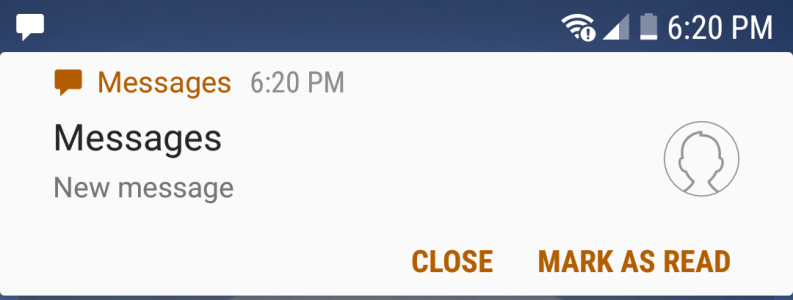
I am using a Samsung Galaxy S7 smartphone, and recently upgraded to Nougat as well. I am having the same issue with how message notifications are displayed, and unfortunately, this is the only place I've seen this issue mentioned.

Attached should be a screenshot showing what we see. Again, this was not an issue before the Nougat update. Any actual help/fix would be appreciated!
 

Attachments

  • 20170305_182526.png
    20170305_182526.png
    54.1 KB · Views: 19
I was having the same problem. If you go to messages, click on the elipsis, go to settings, then notifications, make sure your preview is turned on. It took me two days of being extremely frustrated before my hubby figured it out :)
Hope that helps you guys!!
 
I was having the same problem. If you go to messages, click on the elipsis, go to settings, then notifications, make sure your preview is turned on. It took me two days of being extremely frustrated before my hubby figured it out :)
Hope that helps you guys!!

Here's my problem....you know how before the new update when you would get a message and it showed up at the top of the screen for a few seconds and then disappear? It doesn't do that anymore on my phone. When someone sends me a text message it just shows the messages icon with a 1. Is there a way to make messages show up at the top of the screen like before?
 

Trending Posts

Members online

Forum statistics

Threads
963,283
Messages
6,992,999
Members
3,164,996
Latest member
lilyo7788
