
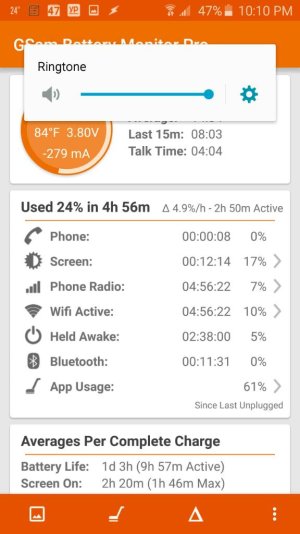
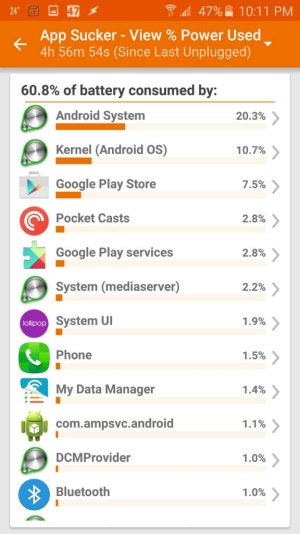
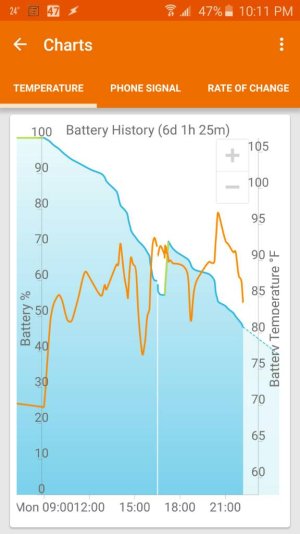
I've got a 64gb AT&T S6 which seems to spend a lot of time busy in Android System and Google Play Services. I'm seeing stuff like after 7.5 hrs (battery 57%) that Google Play Services has kept the CPU busy for 12.5 minutes and held it awake for 32min. Android System has consumed 53 minutes and kept awake 21 minutes. SOT is 42 minutes. Sometimes the power draw is enough to make the phone feel warm in my pocket, around 90-100F.
It just seems like it spends a lot of time in AS and Google Play Services even when I'm doing nothing with the device. They are almost always the highest drainers, but even though I use the device little it often ends up at 50-60% battery at the end of 12-14 hours. I usually have 2 bars of cell connection, GSAM says medium strength most of the time.
This phone was freshly set up about 3 weeks ago, and was updated with all OTAs before being factory reset for the last time. So no OTA installed since the last reset.
Since this is an AT&T phone I have no access to the "optimization" tools Samsung released.
I've already followed S6 optimization advice as far as disabling bloat and reducing power drain.
I'm looking for ideas as to how to figure out how to find what is causing the OS to drain power.
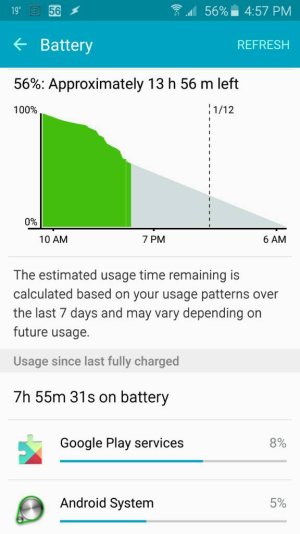
It just seems like it spends a lot of time in AS and Google Play Services even when I'm doing nothing with the device. They are almost always the highest drainers, but even though I use the device little it often ends up at 50-60% battery at the end of 12-14 hours. I usually have 2 bars of cell connection, GSAM says medium strength most of the time.
This phone was freshly set up about 3 weeks ago, and was updated with all OTAs before being factory reset for the last time. So no OTA installed since the last reset.
Since this is an AT&T phone I have no access to the "optimization" tools Samsung released.
I've already followed S6 optimization advice as far as disabling bloat and reducing power drain.
I'm looking for ideas as to how to figure out how to find what is causing the OS to drain power.





 Facebook
 Twitter
 Instagram