Can I turn off Lock Screen Notifications and still allow notifications when unlocked?

dmarcus48

Well-known member
Mar 21, 2013
76
0
0
I have certain apps "i.e. quick change keyboards", I like to have the notifications for it shown on my notification screen, but I do not want to see it on my lock screen. Other apps I DO want to see on the lock screen.

Anyway to control this?

TIA

Dave
 
I have certain apps "i.e. quick change keyboards", I like to have the notifications for it shown on my notification screen, but I do not want to see it on my lock screen. Other apps I DO want to see on the lock screen.

Anyway to control this?

TIA

Dave

Welcome to Android Central!

Unfortunately you can't stop one app from giving a notification on the lock screen. You can turn off the notification for the app but then you wouldn't get any.

Try giving Dynamic Notification a look. I have been using it for a long time now. I have my lock screen notifications turned off.

https://forums.androidcentral.com/e...greatbytes.activenotifications&token=K9j1RSaI
 
Welcome to Android Central!

Unfortunately you can't stop one app from giving a notification on the lock screen. You can turn off the notification for the app but then you wouldn't get any.

Try giving Dynamic Notification a look. I have been using it for a long time now. I have my lock screen notifications turned off.

https://forums.androidcentral.com/e...greatbytes.activenotifications&token=p4xO9-Mn
That's not true there is a way.

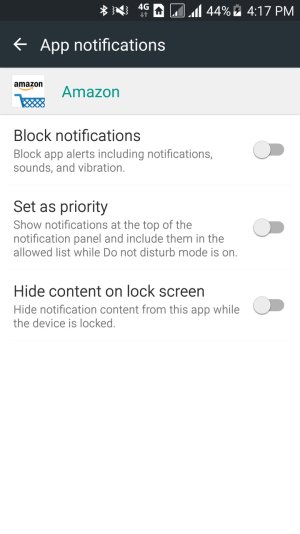
One if you don't want any notification from a specific app to show on your locked screen. You can go to settings - sound and notification then app notification and press on the application u don't want to show. In ur case all of them.

Two you can hide sensetive content from the same settings location.

Good luck

Sent from my SM-G920F using Tapatalk
 
That's not true there is a way.

One if you don't want any notification from a specific app to show on your locked screen. You can go to settings - sound and notification then app notification and press on the application u don't want to show. In ur case all of them.

Two you can hide sensetive content from the same settings location.

Good luck

Sent from my SM-G920F using Tapatalk

You do realize they want every notification to show but "quick change keyboards" on the lock screen. If you go in to the settings you are referring to yes you can block the notification in there but that blocks it from even showing up on the phone not just the lock screen.
 
You do realize they want every notification to show but "quick change keyboards" on the lock screen. If you go in to the settings you are referring to yes you can block the notification in there but that blocks it from even showing up on the phone not just the lock screen.
I do realize that n i hope u realize that u don't know what you are talking. Refer to the picture and toggle the last switch. uploadfromtaptalk1435670372456.jpg

Sent from my SM-G920F using Tapatalk
 
I do realize that n i hope u realize that u don't know what you are talking. Refer to the picture and toggle the last switch.

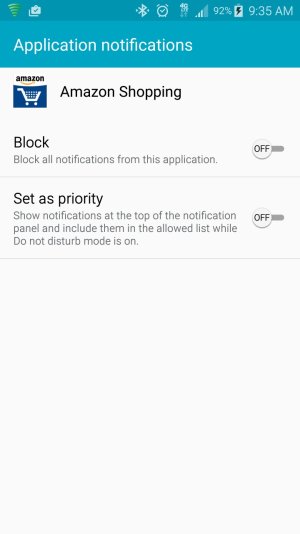
I stand corrected sir, I do not have the lock screen option on my Note 4. I only have the top two on my phone so I assumed that they were all setup the same. My apologies.

Screenshot_2015-06-30-09-35-27.jpg
 

Trending Posts

Forum statistics

Threads
963,325
Messages
6,993,076
Members
3,164,999
Latest member
vickyy