Currents and Play Music Constantly Running?

goldeneye7

Member
Sep 12, 2012
8
0
0
For the last few days, I've noticed that Google Play Music and Google Currents are constantly running when I look in Settings/Apps. I've never used either of these apps - is there something I'm missing?

Stopping them only works temporarily, as they pop up again when I restart the phone. I've also turned off background syncing for Currents, but it still shows up as a running app.

I'm assuming this is activity I shouldn't be worried about, but I'd still like to get to the bottom of it. Thanks very much in advance!

FYI I have a Galaxy Nexus w/ 4.2.2
 
For the last few days, I've noticed that Google Play Music and Google Currents are constantly running when I look in Settings/Apps. I've never used either of these apps - is there something I'm missing?

Stopping them only works temporarily, as they pop up again when I restart the phone. I've also turned off background syncing for Currents, but it still shows up as a running app.

I'm assuming this is activity I shouldn't be worried about, but I'd still like to get to the bottom of it. Thanks very much in advance!

FYI I have a Galaxy Nexus w/ 4.2.2
You can disable those apps. Settings>Application MAnager>swipe over to all apps, and scroll down to specific app. Tap on it, and there should be two buttons, Force Stop and Disable. Disable may be replaced by Uninstall Updates. Tap that then check again to Disable.
 
You can disable those apps. Settings>Application MAnager>swipe over to all apps, and scroll down to specific app. Tap on it, and there should be two buttons, Force Stop and Disable. Disable may be replaced by Uninstall Updates. Tap that then check again to Disable.

Yes, thanks-- I did consider disabling them (and it does require uninstalling updates and resetting the app to factory version)--I guess I was wondering if I should even bother, or are those apps supposed to be doing that because of some recent update? So far, Im not seeing a huge memory hog thing happening, just curious as to why they're there...
 
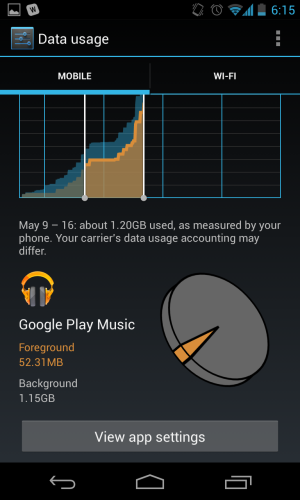
My recent experience with the new Play Music is that it is using a **** ton of data. Anyone have similar experience?


Screenshot_2013-05-16-18-15-51.png
 
My recent experience with the new Play Music is that it is using a **** ton of data. Anyone have similar experience?


View attachment 68456

Yup, same here. Ton of data, and sucks up some juice as well. I'm thinking it's all the cacheing going on in the background, but I have all of my settings for cachring turned off (except over WiFi). If this doesn't improve, I may have to go back to Pandora.

Posted via Android Central App
 
Wow! I've mostly been on wifi since I posted, so I haven't noticed the battery/data usage... but it's still there in the running apps, nonetheless...
 
I use Google Play Music all the time, as my only music player, so I don't want to disable the app.

I looked at the settings, there is nothing in the download queue, and I disabled "Automatically cache" and even enabled "Download via Wi-Fi only", but it still requires a "Force Stop" to cease running in the background. What can I do?
 
My note is also experiencing the same issue. I've forced it to stop and uninstalled all updates but as soon as I reboot it updates and turns itself back on...frustrated.
 
So...any update on this? More than a week since I last posted.

Sorry, first time I've seen this thread.

Your menus may be slightly differently, but generally this is how I get there...

Settings>Google (under Accounts,) > (your e-mail) (under accounts) - From here you can uncheck currents (strongly recommended, this is a battery issue for many JB devices) and uncheck Google Play Music. You can sync it manually by opening the app, etc.

This should prevent it from downloading/checking for data all the time, but the app will still be running in the background. It's not actually a bad thing for it to be running as long as it's not burning data, basically that just allows it to open faster, etc.
 
I have the same issue with play music on my Note 2. I never use it so I just un installed the updates. I also set it so it didn't auto update that fixed music from running in the background all the time.

I also have it unchecked. One thing I do notice is ever since Google I/O Google services has been using allot of battery. I never used to even see it in my battery list now it's always in the top 3.

Anyone else have this issue?

Sent from my SGH-T889 using Tapatalk 2
 

Forum statistics

Threads
962,649
Messages
6,991,244
Members
3,164,893
Latest member
BennyHuyghe
