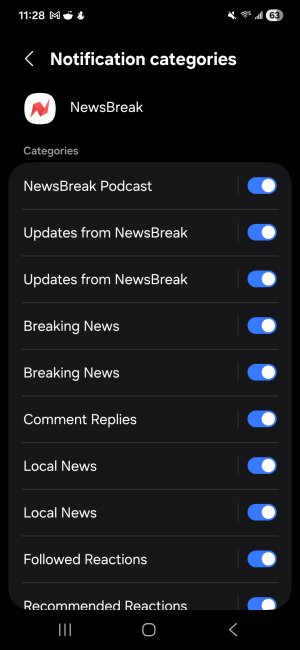
Question Duplicate notification categories for Newsbreak App?

ricardoburnsy

Well-known member
May 29, 2025
120
7
18
1000063383.jpg
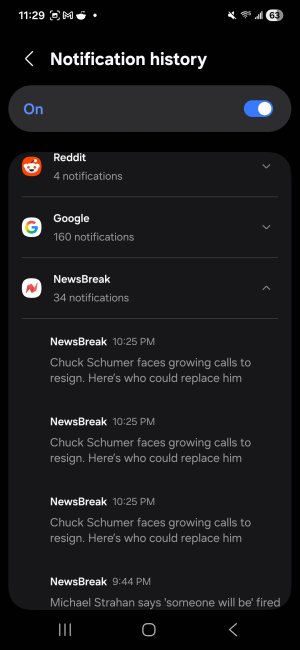
Why when I go into Newsbreak app notifications categories, some of them are duplicated like local news? The second image shows when i get a news notifications it shows it three times. 1000063385.jpg
 
Are you using Secure Folder? I don't believe this is the type of app that would work with Dual Messenger but are you using Dual Messenger?

Are you using any beta version apps?

Do you have multiple accounts with News Break?

If you turn off every other tick, does that result in only one notification?

Has it been this way since you got the app, or did it change?

Since this issue only appears to be affecting this one app, we'll start there. Let's clear the app cache. Settings>Applications>News Break>Force Stop>Storage>Clear Cache/Clear Data. Try the cache first and then check if the app still has duplicate categories. If clearing the cache doesn't do it, clear the app data. This will reset any settings that you may have changed from default, and will cause you to sign-in again if this app requires that. If neither of those get rid of the duplicate categories, I would try a fresh install. Uninstall the app completely and then install it again. If there was a patch or update that caused this sometimes a fresh install can correct bugs.

Let us know what you find and we'll offer more advice.
 
  • Like
Reactions: Laura Knotek
Could those be stories on the same topic but from different sources? For example, could they be from CNN, Fox News, AP?
No same topic from same source. I only get one push notification for the news notification. But when I go into settings app and see notifications history shows it three times for some reason.
 
Are you using Secure Folder? I don't believe this is the type of app that would work with Dual Messenger but are you using Dual Messenger?

Are you using any beta version apps?

Do you have multiple accounts with News Break?

If you turn off every other tick, does that result in only one notification?

Has it been this way since you got the app, or did it change?

Since this issue only appears to be affecting this one app, we'll start there. Let's clear the app cache. Settings>Applications>News Break>Force Stop>Storage>Clear Cache/Clear Data. Try the cache first and then check if the app still has duplicate categories. If clearing the cache doesn't do it, clear the app data. This will reset any settings that you may have changed from default, and will cause you to sign-in again if this app requires that. If neither of those get rid of the duplicate categories, I would try a fresh install. Uninstall the app completely and then install it again. If there was a patch or update that caused this sometimes a fresh install can correct bugs.

Let us know what you find and we'll offer more advice.
I use secure folder but not for newsbreak. I only have one account. Tried uninstalling, still shows it. Tried clearing cache and data as well.
 
While you may not be using Secure Folder for News Break you may find that any new apps installed after activating SF get added to its list automatically. I've had to remove several apps myself because of this, so even though you're not using this app in SF if it appears there this could have an effect.

What about the other questions?
 
  • Like
Reactions: Laura Knotek
While you may not be using Secure Folder for News Break you may find that any new apps installed after activating SF get added to its list automatically. I've had to remove several apps myself because of this, so even though you're not using this app in SF if it appears there this could have an effect.

What about the other questions?
I fixed it by reinstalling app.
 

Members online

Forum statistics

Threads
959,779
Messages
6,980,179
Members
3,164,305
Latest member
krechbkk
