email notifications

steveinil

Well-known member
Feb 17, 2012
487
4
0
ok for whatever reason my notifications wont stop i have the sound set to silent but viberate but i keep getting my notification note when i get an email using the yahoo mail app and gmail. i have restarted the phone a few times completely powered it off a few times no dice both ways anyone else having this issue?
 
I use the stock email app for my work, hotmail, and a home email account. For all of those I have the "Postman" chime set for notification, and vibrate turned off. When I use the main sound setting on the phone and switch to either mute or vibrate mode, I do not get any sound or vibration when emails come in to those email accounts.

I also use the Gmail app for a Gmail account. Although I have similar settings ("Postman" sound notification but the "vibrate" box in the gmail notifications settings is NOT checked), I still get a vibrate notification (but no sound) when the phone's main sound setting is set to "vibrate." When the phone is set to "mute," I do not get either sound or vibration when a gmail arrives.

You might want to try using the stock email app for your yahoo and gmail accounts and see what happens.
 
yeah i may try that it just stinks when it goes off at 1 am or whatever for some crap email from kmart or cabelas or whatever lol
 
You could see whether setting up Blocking Mode for nighttime hours kills these notifications during the hours you specify. That won't help during the day if you are wanting to completely silence all notifications by turning your phone to "vibrate," but it could be better than nothing.
 
You could see whether setting up Blocking Mode for nighttime hours kills these notifications during the hours you specify. That won't help during the day if you are wanting to completely silence all notifications by turning your phone to "vibrate," but it could be better than nothing.

not a bad idea... what i did last night was turned the silenced my notifications in sound settings just turned it all the way down worked great but yeah still drives me nuts during the day but one random wiistl here and there inst a bid deal during the day lol
 
You could see whether setting up Blocking Mode for nighttime hours kills these notifications during the hours you specify. That won't help during the day if you are wanting to completely silence all notifications by turning your phone to "vibrate," but it could be better than nothing.

I would recommend this as well.
 
do you know if i can keep certain people "on" wife kids boss type deal?

For calls? You can. You just set them up as allowed contacts so that way it will block all things except from them (like in case of an emergency they can call and the phone will ring) :).
 
For calls? You can. You just set them up as allowed contacts so that way it will block all things except from them (like in case of an emergency they can call and the phone will ring) :).

ok cool thanks on my galaxy s 4 i never could figure out how to do that lol ill give that a shot tonight.
 
ok cool thanks on my galaxy s 4 i never could figure out how to do that lol ill give that a shot tonight.

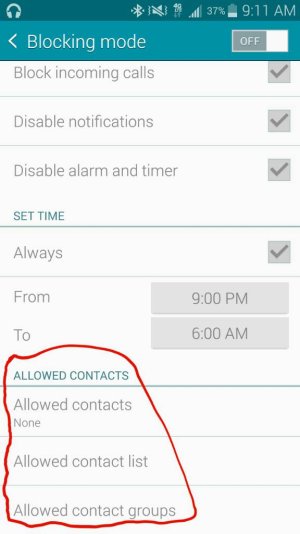
When you enable blocking mode.. Setup the times then scroll to the bottom. You can set them up under the "Allowed Contacts" section. :).
 

Attachments

  • 1414674735644.jpg
    1414674735644.jpg
    46.2 KB · Views: 6

Latest posts

Trending Posts

Forum statistics

Threads
961,185
Messages
6,985,286
Members
3,164,672
Latest member
LostMadSoul