Feb update ATT/S25U. I can't clear cache in Recovery Mode

Richard_Indy

Well-known member
Dec 11, 2017
68
68
18
I always like to clear the phones cache after updating my S25U.

I received the February update:
S938USQS8BYLX.

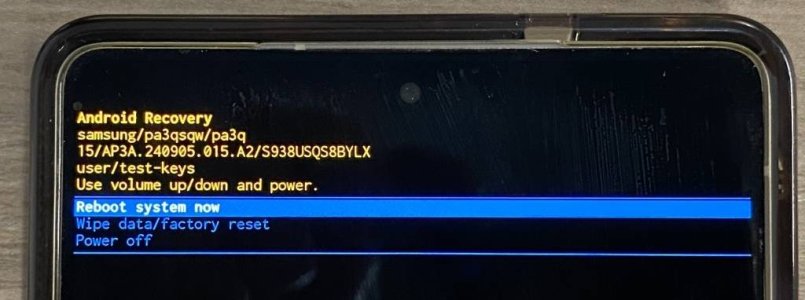
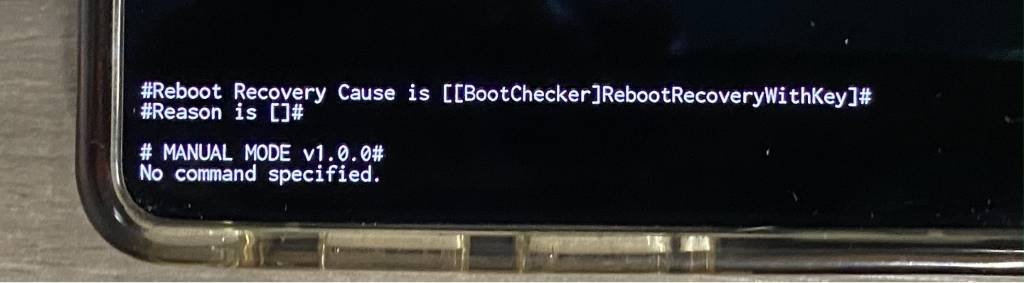
After the initial reboot, I turned off the phone to then boot into recovery mode to clear it's cache and I was greeted with the attached recovery screen. There is no longer, the option to clear cache. View attachment 373424Screenshot_20260227_061528_Photos.jpg
 
  • Like
Reactions: rbird2
I always like to clear the phones cache after updating my S25U.

I received the February update:
S938USQS8BYLX.

After the initial reboot, I turned off the phone to then boot into recovery mode to clear it's cache and I was greeted with the attached recovery screen. There is no longer, the option to clear cache. View attachment 373424View attachment 373425
Sorry here is the top of the recovery screenScreenshot_20260227_061513_Photos.jpg
 
  • Like
Reactions: rbird2
Just found this link from a Samsung Community:


and on SammyGuru:

 
Last edited:
I'm on beta 8.5 for my s25u and they have removed it , hopefully just a glitch on Samsung end and we get it back .
 
Thinking about this for a minute it makes sense they might do away with it as most Android with A/B partition don't have an option like we use to for clearing cache but I'm curious why no ADB option my Pixel has it still.

My Fold 7 also has deleted this
 
Last edited:
  • Like
Reactions: notforhire

Trending Posts

Members online

Forum statistics

Threads
963,302
Messages
6,993,028
Members
3,164,998
Latest member
Ashok Dharshan