help with a notification panel problem on an S7

  • Thread starter Thread starter AC Question
  • Start date Start date
A

AC Question

Hello everybody, got a new Galaxy S7 and I have a "problem" with it, looked everywhere and googled everything about it, or maybe it's my fault for not knowing how to express corectly .. maybe you guys understand and can help out :
I put a PIN code and fingerprints passwords on the phone, and when it's locked, if I swipe down on the screen the notification panel ( even without notifications on it , wifi / sound/ power saving/ location/ airplane mode ) swipes down... the question is how can I prevent that from happening when the phone is locked ? I dont want to leave my phone at work on my desk and people can "mess around" with that. Thank you in advance.
 
Go to: Settings > Lock screen and security > Notifications on lock screen > Content on lock screen: set to "Do not show notifications"
 
It's not working, what that does it not show me notifications at all, what I basically want to do is block the pannel with the wifi/sound/location to appear if you swipe down when the phone is locked
 
If the phone is locked, you can see what the status of some settings are like wifi, bluetooth, etc, but you can't change them without unlocking the phone.
 
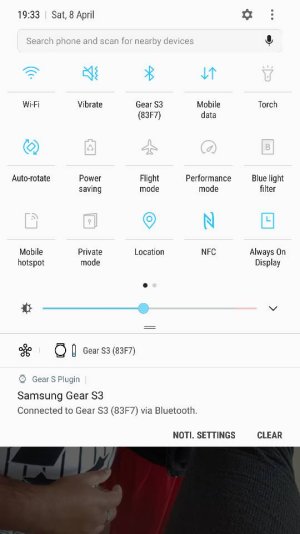
I think you're referring to the extending quick settings which appears when you swipe down from the top of the screen.

This is a new feature on Nougat where this comes down by default and i don't believe can be switched off. This is what i think you're referring to.
 

Attachments

  • 4840.jpg
    4840.jpg
    39 KB · Views: 13
Interesting, some of them can indeed be changed. The only one that would be a problem to me would be the flashlight, by which a malicious person could run your battery down rapidly. I guess if I were worried about someone that would do that, I would also consider that person a threat to just steal the phone, so I would not leave the phone unattended where such a person would find it.
 
Yes, you guys are right, only some of them can be changed even if the phone is locked, it will ask you for the passcode after you press on them for the change to happen, but what I wanted to know was if there is any setting at all that prevents you from swipeing does settings at all when the phone is locked, guess there is not.. Thanks everybody for the quick responce and help.
 

Trending Posts

Members online

Forum statistics

Threads
961,004
Messages
6,984,517
Members
3,164,625
Latest member
babarsaeedfari