How can I add/remove a widget to any of my home pages?

sweetiepy

New member
Jul 30, 2012
2
0
0
I'm not a newbie, but can figure this out

Previously had an S3 so am not completely unfamiliar with Android and Samsung phones. I cannot figure out how to add or remove a widget to any of my home pages. Anywhere there is room for an extra shortcut or widget, there is a fairly large + sign. Can add shortcuts, no prob. Shortcuts will also not move by pressing them and dragging. These issues also happen when I hit the Edit button. Any clues?
 
Re: I'm not a newbie, but can figure this out

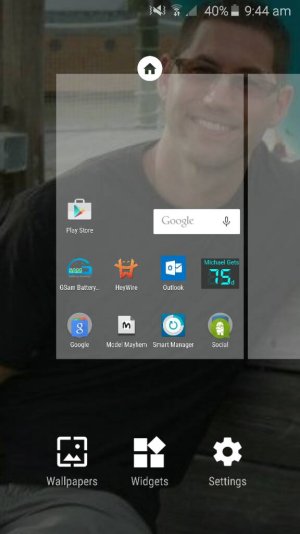
This is how you do it on Nova. You long press the Home screen and this menu pops up. I'm not sure how you do it on TW because I pretty much went to Nova straight away but maybe it is something similar
 

Attachments

  • 1434325580389.jpg
    1434325580389.jpg
    38.5 KB · Views: 18
Re: I'm not a newbie, but can figure this out

Thanks for your response. That is the method all the websites and indeed the Start Guide say to use; it also worked on my S3. It doesn't work on my S6. Pressing and holding a + key does nothing (unless I move my finger on the slick glass, whereas I end up adding an unwanted screen.) I have no areas that don't have a +.
 
Re: I'm not a newbie, but can figure this out

Sounds like you're phone is in "Easy Mode". Go to settings, scroll to easy mode, tap it and on the resulting screen select Standard Mode.
 
Re: I'm not a newbie, but can figure this out

Long press on a blank space on one of the screens, tap the widgets icon at the bottom to bring up the widgets list. If you see a little white > that means there are multiple versions of that widget, tapping it will open the window with the other versions. Once you find the one you want long press on it and the widget list will disappear, keep holding down and drag the widget to a spot where there is space for it, it will show an outline of the space it is going to take, once positioned release your finger.

Edit: I believe Mhunter is correct, you are in easy mode.
 
Re: I'm not a newbie, but can figure this out

Try Settings/Personal/Easy Mode. Make sure it is on Standard Mode.

If in Standard Mode, use the pinch gesture on the homescreen. The widgets button should appear.
 

Trending Posts

Members online

Forum statistics

Threads
963,206
Messages
6,992,842
Members
3,164,988
Latest member
r3dpuk3
