

- May 28, 2011
- 1,544
- 269
- 83
I was playing around with Good Lock and now, all of a sudden, when I tap open or recent apps (the far left button on the bottom of the screen) I get these circled things on the bottom of the recent apps screen. Even when I then tap "close all" they remain there.
I uninstalled Good Lock thinking that was the problem but they still show up on the bottom of the recent apps screen even if there are no other recent apps.
How do I get rid of this?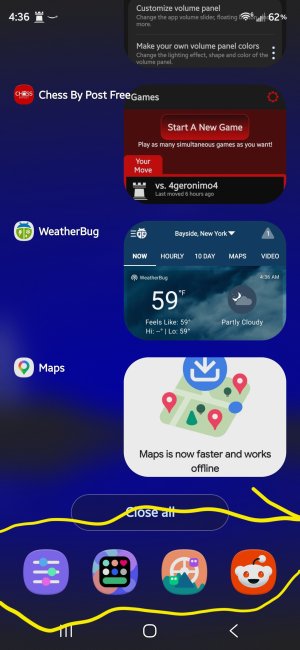
I uninstalled Good Lock thinking that was the problem but they still show up on the bottom of the recent apps screen even if there are no other recent apps.
How do I get rid of this?



 Facebook
 Twitter
 Instagram