How to add a picture to thread

willdsl

Member
Jul 26, 2013
8
0
0
New to posting on forums. I don't know how to add a picture to a thread I am posting. I see the "Insert Image" icon. When I click on it I see I need a ("URL"?). I am very Inexperienced to this world. Would someone please help inform me? :confused:
Thank you.
 
Hello,

To add a picture its not too hard.

Yes there is the Insert Image icon which asks for an URL which is useful if you have your picture/image stored on something like Google+, Dropbox, Photobucket, etc where you are provided a URL to link to the image.

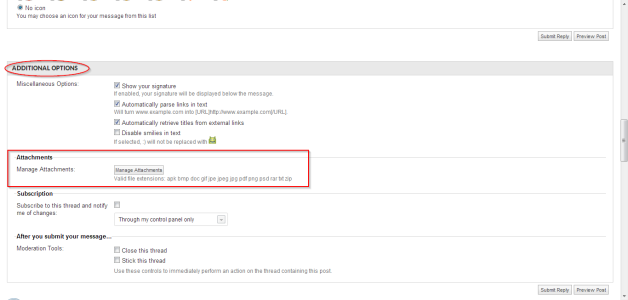
Otherwise if you look at the bottom of the post editor, lower right hand corner you will see an option that says GO ADVANCED. Click on that and it will pull up the post editor in a more advanced form with other options.

Scroll further down and you will see Additional Options/Attachments/Manage Attachments/

Click on that and you can then upload any image or allowed file type directly from your computer or device to the post/forum.

File Attachment Manager.png
 
Are we able to add pictures from a cell phone as well? I have a Note 7 and would like to add pictures to share in thr forum. Can i do it rom my phone or do it on a laptop?
 
Where is the process going wrong? Can you get as far as choosing the image?
 
I can get as far s choosing the image. But once i select the image, it says "cannot upload image"
 
Have you tried it on various different images? Are they all .jpg format?
 
How do I go about re-sizing a screenshot from my phone? I was attempting to upload the pic thru my phone on thr AC app.
 
Off site storage option, (flickr, Photobucket etc) then link the image URL back here..

Don't always trust those links they provide you with also.. Here's an example:

<a data-flickr-embed="true" href="https://www.flickr.com/photos/t0astervan/29233463013/in/datetaken-public/" title="Screenshot_2016-09-14-08-57-07"><img src="https://c6.staticflickr.com/9/8152/29233463013_217051de20_b.jpg" width="480" height="854" alt="Screenshot_2016-09-14-08-57-07"></a><script async src="//embedr.flickr.com/assets/client-code.js" charset="utf-8"></script>

Note the image URL

Code:
https://c6.staticflickr.com/9/8152/29233463013_217051de20_b.jpg

Taking this code, click the small picture frame within the editing tool tray with in this text field and add the url..

29233463013_217051de20_b.jpg
 
So should I try it from a computer and not thru the AC app? I originally went thru the app and was not able to upload the pic.
 
That's your call.. so if there is an issue with AC app.. then techs need to walk you through it.. I prefer the relinking method as mentioned above.
 
So should I try it from a computer and not thru the AC app? I originally went thru the app and was not able to upload the pic.
You could try with the Android Central Forums app, in general much better to access the forums than the main AC app.
 
I can add a picture if from the AC app if i create a new thread but am not able to add one if I am in a topic. Like the topic for "Note 7 screenshots"
 
Something worth looking into.. I've found that while using your device simply login (no app) to the AC or any other site.. The device should work the same as if you you're using an app.. except the image/screen might be larger.. Although I'm on the computer now.. once in a while I log the web site via the LG rebel.. takes some doing.. but I can view my PM etc Doesn't mean I'll answer them.. just means I can check to see if I need to log online to answer questions. in other words.. don't always trust the app..
 

Forum statistics

Threads
960,243
Messages
6,981,584
Members
3,164,446
Latest member
brianatem32