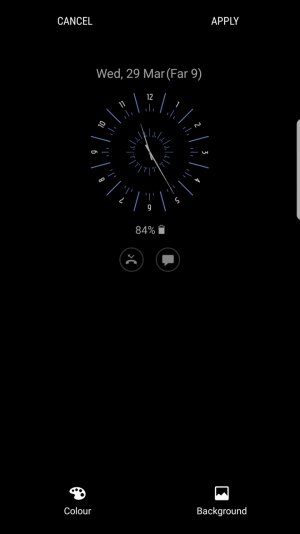
On the Always On Display, what is (Far 1)?

  • Thread starter Thread starter AC Question
  • Start date Start date
A

AC Question

My Samsung galaxy s7 edge updated 3 days ago to android nougat 7.0. On the always on display, (Far 1) appears. Nobody from Samsung is able to find out about the problem, which is weird. I have searched a lot on internet and can't find any solution to remove it.
Please assist.
 

Attachments

  • Screenshot_20170329-232547.jpg
    Screenshot_20170329-232547.jpg
    50.9 KB · Views: 52
What is the 'Cancel' 'Apply' for? Don't see that on mine. Is the screen waiting for some input and causing the Far 9? Also, as it's appended to the date, have you checked the location/time zone settings? I also don't have Colour and Background on my AOD screen, which again leads me to think the phone is waiting for something. Have you tried another type of clock?
 
I remember seeing this question a while back. I am still waiting to find out the answer as I am just curious:-)
 
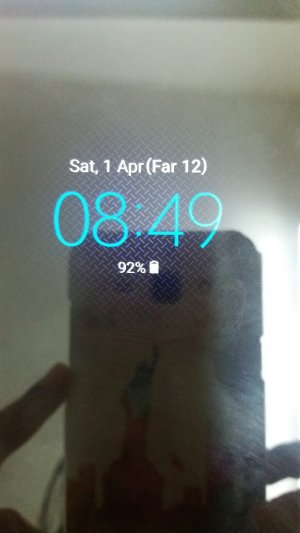
I attach a screenshot of what our feiend asked. Got tge very same question and im very curious whats this FAR thing ...

Does it still show up when you apply that display, and actually turn the screen off? Or only in the setup screen shown? Does it always say "Far 9", or does it ever change from one day to the next? Does it display if you choose one of the other display options?

Those who see this, is your phone set to use U.S. English as a language, or something different?

Just trying to come up with some ideas. This doesn't show up on my U.S. spec phone.
 
Does it still show up when you apply that display, and actually turn the screen off? Or only in the setup screen shown? Does it always say "Far 9", or does it ever change from one day to the next? Does it display if you choose one of the other display options?

Those who see this, is your phone set to use U.S. English as a language, or something different?

Just trying to come up with some ideas. This doesn't show up on my U.S. spec phone.

Valid questions my friend
1) yes of course this is I see all
2) today it says Far 10 so it counts the days
3) yes it applies to all other display option (and it pissed me off THAT much)
4) the languages I use are a) English (UK) and b) Greek.

Please take into consideration that this appeared after the update to NOUGAT approx 10 days ago. That didn't show up on the previous installed version of Android.
 
Strange. Does it go away if you set the language to U.S. English? (I realize that's not a solution, just a test.)
 
Strange. Does it go away if you set the language to U.S. English? (I realize that's not a solution, just a test.)
I was wondering the same thing if it has to do more with a language setting than a clock or screen setting.

I did a quick search and couldn't come up with a language that would abbreviate March as Far but could it be showing it in two languages?
 
Hi everybody and thanks for the assistance on this.
I changed the language to English (US), iso English (UK), and Far is still there :/
Did not take out the Greek language cause it's irrelevant to this Far, (makes no sense in Greek I mean).
What I wonder is IF tomorrow that we change month (April) if this Far will be something else (by the way today that it's the 31st Mar the Far has got the 11th). I wonder if it's another count of calendar ...
 
Hi everybody and thanks for the assistance on this.
I changed the language to English (US), iso English (UK), and Far is still there :/
Did not take out the Greek language cause it's irrelevant to this Far, (makes no sense in Greek I mean).
What I wonder is IF tomorrow that we change month (April) if this Far will be something else (by the way today that it's the 31st Mar the Far has got the 11th). I wonder if it's another count of calendar ...
I have been wanting to know what all this means for a while now. If you figure it out or get anymore information please let us know;-) Thanx!
 
Far=Farvardin
First month of Hijri shamsi year in calendar

Welcome to Android Central, and BRILLIANT!
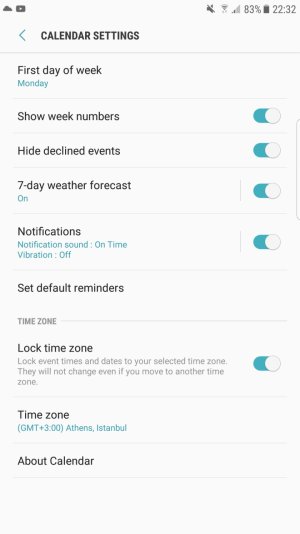
@Wolf359sm, open Calendar, tap Menu>Settings>General, and look for an Alternate Calendar setting. You will most likely see the Hijri calendar selected -- unselect it.
 
Hi Farzin and B. Diddy.
You shed a lot of light. Though I can't change it from the calendar settings menu (take a look at the screenshot), it must be from somewhere else that I will continue searching. And your input makes me a bit suspicious and I hope that it's not because of the "Black Onyx" S7 version that I'm holding (that wasn't the case on the previous android version).

I'm grateful for your assistance. Thank you. I will let you know if I manage to change this and from where.
 

Attachments

  • Screenshot_20170331-223215.jpg
    Screenshot_20170331-223215.jpg
    103.2 KB · Views: 26
Are there any other menus in the Calendar app, or is that all you see? Also, do you have any other calendar apps installed (like the Google Calendar app)?
 
Wolf359sm, I can't seem to find it either and my calendar is setup exactly like your screenshot......

Looking forward for one of us to find the right place....
 

Trending Posts

Members online

Forum statistics

Threads
961,179
Messages
6,985,261
Members
3,164,671
Latest member
majifats