Is this something new with pie? Because on the previous build you were able to do this it's just buried deep in the settings and I can't find it. I think I remember it was in a weird location within the settings I'll have to go back through my notifications and see if I can find it from months ago.
One 'trick' to AVOID is the option to 'reduce animations' under advanced features. I tried this (under the advice of some youtube guru) and it makes scrolling through recent apps painfully slow. Leave this setting off.
One 'trick' to AVOID is the option to 'reduce animations' under advanced features. I tried this (under the advice of some youtube guru) and it makes scrolling through recent apps painfully slow. Leave this setting off.
One 'trick' to AVOID is the option to 'reduce animations' under advanced features. I tried this (under the advice of some youtube guru) and it makes scrolling through recent apps painfully slow. Leave this setting off.
Since I turned that feature on first thing, I didn't even realize the impact on scrolling through recent apps. But completely different for me as well. With animations reduced, pretty much goes one app at a time, whereas without feature turned on, a continuous scroll.
I must not be using the right terminology, it's the clock in the upper bar not in the lock screen that I'd like to change. I used to use Swift Installer for this but it doesn't seem to work on Pie.
I read someplace on another Note 9 forum that the reason that the clock was moved from one side to the other was because Pie is sent out to a multitude of brands of phones and some of them use "The Notch". The Clock was moved to the left to prevent all the information being packed on the right side. Beats me why someone would want a notch in their screen. Oh well.
some carrier have in settings connection a feature called download booster downloads apps and large files with wifi/LTE together for faster downloads just make sure you have enough data plan
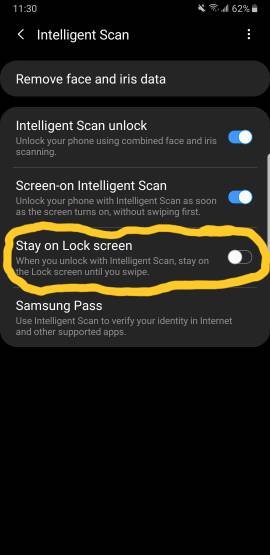
Intelligent Scan
has the option after using iris to swipe to see your notifications before going into home , similar to iPhone face I'd swipe
also turn of unlock animations
Intelligent Scan
has the option after using iris to swipe to see your notifications before going into home , similar to iPhone face I'd swipe
also turn of unlock animations







 Facebook
 Twitter
 Instagram