Samsung classic watch 6

loafty

Member
Feb 28, 2024
7
2
3
Having trouble with downloaded ringtones. They are on the watch in ringtones when select 1 it plays BUT when someone rings the ringtone wont play, i have download a couple and all are the same.
Does anyone know why this is happening & if so does anyone know how to get one to work.
Samsung Australia are no help & haven't got a clue.
Hopefully someone can help me please.
 
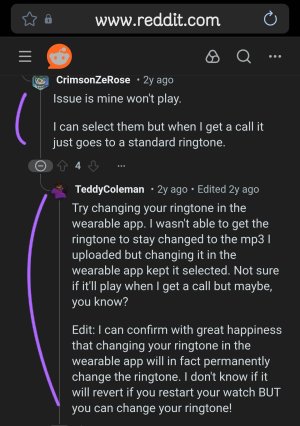
I haven't tried a custom ringtone on my Galaxy Watch 6 Classic, but I found a post on Reddit claiming that setting the ringtone from the wearable app worked.

If that doesn't help, maybe try wiping the cache partition on your watch & give it another shot. The last watch update caused my W6Classic to lose some settings. I had to wipe the cache partition to improve the watch performance.

Screenshot_20260208_195045_Samsung Internet.jpg
 
I haven't tried a custom ringtone on my Galaxy Watch 6 Classic, but I found a post on Reddit claiming that setting the ringtone from the wearable app worked.

If that doesn't help, maybe try wiping the cache partition on your watch & give it another shot. The last watch update caused my W6Classic to lose some settings. I had to wipe the cache partition to improve the watch performance.

View attachment 373237
Hi, just wondering if you were able to get your downloaded mp3 ringtone to work ? If so could you please let me know how to do it.
 
Hi, just wondering if you were able to get your downloaded mp3 ringtone to work ? If so could you please let me know how to do it.
Since you asked, I decided to test it on my Watch 6 Classic & it does work.
(y)

What I did:

---If your custom ringtone is not on your phone yet.

In the Wearable app on your phone,
Go To:
• Manage Content
• Tracks on watch
Select the '+' in the upper right hand corner to select your ringtone file. Then transfer the file to your watch.

Open the Play Store & search for the app, myWear File Explorer & install on watch. Open & allow permissions for Music & Audio. Use the myWear File Explorer app to find your ringtone in the Music folder & move it to the Ringtone folder. Exit the app & reboot watch.

~~After the custom Ringtone is on the watch.

In the Wearable app on your phone.
Go To:
• Sounds and vibration
• Ringtone
Select your custom Ringtone.
That should do it.
☺️

The same procedure works for custom Notifications. Just move the custom Notifications from the music folder to the notifications folder.

Just for reference, this was done on my Watch 6 Classic
WearOS 5
One UI 6

I don't know if this is still valid on the new WearOS 6 with One UI 8.
I'm holding off on updating...
:unsure:
 
Last edited:
Since you asked, I decided to test it on my Watch 6 Classic & it does work.
(y)

What I did:

---If you're custom ringtone is not on your phone yet.

In the Wearable app on your phone,
Go To:
• Manage Content
• Tracks on watch
Select the '+' in the upper right hand corner to select your ringtone file. Then transfer the file to your watch.

Open the Play Store & search for the app, myWear File Explorer & install on watch. Open & allow permissions for Music & Audio. Use the myWear File Explorer app to find your ringtone in the Music folder & move it to the Ringtone folder. Exit the app & reboot watch.

~~After the custom Ringtone is on the watch.

In the Wearable app on your phone.
Go To:
• Sounds and vibration
• Ringtone
Select your custom Ringtone.
That should do it.
☺️

The same procedure works for custom Notifications. Just move the custom Notifications from the music folder to the notifications folder.

Just for reference, this was done on my Watch 6 Classic
WearOS 5
One UI 6

I don't know if this is still valid on the new WearOS 6 with One UI 8.
I'm holding off on updating...
:unsure:
Nice find! I've been wanting to do that since day one and of course, useless wear OS has no such option. Should be good for me too, I'm not going to UI8 ever... 👍🏻
 
  • Like
Reactions: BerryBubbles
Nice find! I've been wanting to do that since day one and of course, useless wear OS has no such option. Should be good for me too, I'm not going to UI8 ever... 👍🏻
Thanks! ☺️

I tested the procedure just to confirm it works & actually found it to be useful! I installed a soft single 'click' notification sound & really like it. Way less annoying when several alerts come at once. (Actually, less annoying if even a single alert comes through.)

I don't plan on updating to UI8 either.
;)
 

Trending Posts

Forum statistics

Threads
961,607
Messages
6,986,677
Members
3,164,704
Latest member
karolbags