Samsung Galaxy S2 Faulty Camera Software

Fixd

Member
Jun 30, 2013
11
0
0
The camera on my Samsung Galaxy SII has been faulty for a long time now. I was hoping that upgrading to Android 4.1 would re-install the firmware for the camera but this wasn't the case.

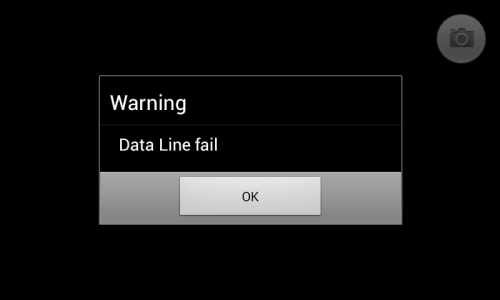
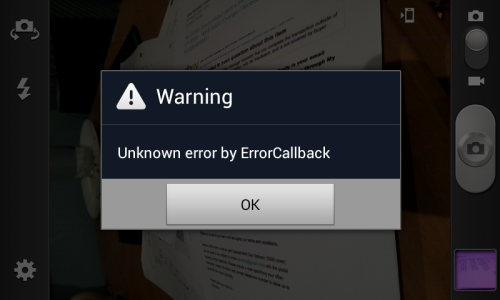
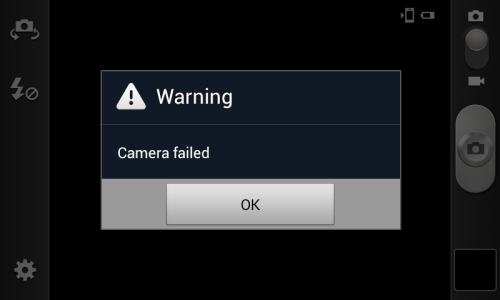
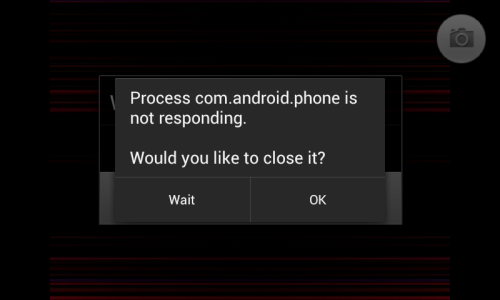
As you can see from the attached screen shots, the camera will fail on opening. On some very rare occasions, I'd be able to open the camera, snap a picture, before it would crash. This shows that it is not the hardware that is faulty, but the firmware instead. Usually on these occasions, the screen will display what the camera is pointing at (as it should) before glitching, showing vividly coloured lines and patches instead, before crashing. On top of this, any flashlight apps that utilise the flash of the camera will function for a short time before they too crash.

Since updating to 4.1, I can open the camera but it will just hang, there won't be an image on screen, just black, and there are also no error messages. I then cannot back out of the camera, without using the home button and closing it in the task manager (with a great delay between pressing the home button and the camera actually minimising).

I was hoping that there is a firmware fix for this, as I don't want to have to go and buy a new phone for merely faulty hardware, when the camera itself is fully functional.

If you need any more information, feel free to ask.

Cheers,
Will
 

Attachments

  • Screenshot_2013-02-16-21-53-49.png
    Screenshot_2013-02-16-21-53-49.png
    38.6 KB · Views: 12
  • Screenshot_2013-03-04-08-37-41.png
    Screenshot_2013-03-04-08-37-41.png
    58.5 KB · Views: 11
  • Screenshot_2013-03-04-08-37-51.png
    Screenshot_2013-03-04-08-37-51.png
    15.1 KB · Views: 11
  • Screenshot_2013-03-11-18-54-59.png
    Screenshot_2013-03-11-18-54-59.png
    209 KB · Views: 12
I agree it appears your camera firmware/software has been corrupted somehow. Only way I know of resolving this would be having the device flashed back to factory stock using Odin which is a tool used to root the device. By doing this it re writes the entire OS & all associated firmware/software back on the phone just like it was when it left the factory.
 
Before flashing stock firmware I would suggest going in the camera app via the app manager: menu - system settings - applications - camera.apk (it might be labeled something else).

Force close the app, clear cache and data. See if that works. If not, factory reset. If still no luck then reinstall the stock firmware.

What model S2 device do you have?
Sent from my SPH-D710 using Tapatalk 2
 
I need you to have a talk regarding this....
Well I stay in India....
My mobile no. is ....
You can even contact me using email...
My email id:
I need your help... coz I'm suffering with the same problem....
I read this thread in Google Currents... thanks to Google
Please contact me.. regarding this or else provide me your details I will ring you.....
 
Last edited by a moderator:
As far as I'm aware, I have the I9100.

I've tried clearing the cache, but that doesn't solve anything in my situation sadly.

Does this mean my only option is to flash the OS?
 
Thank you for this advice, I have just done this to my S2 and it worked!!!
my camera is back on track..

so happy, thanx :)
 
I restored factory settings on my handset, before flashing the OS back to the factory standard, and neither of these have fixed the camera. Any other solutions?
 
hey there - i got 1 question regarding camera firmware - i dont know exactly which one is teh latest one and how can i update it or anything regarding this - tho i searched over and over and found nothing rly interesting - i can tell u this - phone fw ver:TBEC28 and Cam FW ver:SBEF02 - can u tell me if this is the latest or is there any update - where to find it or how to do it - ty vm
 
Re: Samsung Galaxy S3 Faulty Camera Software?

I had this problem recently. Whenever I launched the camera and tried to take a photo the screen would flicker with coloured lines and the phone would crash and restart and, if it wasn't plugged in, it would get to the Samsung symbol and restart again and again in a loop until I finally did plug it in. This only started after I had updated a whole heap of apps. By process of elimination I went through and disabled the suspect apps until the camera worked again then deleted the apps (they were not ones I was using anyway). No need to reset but a bloody annoying waste of time. It seemed the worst offenders were (ironically) the Samsung apps (especially billing) and Google+. My suggestion would be to regularly clean out your app caches, junk any apps you don't use and do NOT set apps to automatically update.

My latest problem is trying to update my firmware using Kies. The firmware downloads to the Mac, everything is conncted, I get the android symbol on the phone saying "Downloading... do not disconnect device!" and that's it. I have started this process 3 times now, the latest attempt is still going 12 hours later and no result. Any ideas?
 
The camera on my Samsung Galaxy SII has been faulty for a long time now. I was hoping that upgrading to Android 4.1 would re-install the firmware for the camera but this wasn't the case.

As you can see from the attached screen shots, the camera will fail on opening. On some very rare occasions, I'd be able to open the camera, snap a picture, before it would crash. This shows that it is not the hardware that is faulty, but the firmware instead. Usually on these occasions, the screen will display what the camera is pointing at (as it should) before glitching, showing vividly coloured lines and patches instead, before crashing. On top of this, any flashlight apps that utilise the flash of the camera will function for a short time before they too crash.

Since updating to 4.1, I can open the camera but it will just hang, there won't be an image on screen, just black, and there are also no error messages. I then cannot back out of the camera, without using the home button and closing it in the task manager (with a great delay between pressing the home button and the camera actually minimising).

I was hoping that there is a firmware fix for this, as I don't want to have to go and buy a new phone for merely faulty hardware, when the camera itself is fully functional.

If you need any more information, feel free to ask.

Cheers,
Will
 
My 1 month old s2 has similar camera probs

It freezes on zoom and often will not open.
I have tried a full system reset restore but now stuck on what else i could do, the sellers say get a quote for fixing! I am in Spain for six months so not that simple? Listening for any help.?