
- Feb 1, 2026
- 5
- 2
- 3
When Android Auto starts i get the usual split screen within about 15 seconds after I start driving. It looks like this....
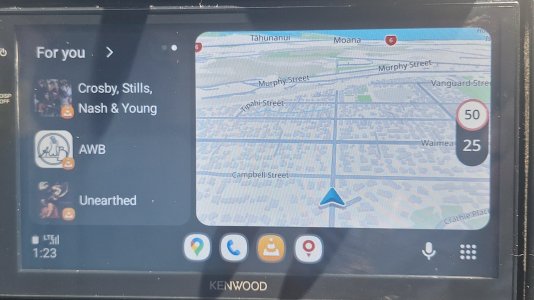
...however when I tap the screen or the Tom Tom icon to go into full screen, the speed/speed limit display disappears...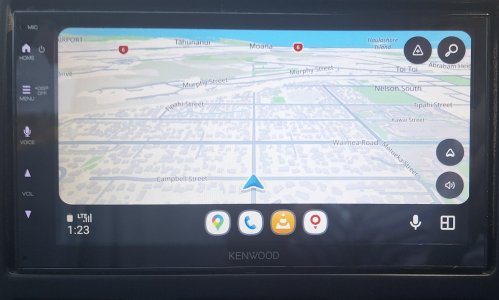
Toggle back to Split-Screen and it reappears - toggle back to full screen and it disappears again. If leave it for several kilometres (about 5 minutes of driving) it eventually appears on the full screen but does not stay...if I stop at traffic lights, after about 30 seconds, it thinks I have stopped driving, and the screen reverts to this...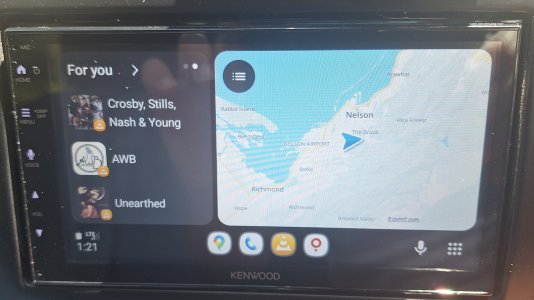
When the lights go green it goes back to the split screen a d I have to tap to get full screen but again it doesn't show the speed or speed limits.
Any ideas?
...however when I tap the screen or the Tom Tom icon to go into full screen, the speed/speed limit display disappears...
Toggle back to Split-Screen and it reappears - toggle back to full screen and it disappears again. If leave it for several kilometres (about 5 minutes of driving) it eventually appears on the full screen but does not stay...if I stop at traffic lights, after about 30 seconds, it thinks I have stopped driving, and the screen reverts to this...
When the lights go green it goes back to the split screen a d I have to tap to get full screen but again it doesn't show the speed or speed limits.
Any ideas?



 Facebook
 Twitter
 Instagram